
Path: Workspace Homepage >> Navigation Panel >> Settings >> Community >> Data >> Export Data
| What is Export Data? |
|---|
| Export Data is the set of reporting tools that let a Community Administrator pull IdeaScale data out of a community into Excel or CSV files, covering members, groups, ideas, comments, votes, tags, stages, campaigns, and full community datasets. |
The Community Administrator and the assigned Community Administrator can export any of the available reports, even when the community is set to Read Only mode. Reports can be generated on demand or placed on a recurring schedule, and the progress of any export can be checked from Reports >> Data Export Logs.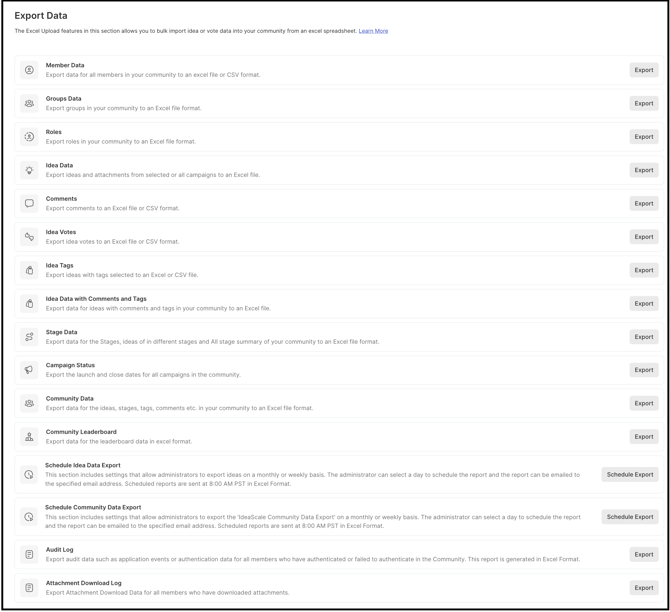
TABLE OF CONTENTS
Member Data
Group Data
Roles
Idea Data
Comments
Idea Votes
Idea Tags
Idea Data with Comments and Tags
Stage Data
Campaign Status
Community Data
Community Leaderboard
Schedule Idea Data Export
Schedule Community Data Export
Audit Log
Attachment Download Log
Below is the list of exports available in the community.
Member data
This article shows how to export the community member data to an Excel file or CSV format.
Help article on Export Member data
Group Data
This article shows all the details of the groups in the community.
Roles
This article shows information about various member roles.
Idea data
This article shows how to export idea data from the community to Excel format and datasets included in Excel file.
Help article on Export Idea data
Comments
This article shows how to export Idea comments to Excel/CSV file format
Help Article on Export Comments
Idea Votes
This article shows how to export Idea votes to Excel/CSV file format
Help Article on Export Idea Votes
Idea Tags
This article shows how to export Idea tags to Excel/CSV file format
Help Article on Export Idea Tags
Idea Data with Comments and Tags
This article shows how to export idea data including comments and tags to Excel format and datasets included in Excel file
Help article on Export Idea Data with Comments and Tags
Stage Data
This article shows how to export stage data from the community to Excel format with all specifications for the stages.
Help Article on Export Stage Data
Campaign Status
This article shows information about a campaign's status, launch date and end date.
Help Article on Export Campaign Status
Community Data
This article shows how to export complete community data in one go.
Help Article on IdeaScale Community Data Export
Community Leaderboard
This article shows how to export the community leaderboard information in the form of a single export.
Help Article on Community Leaderboard Export
Schedule Idea Data Export
The article allows scheduling the Idea data export.
Help Article on Schedule Idea Data Export
Schedule Community Data Export
This export allows scheduling the community data.
Help Article on Schedule IdeaScale Community Data Export
Audit Log
The Export Audit Log provides records of various activities that took place in your community.
Help Article on Export Audit Log
Attachment Download Log
This article will guide to export attachment download data for all members who have downloaded attachments.
Help Article on Export Attachment Download Log
Note:
-
While exporting any report, we recommend initiating only one export report at a time.
-
Exporting multiple reports at the same time is not recommended, as it will slow down each report and may lead to a processing error, which will pause your report.
-
When exporting you can check the progress of it by looking here: Reports >> Data Export Logs