
Path: Workspace Homepage >> Navigation Panel >> Settings >> Community >> Data >> Export Data >> Idea Data
| What is Export Idea Data? |
|---|
| Export Idea Data is a feature that allows a Community Administrator to export a complete set of Idea data, including all attachments, for archival purposes. |
Data is generated in Excel format. Upon selecting Export Data, a link to the generated file is created, and an automated email with the file attached is sent to the Community Administrator as a receipt of the request performed. Previously generated exports remain accessible at a later date from Export Log.
Role Permissions
- Community Administrator: Configures export options, generates Idea data exports, and accesses previously generated exports from the Export Log.
TABLE OF CONTENTS
Export Data OptionsExport Ideas Attachments
Fields on Exported Excel Sheet
Export Log
Frequently Asked Questions
Export Data Options
Before generating an export, a Community Administrator can configure the following options.
Filter Data
- Date Filters: Specify a start date and an end date to download data for a specific time period. Selecting Hide Date Filters exports all data from the beginning of the community to the current date.
- Campaign: Select the campaign for which data should be downloaded. Selecting All Campaigns exports data including data from Archived Campaigns.
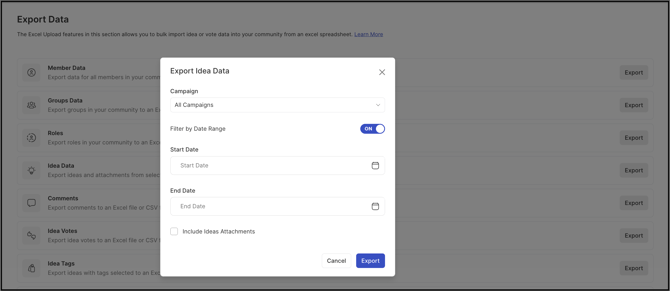
Export Ideas Attachments
Only if the Community Administrator enables this setting will a zip file containing all attachment files export alongside the exported Idea data file.
Note: Geo Location is included in the export by default and is determined by IP address. Results may not reflect a member's actual location if the member is using a VPN.
Fields on Exported Excel Sheet
The exported Excel file contains multiple sheets, each covering a different set of Idea, Comment, or Attachment data.
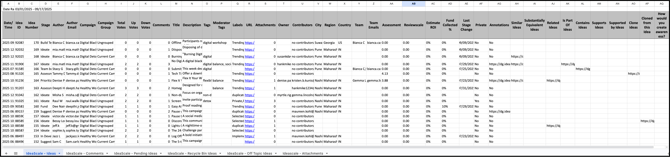
Ideas Sheet
Sheet 1 contains Ideas data in detail, with the following fields:
- Date/Time
- Idea ID
- Idea Number
- Stage
- Author: Name of the Idea submitter.
- Author Email Address
- Campaign
- Campaign Group (if any)
- Total Votes
- Upvotes
- Downvotes
- Comments
- Title: Idea title.
- Description: Idea description.
- Tags
- Moderator Tags
- Labels
- URL: Idea URL.
- Attachment
- Owner: Idea owner.
- Contributors
- City: City from which the Idea was submitted.
- Region: State from which the Idea was submitted.
- Country: Country from which the Idea was submitted.
- Stage Details: The columns following Country contain stage-specific details, such as build team members and their email addresses, Assessment, Estimated ROI, Reviewscale, and percentage of funds collected.
- Last Stage Change
- Private: Indicates private Ideas.
- Annotations: Indicates Ideas that have annotations.
- Linked Ideas: Separate columns for Similar Ideas, Substantially Equivalent Ideas, Related Ideas, Is Part Of Ideas, Supports Idea, and Supported By Ideas.
- Clone Ideas: URL of the Idea cloned from this Idea.
- Cloned From This Idea: URL of the Idea this Idea was cloned from.
- Custom Fields
Note:
The Idea Title and Idea Description columns display customized names if those fields have been customized on the Idea Submission Form.
The Last Stage Change column reflects the community-selected date format. If no stage change has occurred, the column remains empty.
Comments Sheet
Sheet 2 contains Comments data with the following fields: Date, Idea ID, Idea Number, Author, Author Email Address, Comment, and Attachment (if any).
Pending Ideas Sheet
Sheet 3 contains Pending Ideas, formatted the same as the Ideas Sheet, that have not yet been approved by a Moderator.
Recycle Bin Ideas Sheet
Sheet 4 contains Ideas in Recycle Bin status, formatted the same as the Ideas Sheet.
Off-Topic Ideas Sheet
Sheet 5 contains Ideas marked Off-Topic by moderation, formatted the same as the Ideas Sheet.
Attachment Details Sheet
Sheet 6 contains Attachment details with the following fields: Idea URL, Stage, Idea ID, Author Email, File Name, Alt Text, Notes, File Size, Date and Time of Attachment, and Download URL.
Note: Any image pasted into an Idea or Comment is automatically renamed using a random set of characters.
Export Log
Previously generated exports can be accessed by navigating to Data >> Export Data >> Export Log.
Frequently Asked Questions
Is a zip file of attachments always included in an Idea data export?
No. A zip file containing attachment files is only generated and included alongside the exported Idea data file if the Community Administrator has enabled Export Ideas Attachments.
Does exporting Idea data change or remove any existing Ideas or Campaigns?
No. Exporting Idea data only generates a downloadable file and email receipt; it does not modify or remove any Idea, Comment, Campaign, or attachment data within the community.
Why might the Geo Location shown in an export not match a member's actual location?
Geo Location is determined by IP address. If a member is using a VPN to mask their location, the reported Geo Location may not reflect where the member actually submitted the Idea or Comment from.
Why is the Last Stage Change column empty for some Ideas?
The Last Stage Change column only populates once an Idea has moved between stages. If an Idea has not had a stage change, the column remains empty.
Related Articles