
Path: Workspace Homepage >> Navigation Panel >> Settings >> Community >> Data >> Export Data >> Attachment Download Log
| What is the Attachment Download Log? |
| What is the Attachment Download Log?The Attachment Download Log is a Community Data export that reports on activity related to idea attachments, including who uploaded a file, who downloaded it, and how often it was downloaded. |
The Attachment Download Log gives visibility into how idea attachments are being accessed within a community, surfacing which members uploaded files and which members downloaded them, along with download frequency.
Role Permissions
- Community Administrator: Can export the Attachment Download Log to review records of attachment uploads and downloads within the community.
Export Options
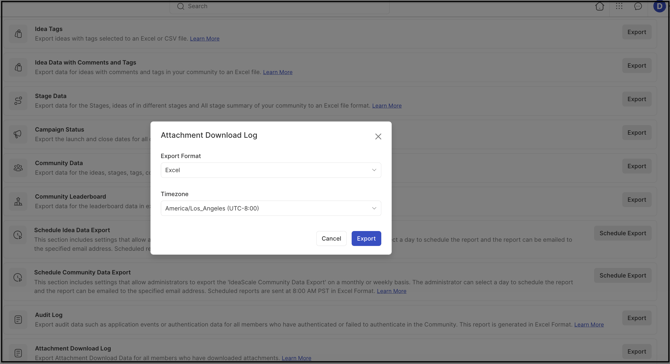
The Attachment Download Log can be exported from Settings >> Community >> Data >> Export Data >> Attachment Download Log, with the following options:
- Export Format: The exported data can be downloaded in Excel or CSV format.
- Timezone: A preferred timezone can be selected for viewing the exported data, instead of defaulting to the community's configured timezone.
Exported Fields
The exported file includes the following fields:
- Filename: The name of the file, including its extension, attached to an idea.
- URL to Idea: The URL of the idea the file is attached to.
- Uploader: The name of the member who uploaded the file attachment.
- Downloader: The name of the member who downloaded the file attachment. See Exceptions below for public community handling.
- Email Address: The email address of the member who downloaded the file attachment.
- Last Downloaded: The date and time the attachment was most recently downloaded.
- Frequency: The number of times the file attachment was downloaded.
Note: A log entry is created only for attachments that have been downloaded at least once. An idea attachment that has never been downloaded does not generate a log entry.
%20copy.jpg?width=670&height=142&name=downloads%20(41)%20copy.jpg)
Exceptions
- Public Community Downloads: If an unregistered member downloads an attachment in a public community, the Downloader field displays "Anonymous" and the Email Address field displays "Not applicable," since the content is publicly accessible.
Frequently Asked Questions
Does every idea attachment appear in the Attachment Download Log?
No. The log only includes attachments that have been downloaded at least once. Attachments that were uploaded but never downloaded do not generate a log entry.
Who can access the Attachment Download Log?
The Community Administrator can export the Attachment Download Log from the Export Data settings.
Can the exported data be viewed in a timezone other than the community's default?
Yes. A preferred timezone can be selected at the time of export, instead of using the community's default timezone.
Why does a download show "Anonymous" as the Downloader?
This occurs when an unregistered member downloads an attachment in a public community. Since the content is publicly accessible, no member identity is captured, so the Downloader field displays "Anonymous" and the Email Address field displays "Not applicable."
Related Articles