
Path: Workspace Homepage >> Navigation Panel >> Settings >> Community >> Data >> Export Data >> Stage Data
| What is Export Stage Data? |
|---|
| Export Stage Data is a feature that allows the Community Administrator to export a complete set of Stage data, including all attachments, for archival purposes. |
Export Stage Data generates the exported file in Excel format. Upon selecting Export Data, a link to the file is generated for download, and an automated email with the file attached is sent to the Community Administrator as confirmation that the request was processed.
Role Permissions
- Community Administrator: Configures and runs Stage Data export requests, and receives the exported file by email as a record of each request.
TABLE OF CONTENTS
Export ConfigurationExported File Structure
Stage Summary Sheet
Stage Function Sheets
Exceptions
Frequently Asked Questions
Export Configuration
Before running an export, the Community Administrator sets the following options: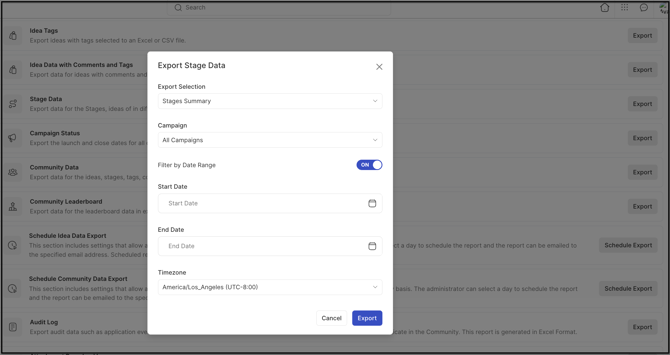
- Export Selection: Determines whether the export produces a summary of all Stages in the community or data for a specific Stage only.
- Campaign: Determines which campaign's data is included in the export. Selecting All Campaigns includes data from Archived Campaigns as well. See Exceptions below.
- Filter by Date Range: When this switch is left disabled, the export includes all data from the beginning of the community's history up to the current date. Enabling the switch restricts the export to a specific start date and end date.
- Timezone: Sets the timezone used to display dates and times in the exported data, allowing the Community Administrator to view results in a timezone other than the community's default.
Exported File Structure
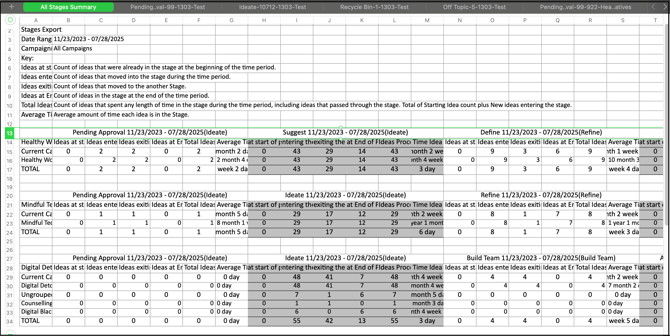
The exported Excel file contains a Stage Summary Sheet followed by a series of Stage Function Sheets, one for each Stage and idea category in the community.
Stage Summary Sheet
The first sheet in the exported file contains stage data in detail, with the following fields:
- Date Range: The dates selected for the export.
- Campaigns: The name of the campaign selected for the export.
- Ideas at Start of Period: The number of ideas already in the Stage at the beginning of the selected time period.
- Ideas Entering the Stage: The number of ideas that moved into the Stage during the selected time period.
- Idea Exiting the Stage: The number of ideas that moved out of the Stage to the next Stage.
- Ideas at End of Period: The number of ideas in the Stage at the end of the selected time period.
- Total Ideas Processed: The number of ideas that spent any length of time in the Stage during the period, including ideas that passed through the Stage.
- Average Time Idea in Stage: The average amount of time an idea spends in the Stage.
The Stage Summary Sheet also includes a summary of all Stages, showing the number of ideas in each Stage along with the promotion of ideas into the next Stage through the end of the period.
Stage Function Sheets
Beginning with the second sheet, the exported file includes a separate sheet for Pending Ideas, Recycled Ideas, and Off-Topic Ideas, followed by one sheet per Stage in each funnel.
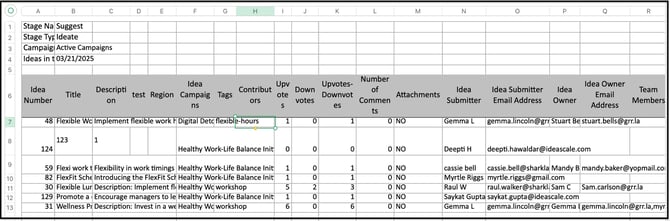
The columns included on each sheet depend on the Stage's function:
- Ideate Stage Function Sheet: Stage Name, Stage Type, Idea Number, Idea Title, Idea Description, Custom Fields (a separate column for each custom field), Idea Campaigns, Tags, Contributors Name, Upvotes, Downvotes, Upvotes-Downvotes (total number of votes), Number of Comments, Attachments (Yes/No), Idea Submitter Name, Idea Submitter Email Address, Idea Owner Name, Idea Owner Email Address, and Team Members.
- Build Team Stage Function Sheet: Idea Number, Title, Description, Custom Fields, Idea Submitter Name, Idea Submitter Email Address, Idea Campaign, Tags, Set Team Size (the Stage's number of positions), Actual Team Size (the number of positions assigned), Team Members Name, Team Members Email Address, Team Role, and Idea Contributors.
- Refine Stage Function Sheet: Idea Number, Title, Description, Custom Fields, Idea Submitter Name, Idea Submitter Email Address, Idea Owner Name, Idea Owner Email Address, Refinement Question 1, Last Edit (the name of the Refiner for Refinement Question 1), the remaining refinement questions and their Last Edit values, and Tags.
- Assessment Stage Function Sheet: Idea Number, Title, Description, Custom Fields, Idea Submitter Name, Idea Submitter Email Address, Idea Owner Name, Idea Owner Email Address, Idea Campaign, Tags, Assessment Ratings, Assessment Questions, Member Name, and Member Email.
- ReviewScale Stage Function Sheet: Idea Number, Title, Description, Custom Fields, Idea Submitter Name, Idea Submitter Email Address, Idea Owner Name, Idea Owner Email Address, Idea Campaign, Tags, Reviews, Review Questions, Reviewer Name, and Reviewer Email.
- Fund Stage Function Sheet: Idea Number, Title, Description, Custom Fields, Idea Submitter Name, Idea Submitter Email Address, Idea Owner Name, Idea Owner Email Address, Idea Campaign, Tags, Funding Goal, and Funds Raised.
- Estimate Stage Function Sheet: Idea Number, Title, Description, Custom Fields, Idea Submitter Name, Idea Submitter Email Address, Idea Owner Name, Idea Owner Email Address, Idea Campaign, Tags, Cost: Average Estimate, Value: Average Estimate, and Who Estimated.
- Reserve Stage, Recycle Bin, and Off-Topic Sheets: Use the same columns as the Ideate Stage Function Sheet.
Note: The Idea Title and Idea Description columns display customized field names if the Idea Submission Form has been customized with different labels for those fields.
Exceptions
- All Campaigns Selection: Selecting All Campaigns as the Campaign option includes data from Archived Campaigns in the export, in addition to active campaigns.
Frequently Asked Questions
What file format is used for the exported Stage Data?
The exported Stage Data file is generated in Excel format.
How is the exported file delivered?
A link to the exported file is generated for download at the time of the request, and the file is also sent as an email attachment to the Community Administrator who ran the export.
Can Stage Data be exported for a single Stage instead of the entire community?
Yes. The Export Selection option determines whether the export covers a summary of all Stages or data for one specific Stage.
Does exporting Stage Data include ideas from Archived Campaigns?
Only when All Campaigns is selected as the Campaign option. See Exceptions above.
Will the exported file reflect custom labels used for the idea title or description?
Yes. If the Idea Submission Form has been customized with different names for the Idea Title or Idea Description fields, the exported Stage Function Sheets display those customized names.
Related Articles