
Path: Community >> Topbar >> Activity Bell
| What is the Activity Bell? |
|---|
| The Activity Bell is an icon that gives a member access to Notifications, Messages, and Alerts. |
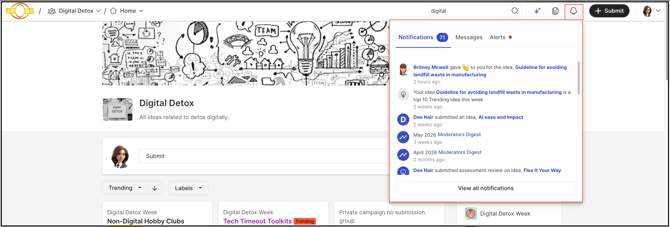
Selecting the Activity Bell icon opens a panel with three sections — Notifications, Messages, and Alerts — giving a member a single place to review in-app notifications, unread messages, and actionable items awaiting a response.
Role Permissions
- All Roles (Community administrators, Moderators & Members): Can access the Activity Bell icon and its Notifications, Messages, and Alerts sections.
TABLE OF CONTENTS
Notifications
In-app notifications are messages sent to engage members of the community. These notifications appear under the Activity Bell icon, located at the top right of the community next to the Profile icon. A blue dot next to the notifications indicates that new notifications have appeared since the member last opened the Activity Bell.
Help Article for In-App Notification
Messages
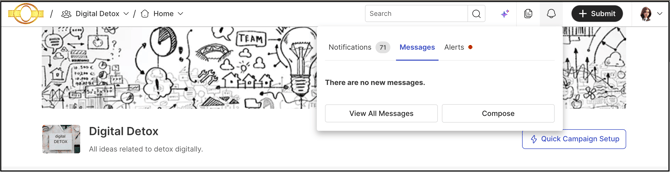
The Messages section shows all unread messages and includes a button for navigating to all messages as well as composing new ones.
Alerts
The Alerts section shows all actionable items awaiting a member's action, such as draft ideas, community member profile questions to be completed, and ideas awaiting stage actions.
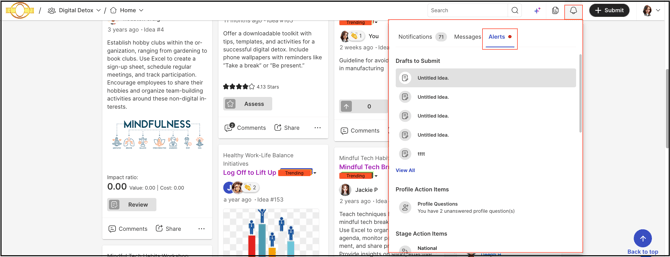
Selecting View All navigates to the Profile page's My Ideas section.
Frequently Asked Questions
What indicates that a new notification has appeared in the Activity Bell?
A blue dot appears next to the notifications when new notifications have arrived since the member last opened the Activity Bell.
Can a new message be composed directly from the Activity Bell?
Yes. The Messages section includes a button for composing new messages, in addition to navigating to all messages.
What kinds of items appear under Alerts?
Alerts show actionable items awaiting a member's action, including draft ideas, community member profile questions to be completed, and ideas awaiting stage actions.
Where does selecting View All in the Alerts section navigate to?
Selecting View All navigates to the Profile page's My Ideas section.
Related Articles