
Path: Workspace Homepage >> Navigation Panel >> Whiteboard
| What is the IdeaScale Whiteboard Dashboard? |
|---|
| The IdeaScale Whiteboard Dashboard is the central hub that hosts every board in a community, giving team members a single place to create, find, organize, and collaborate on boards. |
The Whiteboard Dashboard is organized into three main sections: Dashboard, Task Manager, and Folders. Access to individual boards on the dashboard is controlled through board-level Sharing Permissions.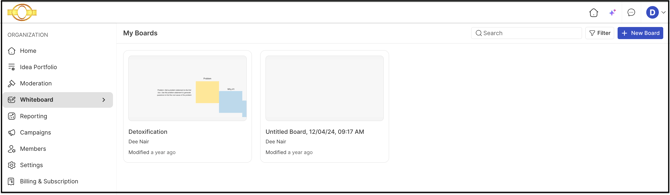
TABLE OF CONTENTS
Dashboard
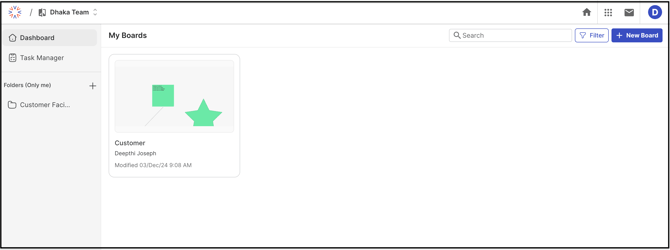
The Dashboard is the central location for all community boards and displays everything created within the community. A new board is created by selecting the New Board button. The Search bar and filtering options help locate a specific board quickly.
Task Manager
The Task Manager is used to create and manage tasks associated with boards. It is accessible from both an individual board and the main dashboard. From a board, the Task Manager shows tasks for that board only. From the dashboard, it shows tasks across multiple boards in the community.

Help Article on Create a Task.
Folders
Folders help organize boards and reduce clutter on a busy dashboard. Each folder is private to the member who created it and is not shared with other users. Boards inside a folder can still be shared as usual.
To create a folder and add boards to it:
- Select the + icon in the Folders section.
- Enter a name for the folder.
- On an existing board, select the three-dot menu and choose the option to move the board to a folder
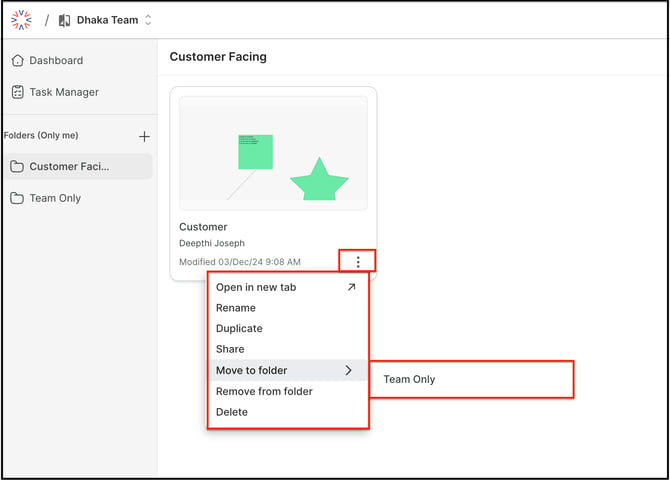
Note: A board added to a folder is still accessible from the main dashboard.
Sharing Permissions
Community Administrator and Moderators control which members can access a board. They do this through the sharing modal. The settings chosen there decide whether a member can see the board on their dashboard, and whether that member can view or edit the board, either from the dashboard or through the sharing link.
Help Article on Board Sharing permission