
Path: Workspace Homepage >> Navigation Panel >> Settings >> Email Settings >> Notification Emails >> Verification and Password Email Templates
| What are Verification and Password Email Templates? |
|---|
| Verification and Password Email Templates are the system-generated email notifications used for account verification and password management, with a customizable subject line, message body, and button text available for each supported language. |
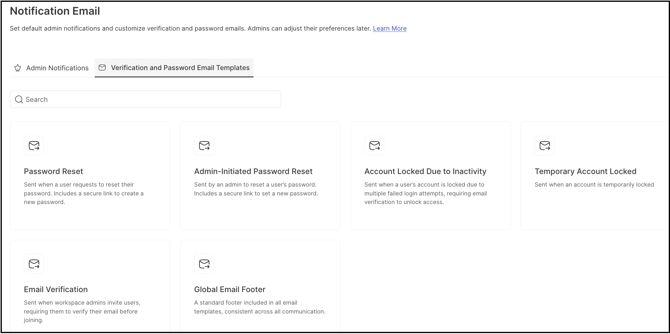
Verification and Password Email Templates allow a Workspace Administrator to configure and customize the system-generated emails used for verification and password management. Within this section, the subject line, message body, and button text for these notifications can be adjusted for each supported language, ensuring users receive clear, consistent, and localized communication. Hyperlink settings within these templates are fixed and cannot be customized; see Exceptions below.
Role Permissions
- Workspace Administrator: Configures and customizes the subject line, message body, button text, and mailing address for the Verification and Password Email Templates, in each supported language.
- All Other Roles (Community-level Administrator, Moderator & Members): Access to this section is not available.
TABLE OF CONTENTS
Password Reset
Admin-Initiated Password Reset
Account Locked Due to Inactivity
Temporary Account Locked
Email Verification
Global Email Footer
Exceptions
Frequently Asked Questions
Password Reset
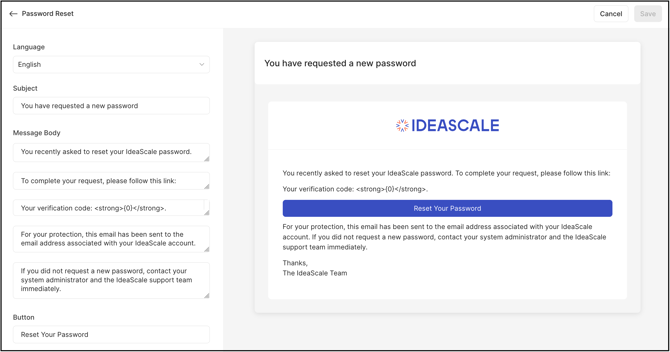
This email notification is sent to a user after selecting the Forgot password link on the Workspace login page. The following elements can be customized:
- Language: The language for which the email notification is being customized.
- Subject: The subject line of the email notification.
- Message Body: The body text of the email notification. Each paragraph appears in its own text area and can be customized individually. See Exceptions below for mandatory field requirements.
- Button: The text that appears on the action button in the email.
Help Article for Password Reset
Admin-Initiate Password Reset
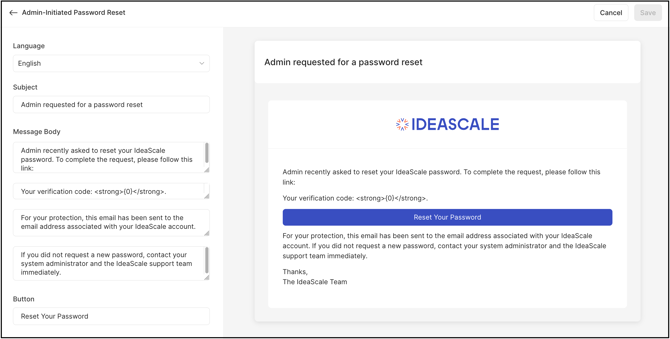
This email notification is sent to a member after a Workspace Administrator or Community Administrator initiates a password reset request on their behalf from the Member Management Dashboard. The following elements can be customized:
- Language: The language for which the email notification is being customized.
- Subject: The subject line of the email notification.
- Message Body: The body text of the email notification. Each paragraph appears in its own text area and can be customized individually. See Exceptions below for mandatory field requirements.
- Button: The text that appears on the action button in the email.
Help Article for Member Management
Account Locked Due to Inactivity
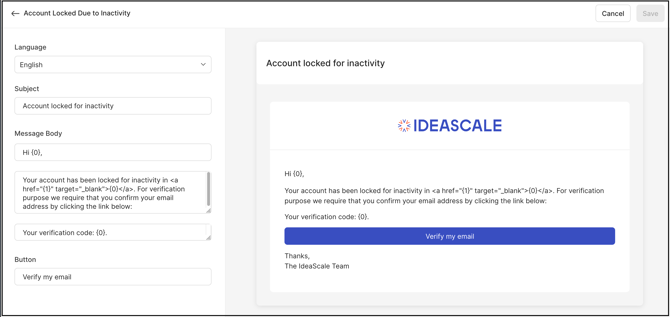
This email notification is sent to a member when their account is locked due to inactivity in the community, based on the number of days configured by a Workspace Administrator under Manage Workspace >> Security >> Security Policy >> Maximum allowed inactive days. The following elements can be customized:
- Language: The language for which the email notification is being customized.
- Subject: The subject line of the email notification.
- Message Body: The body text of the email notification. Each paragraph appears in its own text area and can be customized individually. See Exceptions below for mandatory field requirements.
- Button: The text that appears on the action button in the email.
Help Article for Security Policy Settings
Temporary Account Locked
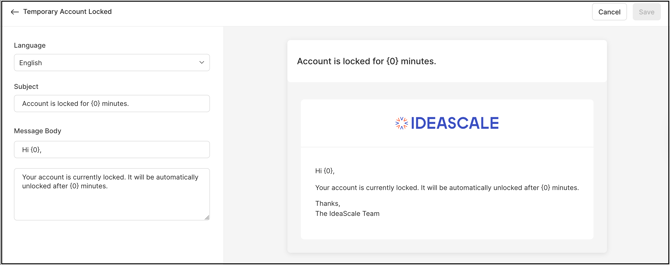
This email notification is sent to a member when their account is temporarily locked due to multiple unsuccessful login attempts caused by incorrect credentials. The following elements can be customized:
- Language: The language for which the email notification is being customized.
- Subject: The subject line of the email notification.
- Message Body: The body text of the email notification. Each paragraph appears in its own text area and can be customized individually. See Exceptions below for mandatory field requirements.
Help Article for Authentication Failure
Email Verification
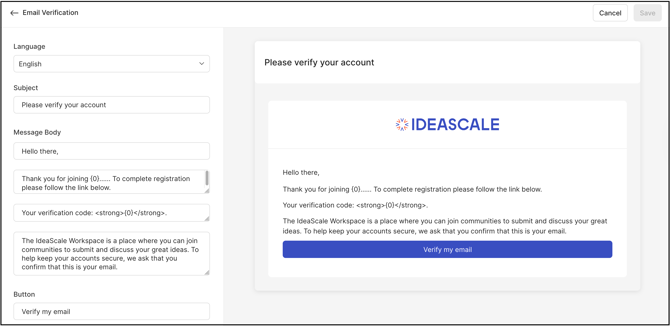
This email notification is sent to a member to verify and confirm the email address associated with their account. The following elements can be customized:
- Language: The language for which the email notification is being customized.
- Subject: The subject line of the email notification.
- Message Body: The body text of the email notification. Each paragraph appears in its own text area and can be customized individually. See Exceptions below for mandatory field requirements.
- Button: The text that appears on the action button in the email.
Help Article for Registration Process
Global Email Footer
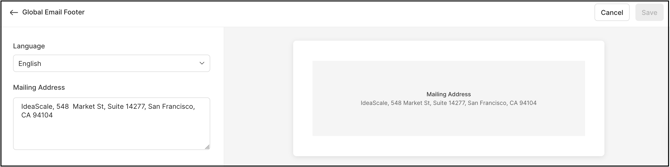
This text appears at the end of every email notification sent to users. The following elements can be customized:
- Language: The language for which the email notification footer is being customized.
- Mailing Address: The mailing address that appears at the end of each email notification.
Exceptions
- Hyperlink Settings: Hyperlink settings within the Verification and Password Email Templates are fixed and cannot be customized.
- Mandatory Message Body Fields: Message Body text fields are mandatory across all templates in this section and must contain content before changes can be saved.
Frequently Asked Questions
Can the hyperlink settings in these email templates be changed?
No. Hyperlink settings within the Verification and Password Email Templates are fixed and cannot be customized.
Can a Message Body field be left blank when editing a template?
No. Message Body text fields are mandatory across all templates in this section and must contain content before changes can be saved.
Who can customize the Verification and Password Email Templates?
A Workspace Administrator configures and customizes the subject line, message body, button text, and mailing address for these templates, in each supported language.
What triggers the Account Locked Due to Inactivity email?
This email is triggered when a member's account is locked due to inactivity in the community, based on the number of inactive days configured by a Workspace Administrator under Manage Workspace >> Security >> Security Policy >> Maximum allowed inactive days.
What triggers the Admin-Initiated Password Reset email?
This email is triggered when a Workspace Administrator or Community Administrator initiates a password reset request on behalf of a member from the Member Management Dashboard.
Related Articles
- Help Article for Password Reset
- Help Article for Member Management
- Help Article for Security Policy Settings
- Help Article for Authentication Failure
- Help Article for Registration Process