
Path: Workspace Homepage >> Navigation Panel >> Settings >> Community >> Data >> Import Data
| What is Import Data? |
|---|
| Import Data is a set of settings that allows bulk addition of ideas, comments, co-submitters, idea owners, and votes to a community. |
Importing data gives Community Administrators easy access to add ideas, comments, co-submitters, idea owners, and votes to a community in bulk, using an Excel sheet, rather than entering each record individually.
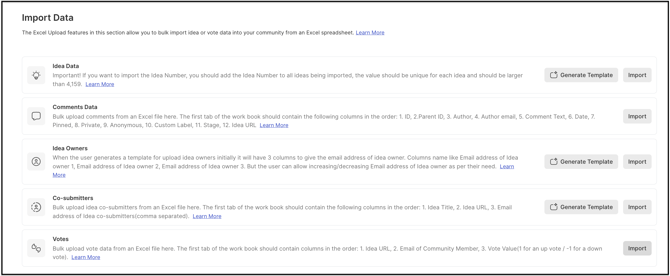
TABLE OF CONTENTS
Idea Data
Comments Data
Idea Owners
Co-submitters
Votes
Idea Data:
This setting helps community administrators to import bulk ideas in a community by using an Excel sheet.
Help article on Importing ideas
Comments Data:
This setting helps community administrators to import bulk comments in a community by using an Excel sheet.
Help Article on Import Comments
Idea Owners:
This settings helps community administrators to bulk import idea owners for ideas by using an Excel sheet.
Help Article on Import Idea owners
Co-submitters:
This settings helps community administrators to bulk import idea co-submitters for ideas by using an Excel sheet.
Help Article on Co-Submitters
Votes:
This setting helps administrators to import bulk votes for ideas in a community by using an Excel sheet.