
Path: Workspace Homepage >> Navigation Panel >> Settings >> Data >> Export Data >> Member Data
| What is Export Member Data? |
|---|
| Export Member Data is a Workspace Settings tool that allows the Workspace Administrator to download registration, activity, and security details for every member registered in the Workspace, in Excel or CSV format. |
Export Member Data provides the Workspace Administrator with a quick way to obtain information on all members registered within the Workspace by generating a downloadable export file.
Role Permissions
- Workspace Administrator: Accesses Export Member Data and downloads workspace-level member data in Excel or CSV format.
TABLE OF CONTENTS
Access Export Member DataExport Options
Generate the Export
Data Included in the Export
Frequently Asked Questions
Access Export Member Data
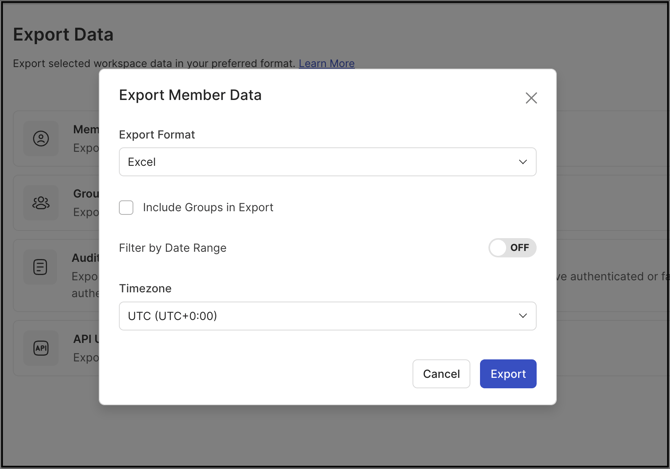
Export Member Data is accessed by navigating to Settings >> Data >> Export Data, then selecting Member Data.
Export Options
The following options are available before generating the export:
- Export Format: Member data can be exported in Excel or CSV file format.
- Include Groups in Export: Selecting this checkbox adds a Groups column to the export that lists all groups associated with each member.
- Filter by Date Range: Enabling this switch makes start and end date fields available, so the export can be limited to a specific time period.
- Timezone: Selecting a timezone from the dropdown displays all exported data in that timezone.
Note: The Filter by Date Range switch is off by default. Leaving it off exports member data from the beginning up to the current date.
Generate the Export
Selecting the Export button generates the file and makes it available for download.
Data Included in the Export
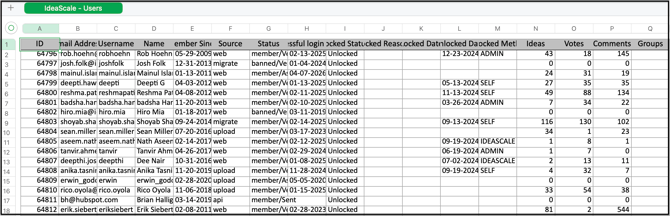
The exported file includes the following fields for each member:
- ID: The member's ID.
- Email Address: The member's registered email address.
- Username: The member's username, used for @mentions.
- Name: The member's display name.
- Member Since: The date the member registered.
- Source: The source through which the member registered, such as Web, Quick Add by Admin, Upload, Social Login, or SSO.
- Status (Member Status/Member Email Status): Indicates whether the member's email address is verified, unknown, sent, or assumed.
- Last Successful Login Date and Time: The date and time of the member's last successful login attempt.
- Locked Status: Shows Locked for members who are locked out, and Unlocked for members who can access the Workspace.
- Locked Reason: The reason a member was locked, such as Wrong Password or Account Inactivity.
- Locked Date: The date and time the member was locked.
- Unlocked Date: The date and time the member was unlocked.
- Unlocked Method: Shows whether the member was unlocked by Admin, via Verification Email (Self), or through a time-based lock.
- Ideas: The number of ideas the member submitted across the Workspace.
- Votes: The number of votes the member cast across the Workspace.
- Comments: The number of comments the member submitted across the Workspace.
- TOS Acceptance (Yes/No): When enabled, indicates whether the member accepted the Workspace-level Terms of Service.
- TOS Acceptance Date: The date and time the member accepted the Terms of Service.
- Groups: The names of the groups the member belongs to; included only when Include Groups in Export is enabled.
- Member Profile Questions (if any): All member profile questions, shown in separate columns along with the member's answers.
Frequently Asked Questions
Which role can access Export Member Data?
The Workspace Administrator is the role that accesses Export Member Data, located under Settings >> Data >> Export Data >> Member Data.
What file formats are available for the export?
Member data can be exported in either Excel or CSV format.
What happens if the Filter by Date Range switch is left off?
The export includes member data from the beginning up to the current date. The switch only needs to be enabled to limit the export to a specific start and end date.
Can group membership be included in the exported file?
Yes. Selecting Include Groups in Export adds a Groups column to the file that lists every group associated with each member.
Are custom profile questions included in the export?
Yes. Member Profile Questions, if any, appear as separate columns in the export, each showing the member's corresponding answer.
Related Articles