
Path: Workspace Homepage >> Navigation Panel >> Settings >> Community >> Community Configuration >> Tags >> Predefined User Tags
Path: Workspace Homepage >> Navigation Panel >> Settings >> Community >> Campaigns >> Action (3 dots) dropdown >> Tags >> Predefined User Tags
| What are Predefined User Tags? |
|---|
| Predefined User Tags are a structured list of approved tags that an Administrator creates for members to use when tagging ideas, ensuring consistent categorization and improving search, filtering, and reporting. |
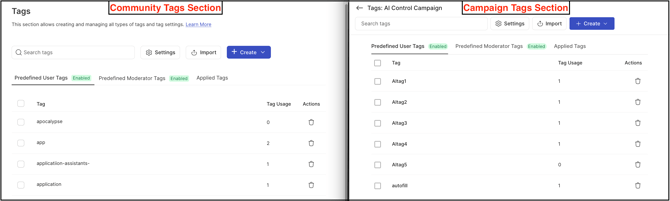
Predefined User Tags can be defined at the community level for broad use across a community, or at the campaign level for a specific initiative.
Role Permissions
- Community Administrator: Creates and configures Predefined User Tags at the community level, including enabling the option for members to select from the list.
- Campaign Administrator: Creates and configures Predefined User Tags at the campaign level, including choosing whether members can also use community-level tags.
- Members: Select one or more tags from the predefined list when tagging an idea.
- Community Moderator, Campaign Moderator: Select from the predefined list when tagging ideas from Idea Management and the Moderator Dashboard.
TABLE OF CONTENTS
Settings
Creation of Tags
Import Tags
Tag Visibility
Frequently Asked Questions
Settings
The Predefined User Tags tab, present at both the community level and the campaign level, displays every Predefined User Tag an Administrator has created for members to use when tagging ideas. The feature can be enabled or disabled from Settings at the community level and the campaign level independently.
A. Community Level Settings
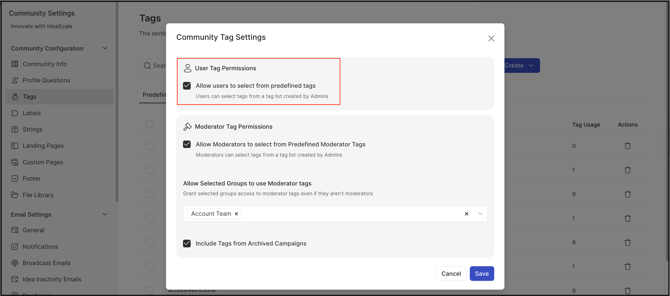
To configure Predefined User Tags at the community level, navigate to Navigation Panel >> Settings >> Community >> Community Configuration >> Tags, then select the Settings button. This opens a modal containing the User Tag Permissions section.
Within this modal, enabling Allow users to select from predefined tags:
- Makes the predefined tags available for members to choose from when tagging ideas.
- Updates the label beside the Predefined User Tags tab from Disabled to Enabled, indicating the feature is active at the community level.

B. Campaign Level Settings
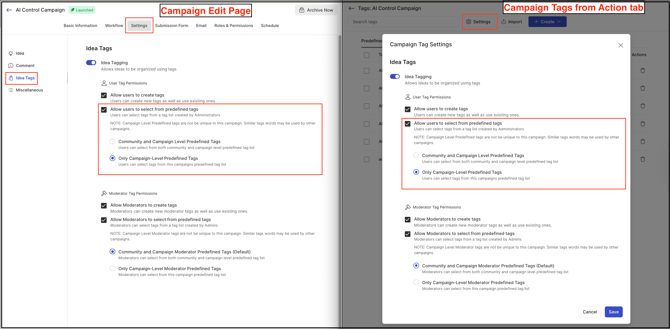
Campaign-level Predefined User Tags can be configured from either of two locations:
- Campaigns >> Action (three dots) dropdown >> Edit >> Settings >> Idea Tags >> Predefined User Tags
- Campaigns >> Action (three dots) dropdown >> Tags >> Predefined User Tags
From either location, selecting the Settings button opens the User Tag Permissions modal. Within this modal, the Campaign Administrator chooses how members apply predefined tags by selecting one of the following options:
1. Community and Campaign-Level Predefined Tags: Members can use tags from both the community-level predefined tag list and the campaign's own predefined tag list. This option supports consistent tagging across the community while still allowing campaign-specific tags.
2. Only Campaign-Level Predefined Tags: Members can use only the tags defined for the specific campaign. This option supports a focused, specialized tagging scheme that is not mixed with broader community tags.
Note: The Predefined User Tags option becomes available only after Idea Tagging is enabled for the campaign.
Creation of Tags
An Administrator can create Predefined User Tags at both the community level and the campaign level, supporting organization-wide consistency as well as campaign-specific needs.
Note: Campaign-specific Predefined User Tags are not unique to the campaign; similar tags may be created by other campaigns.
Import Tags
An Administrator can import Predefined User Tags in bulk using an Excel file rather than creating each tag manually. Bulk import is available for both Community Predefined User Tags and Campaign Predefined User Tags.
Tag Visibility
Predefined User Tags are presented to members as a dropdown menu when selecting tags on the Idea Submission form, the Idea Details page, within Idea Management, and on the Moderator Dashboard. From this dropdown, members can select one or multiple tags from the predefined list to categorize each idea.
Idea Submission form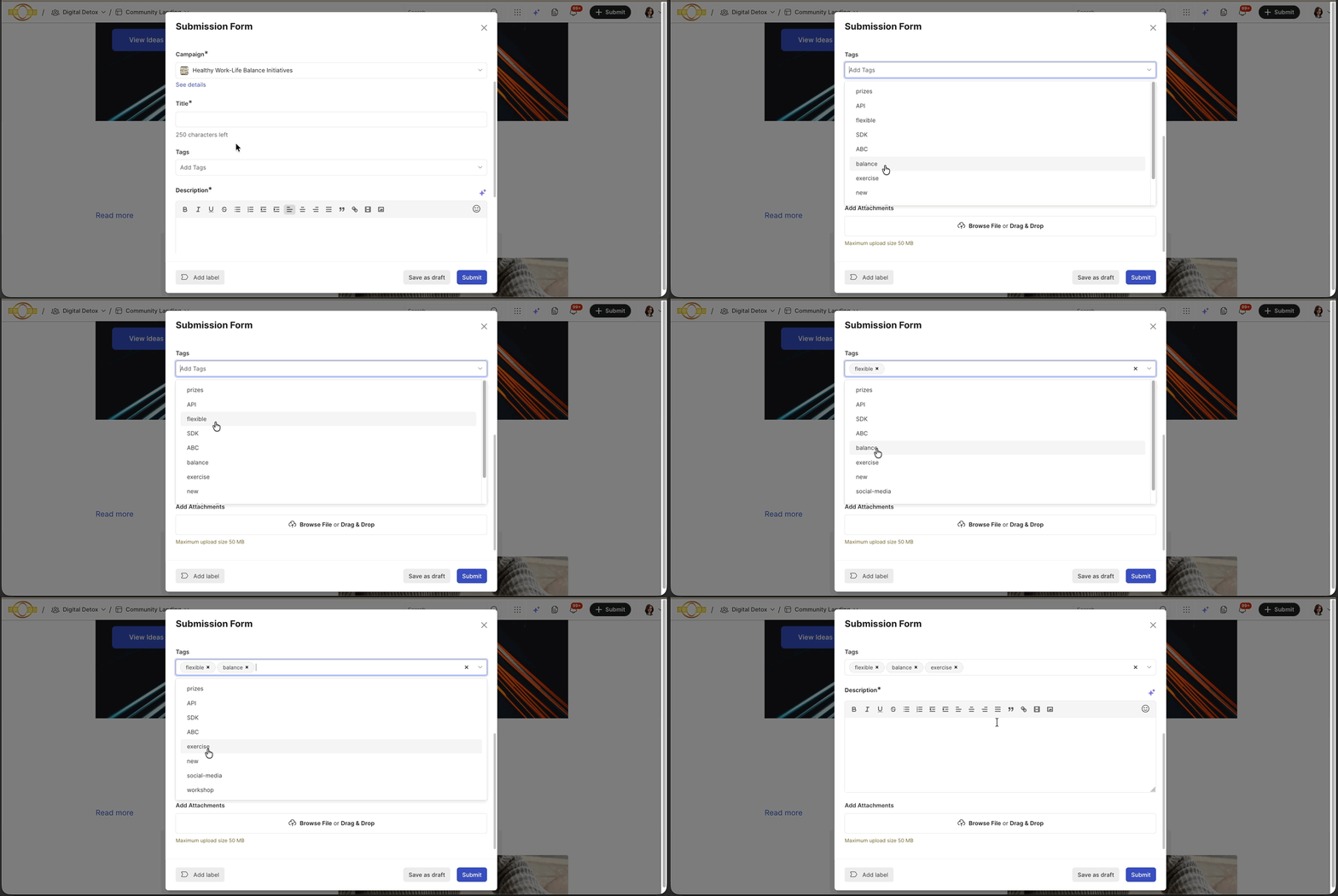
Idea Details Page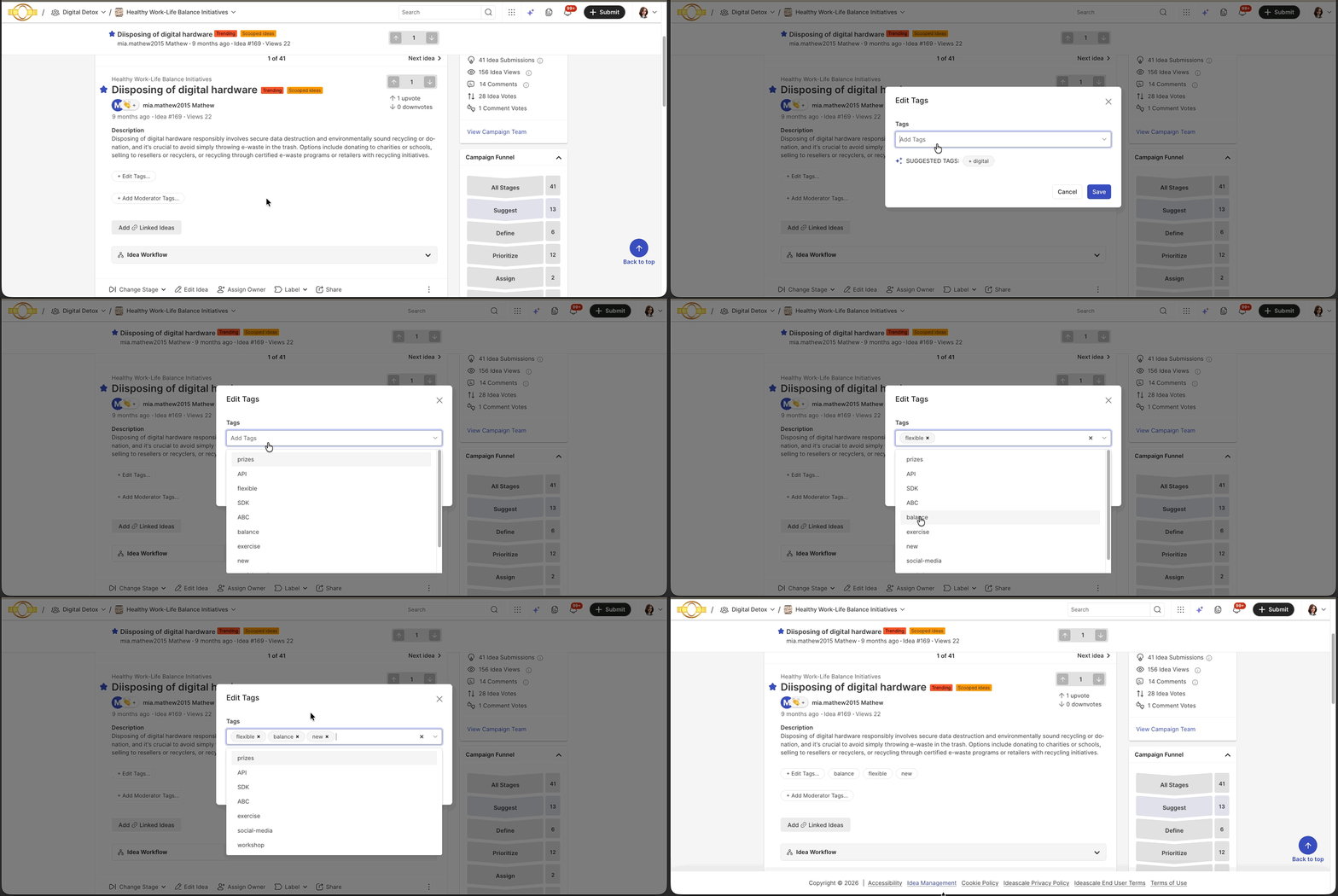
Idea Management & Moderator Dashboard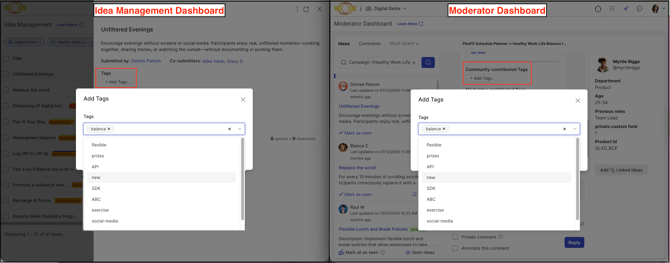
Frequently Asked Questions
Can a member create a new tag if it is not on the predefined list?
No. When Allow users to select from predefined tags is enabled, members must use tags from the Predefined User Tags list; new tags must be added by an Administrator.
What happens if Predefined User Tags is enabled at both the community and campaign level for the same campaign?
The result depends on the option selected in the campaign's User Tag Permissions modal. If Community and Campaign-Level Predefined Tags is selected, members can use tags from both lists. If Only Campaign-Level Predefined Tags is selected, members can use only the tags defined for that campaign.
Why is the Predefined User Tags option unavailable when configuring a campaign?
The Predefined User Tags option only becomes available after Idea Tagging has been enabled for the campaign.
Can a member select more than one tag when tagging an idea?
Yes. Members can select one or multiple tags from the predefined list when tagging an idea.
Related Articles