
Path: Workspace Homepage >> Navigation Panel >> My Work
The My Work section brings together a member’s personal items from every community in the workspace. It provides quick access to ideas, tasks, and activities without requiring the member to open a specific community first.
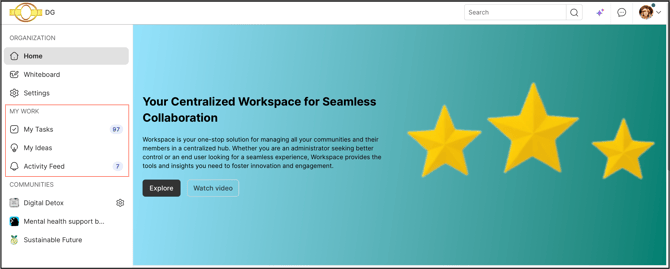
Role Permission
All members have permission to access it.
TABLE OF CONTENTS
My Tasks
My Ideas
Activity Feed
Exceptions
Frequently Asked Questions
My Tasks
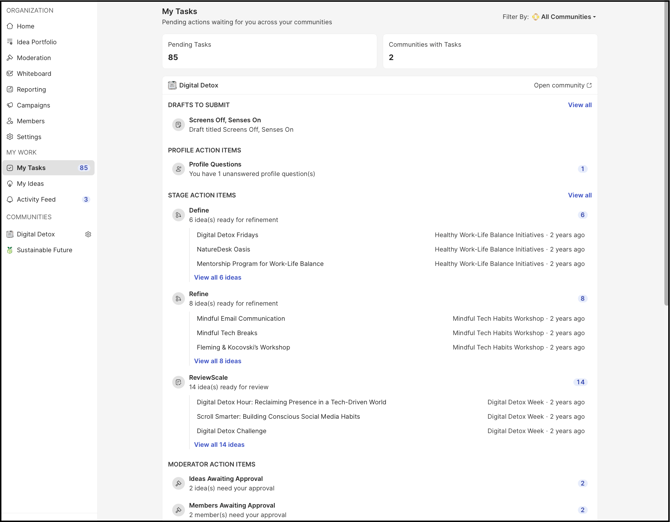
The My Tasks section lists all pending action items that require the member’s attention. Items are grouped by community. Members can narrow the list to a single community using the Filter by dropdown.
Task Categories
My Tasks includes the following categories:
- Drafts to Submit: Lists the ideas saved as drafts that have not yet been submitted.
- Profile Action Items: Shows the count of unanswered Profile questions and Confirm Profile Fields.
- Stage Action Items: Lists the stages, along with the titles of the ideas, that require action from the member.
- Moderator Action Items: Shows the count of Ideas Awaiting Approval and Members Awaiting Approval.
Note: Moderator Action Items are visible only to moderators. Refer to Exceptions for details.
My Ideas
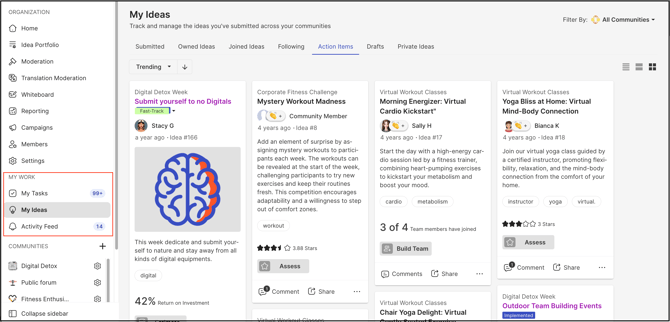
The My Ideas section is the same view available under Profile page >> My Ideas on a member’s profile. It is surfaced on the workspace homepage for easier access.
Activity Feed
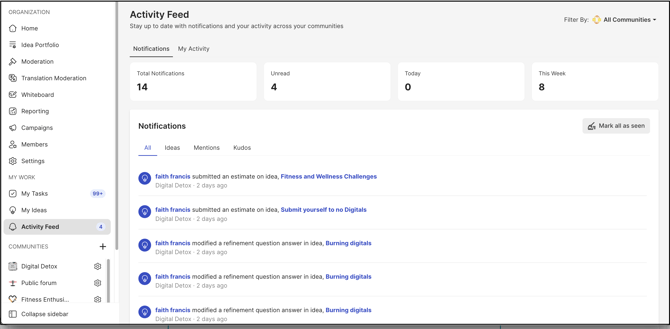
The Activity Feed section is the same view available under Profile page >> Notifications on a member’s profile. It is surfaced on the workspace homepage for easier access.
Help article on Profile >> Notifications
Exceptions
-
Only moderators can see Moderator Action Items under My Tasks.
Frequently Asked Questions
Who can access the My Work section?
All members of the workspace can access My Work.
Does a member need to open a community to view their items in My Work?
No. My Work consolidates the member’s ideas, tasks, and activities from every community in the workspace, so opening an individual community is not required.
How can a member view tasks for only one community?
Under My Tasks, the member can select a community from the Filter by dropdown. The list then shows only that community’s action items.
What does Profile Action Items show?
It shows the count of unanswered Profile questions and Confirm Profile Fields that the member needs to complete.
Why is Moderator Action Items not visible under My Tasks?
Moderator Action Items appear only for moderators. Members without the moderator role do not see this category.
What does Moderator Action Items include?
It shows the count of Ideas Awaiting Approval and Members Awaiting Approval.
Is My Ideas in My Work different from My Ideas on the profile page?
No. It is the same section as Profile page >> My Ideas, surfaced on the workspace homepage for easier access.
Is the Activity Feed different from Notifications on the profile page?
No. It is the same section as Profile page >> Notifications, surfaced on the workspace homepage for easier access.
Where can a member find ideas that were saved as drafts?
Saved drafts are listed under My Tasks >> Drafts to Submit, grouped by community.
Related Articles