
Path: Workspace Homepage >> Navigation Panel >> Settings >> Security >> Authentication >> Login Assistance
| What is Login Assistance Configuration? |
|---|
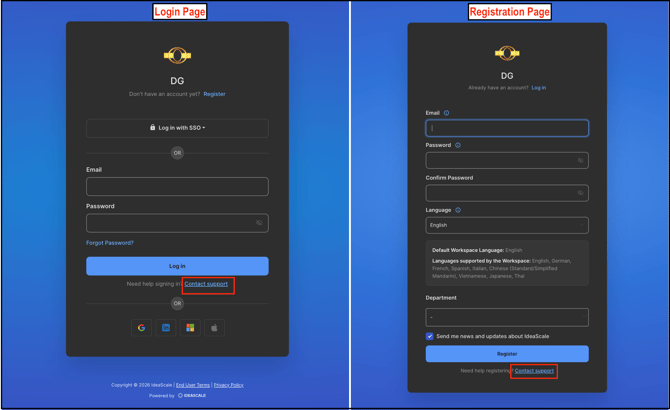
| Login Assistance Configuration is a Workspace Administrator-level setting that customizes the destination of the Contact Support link displayed on the Workspace Login page and Workspace Registration page. |
The Contact Support link gives members a direct path to reach help when they are unable to access their accounts. A Workspace Administrator can point this link to a support email address, a help center or FAQ page, or another helpful resource.
Role Permissions
- Workspace Administrator: Configures the destination of the Contact Support link displayed on the Workspace Login page and Workspace Registration page.
- Member: Views the Contact Support link on the Workspace Login page and Workspace Registration page and can select it to reach the configured destination.
TABLE OF CONTENTS
Accessing Login Assistance SettingsContact Support Link Placement
Configuring the Contact Support Link Destination
Frequently Asked Questions
Accessing Login Assistance Settings
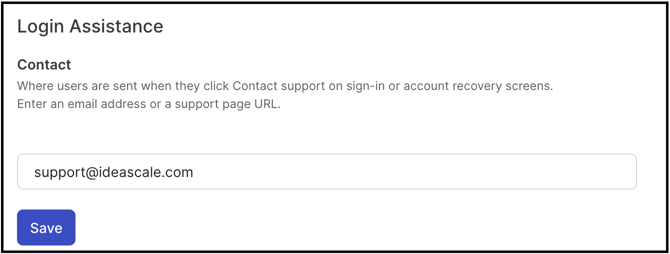
A Workspace Administrator can navigate to Settings >> Security >> Authentication >> Login Assistance to configure the Contact Support link.
Contact Support Link Placement
The Contact Support link appears on 2 pages: the Workspace Login page and the Workspace Registration page.
Configuring the Contact Support Link Destination
A Workspace Administrator can redirect the Contact Support link to any of the following destination types:
- Email Address: Opens an email compose window addressed to a specified email address — for example, support@ideascale.com.
- Web Page: Opens a specified web page, such as a company FAQ page, company website, or dedicated support portal — for example, https://ideascale.com.
- Image URL: Opens a specified image, whether uploaded to the IdeaScale file library or hosted elsewhere on the web.
Note: If the Contact Support link is not otherwise configured, it defaults to opening an email compose window addressed to the IdeaScale support email address, support@ideascale.com.
Frequently Asked Questions
Where does the Contact Support link appear?
The Contact Support link appears on 2 pages: the Workspace Login page and the Workspace Registration page.
What happens if the Contact Support link is not configured?
If left unconfigured, the Contact Support link defaults to opening an email compose window addressed to support@ideascale.com.
What types of destinations can the Contact Support link redirect to?
The Contact Support link can redirect to an email address, a web page such as a company FAQ page or support portal, or an image URL.
Who can configure the Contact Support link?
A Workspace Administrator configures the destination of the Contact Support link.
Related Articles