
Path: Member Profile Page
| What is Follow/Unfollow Member? |
| Follow/Unfollow Member allows a member to start or stop receiving email notifications about another member's activities within a community. |
Following other members is a common feature across social and community platforms. IdeaScale extends this functionality so members can stay informed about the community activity of members whose contributions they want to follow.
Role Permissions
- All Roles (Community Administrator, Moderator & Member): Can follow or unfollow another member from that member's profile to start or stop receiving email notifications about that member's activities.
Following a Member
By accessing the profile of a member (X), another member (Y) can select the Follow link to begin receiving email notifications regarding X's activities in the community.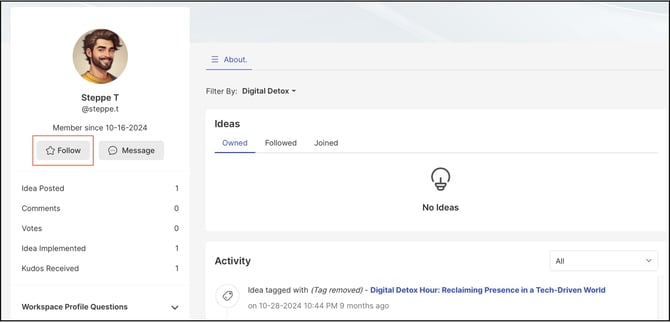
Note: The member (X) being followed is never made aware of who is following them.
A member's profile can be accessed from:
- The idea submitter's name on an idea.
- A member's name shown on community activities.
- The Search tool within the Workspace or Community.
Each time a followed member (X) submits a new idea, the follower (Y) is notified by email with a New Idea notification.
Unfollowing a community member
To stop following a member (X), the follower (Y) can navigate to X's profile and select the Unfollow button.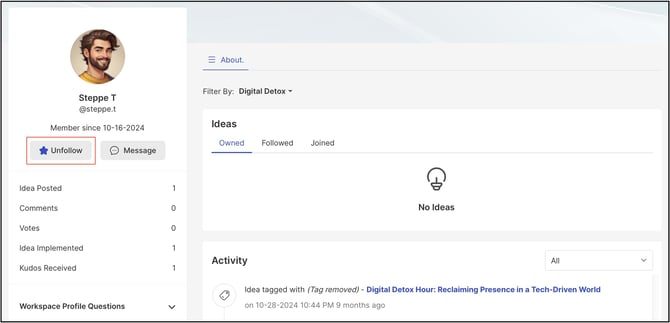
Members currently being followed can be found under Profile >> About >> Members Followed.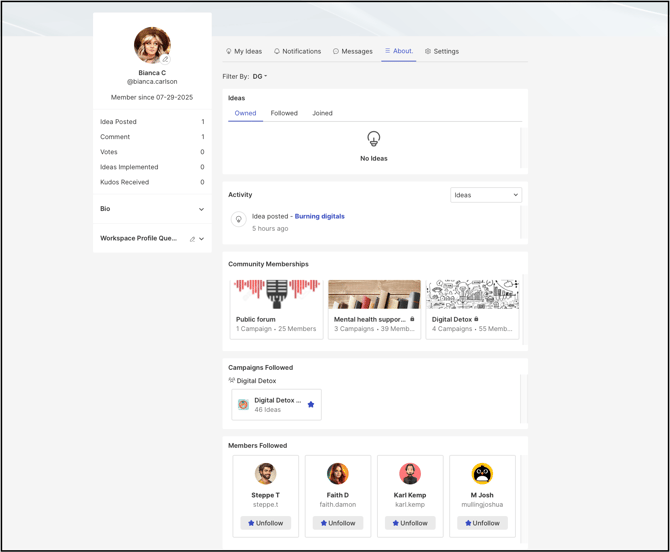
Exceptions
- Digest Email Setting Override: Regardless of whether a member's Digest email notification setting is weekly, daily, or real-time, an idea submitted by the followed member always triggers an instant, real-time notification for comments and stage changes.
Frequently Asked Questions
Does the member being followed know who is following them?
No. The member being followed is never made aware of who is following them.
What triggers a notification email to a follower?
A follower receives a New Idea email notification each time a member they follow submits a new idea.
Where can a member view the list of members they are following?
Under Profile >> About >> Members Followed.
From where can a member access another member's profile to follow or unfollow them?
A member's profile can be accessed from the idea submitter's name on an idea, a member's name shown on community activities, or the Search tool within a Workspace or Community.
Related Articles