
Path: Workspace Homepage >> Navigation Panel >> Settings >> Community >> Data >> Export Data >> Idea Data with Comments and Tags
| What is Export Idea Data with Comments and Tags? |
|---|
| Export Idea Data with Comments and Tags is a Data export feature that generates a multi-sheet Excel report containing idea records together with their associated Comments and Tags usage. |
The first sheet of the report focuses on ideas and their comments, while a second sheet shows how many times each Tag has been used on a given idea, giving a view of Tag usage across ideas. Additional sheets separate out Moderator Tags, Pending Ideas, Recycle Bin Ideas, and Off-Topic Ideas.
Role Permissions
- Community Administrator: Can export Idea Data with Comments and Tags for any Campaign within the community, including Archived Campaigns.
Export Options
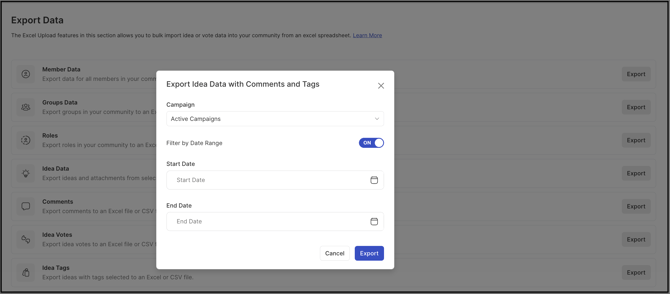
Before generating the report, the Community Administrator sets the scope of the export using the following options.
Campaign
The Community Administrator selects the Campaign for which data should be exported. Selecting All Campaigns exports data including Archived Campaigns.
Filter by Date Range
The Filter by Date Range switch controls the time period covered by the export. Leaving the switch disabled exports all data from the beginning up to the current date. Enabling the switch requires specifying a start date and an end date, limiting the export to that period.
Exported Excel Sheets
The exported file is an Excel workbook containing the following sheets.
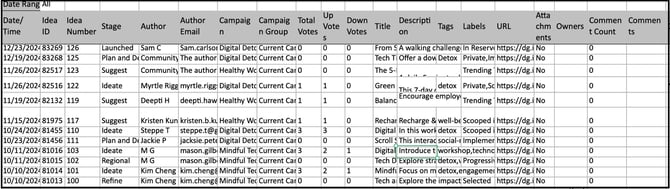
Sheet 1: Ideas
Sheet 1 contains idea data in detail, with the following fields:
- Date/Time
- Idea ID
- Idea Number
- Stage
- Author: Name of the idea submitter/author.
- Author Email Address
- Campaign
- Campaign Group (if any)
- Total Votes
- Up Votes
- Down Votes
- Title: Idea title.
- Description: Idea description or body of the idea.
- Tags
- Labels
- URL: Idea URL.
- Attachments
- Owners: Email addresses of all the idea owners.
- Comment Count
- Comments: Comment text.
- City: City of the idea submitter, if Include Geolocation is enabled.
- Region: State of the idea submitter, if Include Geolocation is enabled.
- Country: Country of the idea submitter, if Include Geolocation is enabled.
Note: Geolocation information is visible only if the user has allowed it to be shared. Location is determined by IP address; in some cases a user may be using a VPN to mask their location, so geolocation is reported to the best of the system's ability.
Sheet 2: Tags
Sheet 2 shows statistics for user and predefined Tags on each idea, with the following fields:
- Idea ID
- Idea Number
- Idea Title
- Tag One
- Tag Two
- Tag Three, and so on for each additional Tag.
Sheet 3: Moderators Tags
Sheet 3 shows statistics for Tags applied by Moderators on ideas, using the same field format as Sheet 2.
Sheet 4: Pending Ideas
Sheet 4 lists Pending Ideas using the same field format as Sheet 1.
Sheet 5: Recycle Bin Ideas
Sheet 5 lists ideas in the Recycle Bin using the same field format as Sheet 1.
Sheet 6: Off-Topic Ideas
Sheet 6 lists Off-Topic Ideas using the same field format as Sheet 1.
Exceptions
- Customized Idea Submission Form Fields: If the Idea Title or Idea Description fields have been customized in the Idea Submission Form, the exported sheet displays the customized field names in place of the default names.
- Pasted Images: An image pasted directly into an idea or a comment is exported with an automatically generated file name made up of a random set of characters, rather than its original file name.
Frequently Asked Questions
Does exporting All Campaigns include Archived Campaigns?
Yes. Selecting All Campaigns when choosing the export scope includes data from Archived Campaigns along with active ones.
What is the difference between Sheet 2 and Sheet 3?
Sheet 2 shows Tag usage statistics for user and predefined Tags applied to an idea, while Sheet 3 shows statistics for Tags applied specifically by Moderators, using the same field format.
Does the export include idea comments?
Yes. Sheet 1 includes a Comment Count field and a Comments field containing the comment text for each idea.
Why do pasted images appear with random file names in the export instead of their original names?
Pasted images are automatically renamed using a random set of characters when exported; see Exceptions above.
What happens if the Filter by Date Range switch is left disabled?
The export includes all data from the beginning of the Campaign up to the current date.
Related Articles