
Path: Workspace Homepage >> Navigation Panel >> Settings >> Community >> Data >> Erase Data
| What is Erase Data? |
|---|
| Erase Data is the community-level tool used to permanently delete all ideas in a community, or to delete all ideas and members together in a single action. |
Erase Data is located under Community >> Data alongside Export Data and Import Data. Because erased data cannot be recovered, the tool requires typed confirmation before either action can be completed.
Role Permissions
- Community Administrator: Can erase all ideas within a community, or erase all ideas and members together, using the Erase Data tool.
- Workspace Administrator: Can also erase all ideas within a community, or erase all ideas and members together, using the Erase Data tool.
Erase All Ideas
The Community Administrator can erase every idea within a community using this tool. To do so, type DELETE in capital letters in the confirmation field and select Confirm Erase. Ideas are erased immediately once confirmed.
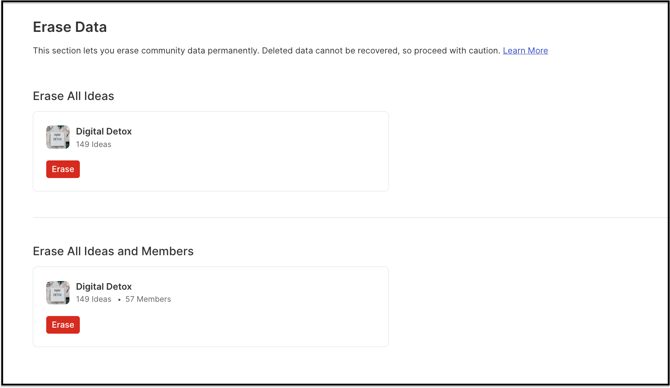
Note: Data, including ideas, comments, votes, and attachments, cannot be recovered once erased. Confirm that all data is no longer needed before using this function.
Erase All Ideas and Members
The Community Administrator can erase all members of a community along with all of its ideas in a single action using this tool. To do so, type DELETE in capital letters in the confirmation field and select Confirm Erase. Ideas and members are erased immediately once confirmed.
Note: Members erased using this function must be invited again to rejoin the community.
Frequently Asked Questions
Can erased ideas or members be recovered after using Erase Data?
No. Once ideas, comments, votes, attachments, or members are erased using either function, the data cannot be recovered.
What is required to confirm an Erase Data action?
Typing DELETE in capital letters in the confirmation field and selecting Confirm Erase is required to complete either the Erase All Ideas or Erase All Ideas and Members action.
Do members erased through Erase All Ideas and Members remain part of the community?
No. Erased members are removed from the community entirely and must be invited again to rejoin.
Does Erase All Ideas also remove members from the community?
No. Erase All Ideas removes only the ideas in the community. Members are removed only when Erase All Ideas and Members is used instead.
Related Articles