
The Ideate stage lets administrators define how votes are counted when there are two or more Ideate stages in the same workflow. When voting is enabled, community admin can choose whether votes should be counted cumulatively across all Ideate stages or separately within each individual stage. Administrator can configure this behavior by selecting the desired vote-counting method from the Ideate stage drop-down menu in the Settings section.
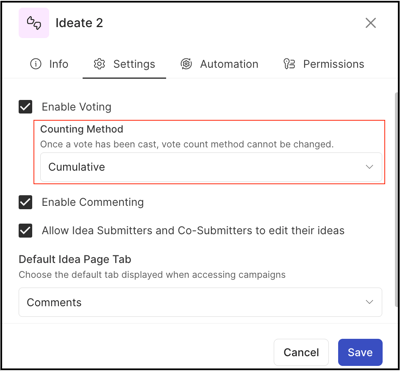
TABLE OF CONTENTS
Cumulative Vote
The cumulative voting option is the default for the ideate stage. This selection is not visible when there is only one Ideate stage in the workflow.
-
When the vote count is selected as Cumulative, the vote count is preserved throughout the workflow.
-
End users can vote one time per idea only.
Per Stage Basis Vote
If a workflow has more than one ideate stage, this allows selecting Per Stage Basis vote count method for the ideate stage.
-
This stage allows the same member to vote on the same idea when the idea is moved to a different Ideate stage within same workflow with a per-stage basis method every time.
-
End-user can vote on the same idea every time whenever a new per-stage basis ideate stage is created.
-
When the idea moves from cumulative to per stage basis ideate stage, vote count will be starting from zero. Vote will be counted from the idea's current stage stats.
-
Only a single vote per member will be allowed in each Ideate stage.
- If ideas move from cumulative/per stage basis to per stage basis/ cumulative, the previous ideate stage's vote cast will appear under the Activity tab.
Move Idea
Ideas can be moved from one stage to another stage OR one campaign to another campaign.
Stage Change
If ideas move from one ideate (cumulative/per stage basis) stage to another ideate (cumulative/per stage basis) stage-
a) Condition: Cumulative to Cumulative Stage
Action:
-
Member votes on an idea that is in the cumulative ideate stage.
-
Idea moves to another cumulative ideate stage.
Outcome:
End users can not vote again on the same idea and the previous vote cannot be retracted.
b) Condition: Per Stage Basis to Per Stage Basis Stage
Action:
-
Member votes on an idea that is in the per stage basis ideate stage.
-
Idea moves to another per stage basis ideate stage.
Outcome:
End users can vote again on the same idea and the new vote will be counted as a stage-specific vote cast.
c) Condition: Cumulative to Per Stage Basis Stage
Action:
-
Member votes on an idea that is in the cumulative ideate stage.
-
Idea moves to per stage basis ideate stage.
Outcome:
End users can vote again on the same idea and the vote cast will start from zero.
d) Condition: Per Stage Basis to Cumulative Stage
Action:
-
Member votes on an idea that is in the per stage basis ideate stage.
-
Idea moves to cumulative ideate stage.
Outcome:
End users can vote again on the same idea and the vote cast will start from zero.
- In the export idea data report, cumulative and per stage basis vote cast will be summed up together.
- If an idea moves to a different workflow cumulative/ per stage basis ideate stage and it has previous stage vote, vote cast will start from zero again in the new workflow stage. But the export idea data report shows the total vote cast of the previous stage and present stage.
Campaign Change
If an idea moves from one campaign to another campaign.
a) Condition:
Change campaign within the same workflow.
Outcome:
Idea will be moved with the previous vote count to the new campaign.
b) Condition:
Change campaign with different workflow.
Outcome:
-
Vote count will start from zero in the campaign and the previous campaign's votes cast will not be moved along with the ideas to the new campaign.
-
Previous campaign vote count will be visible under the Activity tab.
-
In the Export Idea Data report, the total vote count will sum up (previous campaign vote and new campaign vote)
If the idea moves to a different stage while changing the campaign the previous votes will still be visible in the Export Idea Data report (even if the new campaign workflow has no ideate stage).