
Path: Workspace Homepage >> Navigation Panel >> Settings >> Data >> Export Data >> API Usage
| What is Workspace API Usage? |
|---|
| Workspace API Usage is a workspace-level data export that provides a record of all API activity across a workspace's communities, including usage details and connection sources. |
The Workspace API Usage export provides an overview of all APIs used within the workspace's communities, including details on usage and connections. It gives administrators the insights needed to monitor API activity, understand integration points, and see how these APIs contribute to the platform's functionality.
Role Permissions
- Workspace Administrator: Accesses and configures the Workspace API Usage export from Settings >> Data >> Export Data
Configure the API Usage Export
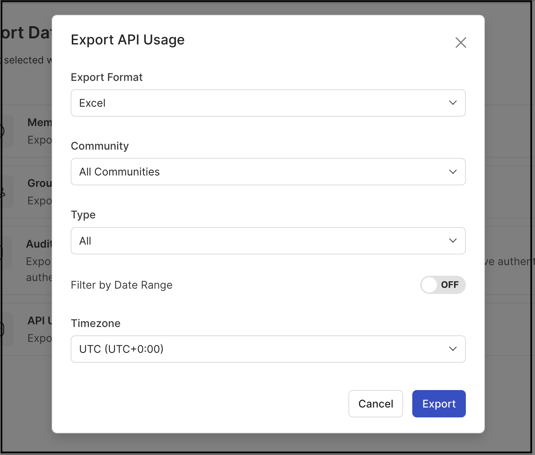
The Workspace API Usage export is available from Settings >> Data >> Export Data. Selecting the API Usage export opens the export configuration screen, which includes the following fields:
- Export Format: Data can be exported in Excel or CSV file format.
- Community: A dropdown that specifies whether the export covers all communities or is limited to a single community.
- Type: A dropdown that selects the API usage type for the export — All, MCP, or Other.
- Filter by Date Range: Enabling this switch sets a start and end date to export data for a specific time period. Leaving the switch off exports all data from the beginning up to the current date.
- Timezone: A dropdown that selects the timezone in which all exported data appears.
Selecting the Export button generates the file and makes it available for download.
Exported Fields
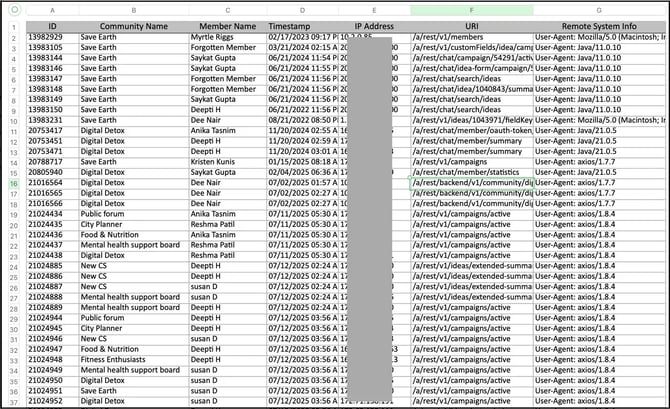
The exported Excel file includes the following fields:
- ID: The API action ID.
- Community Name: The name of the community the API was used for.
- Member Name: The display name of the member who used the API.
- Timestamp: The date and time when the API was used, shown in MM/DD/YYYY HH:MM format.
- IP Address: The IP address from which the API was used.
- URL: The specific endpoint accessed during the API call. This helps identify whether data was retrieved from sources such as Slack, IdeaScale AI, the MCP server, or API tools such as Postman. For example:
- /a/rest/v1/ — indicates the API was used via a REST API app such as Postman or an MCP server.
- /a/rest/chat/ — indicates the API was used via a chat app such as Slack.
- /a/rest/backend/v1/ — indicates the API was used via a backend API such as IdeaScale AI.
- Remote System Info: Identifies which platform or tool accessed the API, such as Slack, IdeaScale AI, the MCP server, or API applications such as Postman. For example:
- User-Agent: Java/21.0.5 — indicates the API was used by a chat app such as Slack.
- User-Agent: axios/1.7.7 — indicates the API was used by IdeaScale AI.
- User-Agent: ideascale-mcp-server/1.0.0 — indicates the API was used by an MCP server such as Claude or Cursor IDE.
- User-Agent: PostmanRuntime/7.43.3 — indicates the API was used by a REST API app such as Postman.
Frequently Asked Questions
What file formats are available for the Workspace API Usage export?
The export can be generated in either Excel or CSV format.
Can the export be limited to a single community?
Yes. The Community field allows the export to be limited to a single community, or expanded to cover all communities in the workspace.
What does the URL field in the exported file indicate?
The URL field shows the specific endpoint accessed during the API call, which helps identify the origin of the request — for example, whether it came from a chat app such as Slack, from IdeaScale AI, from an MCP server, or from a REST API tool such as Postman.
What happens if the Filter by Date Range switch is left off?
Leaving the Filter by Date Range switch off exports all API usage data from the beginning up to the current date, rather than limiting results to a specific time period.
Related Articles