
Path: Workspace Homepage >> Navigation Panel >> Idea Portfolio
| What is Merge or Unmerge Ideas? |
|---|
| Merge and Unmerge is a moderation feature that consolidates duplicate or closely related ideas into a single, authoritative Parent idea, while remaining fully reversible. |
As a community grows, members naturally submit duplicate or closely related ideas. Merge and Unmerge allows moderators to keep the workspace clean and focused by consolidating related feedback into a single Parent idea while fully preserving votes, comments, and attachments. Merging and unmerging can be performed only from Idea Portfolio.
Role Permissions
- Workspace Administrator: May merge ideas only when assigned as admin or moderator on the designated Parent idea and on each Child idea included in the merge.
- Community Administrator or Community Moderator: May unmerge ideas only when assigned corresponding admin or moderator permissions on both the Parent idea and the Child idea being separated.
- Community Member: Cannot view or initiate the Unmerge action from a read-only Child idea page.
TABLE OF CONTENTS
Core Definitions
Permissions
How to Merge an Idea
How to Unmerge an Idea
Contents transferred during Merge
Rules and Constraints
Effects of Merging an Idea
Effects of Unmerging an Idea
Exceptions
Frequently asked Questions
Core Definitions
- Parent Idea: The primary, master idea that receives all data and remains active for community interaction.
- Child Idea: The duplicate or related idea whose content is absorbed into the parent. Once merged, it becomes a read-only that redirects users to the parent.
Permissions
To execute these actions, moderators must have explicit authorization:
- To Merge: The user performing the action must be an assigned admin or moderator on the designated parent idea as well as on each child idea included in the merge.
- To Unmerge: The user must have corresponding admin or moderator permissions on both the parent and child ideas being separated. Standard community members cannot see or initiate the unmerge action from read-only child idea pages.
How to Merge an Idea
Merging ideas is only available when the workspace has the Idea Duplicate Detection tool enabled. This tool is enabled by default for all workspaces. If it is not active in your workspace, please contact Support or your Account Manager to have it enabled.
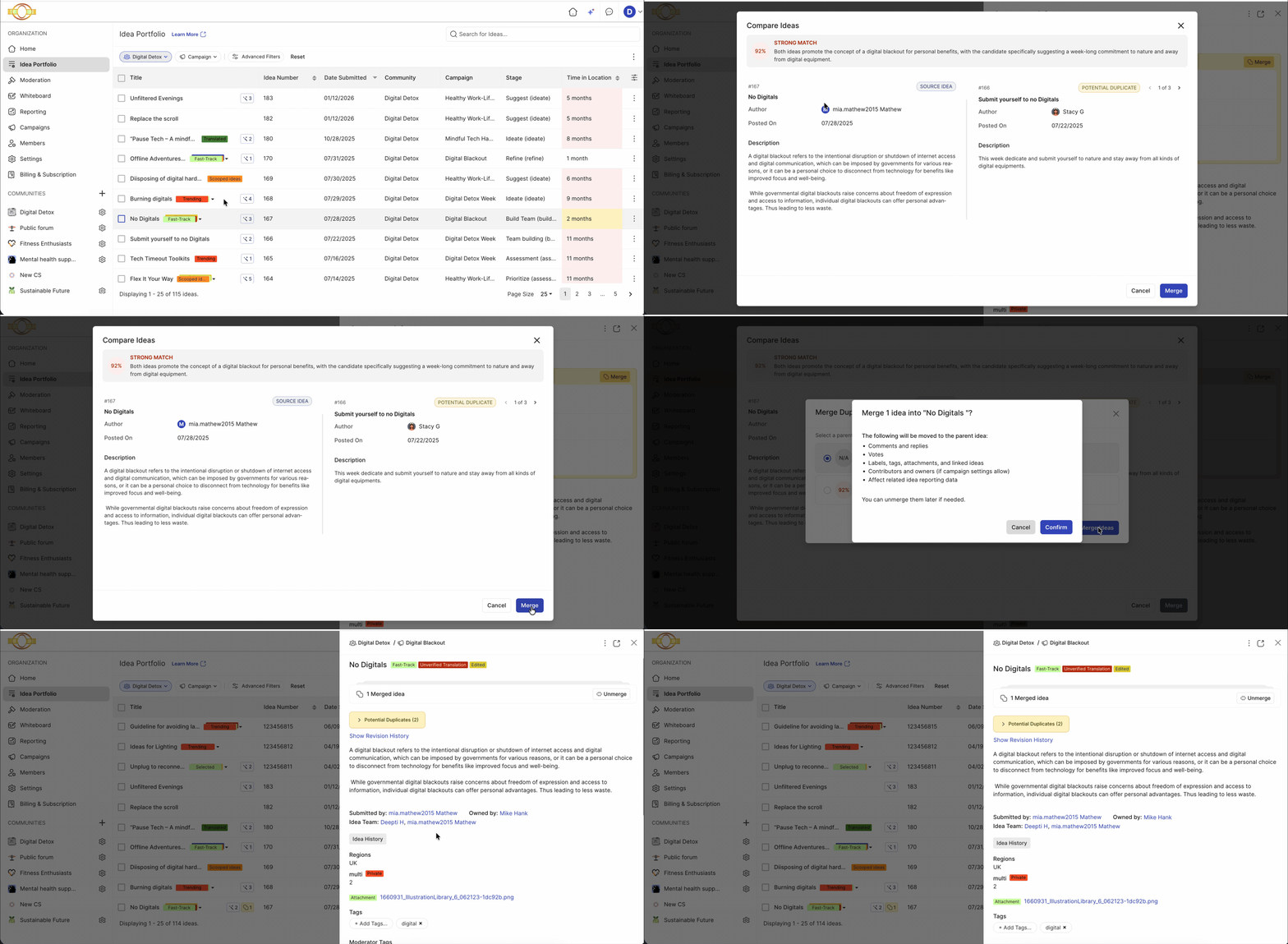
Steps to Merge an Idea:
1. Click the idea title that has potential duplicates to open the side panel.
2. Review and compare the ideas, then designate which will be the Parent idea and which will be the Child idea.
3. Click the Merge button to complete the merge.
How to Unmerge an Idea
.gif?width=670&height=328&name=Screen-Recording-2026-06-30-at-4%20(1).gif)
Steps to Merge an Idea:
1. Click the idea title to open the side panel.
2. Click the Unmerge button to complete the process.
Contents Transferred during Merge
When a child idea is merged into a parent, data flows into the parent idea according to specific consolidation rules to ensure no historical context or engagement is lost.
Here is a list of contents that gets transferred during the Merge:
- Vote: All unique votes move to the parent. If a community member voted on both the parent and the child, their child vote is discarded to prevent double-counting.
- Comments & Replies: All the comments and the replies moves to the parent. The exact internal thread structure and timestamps are preserved.
- Annotations: All annotations moves to the parent and are appended to the end of the parent’s existing annotation sequence.
- File Attachments: Files originally uploaded to the child idea are automatically re-associated with the parent.
- Labels & Tags: Any labels or tags present on the child are applied to the parent (if they weren't there already).
- Linked Ideas: Any external ideas linked to the child are updated to link directly to the parent.
- Co-submitters & Idea Owners: Child Co-submitters and idea owners are added to the parent's list of Co-submitters/ Idea owners so credit is maintained.
Rules and Constraints
To maintain data integrity and prevent system loops, several strict guardrails are in place:
- Visibility and Access to Merge/Unmerge Ideas: The ideas can be merged / unmerged only from Idea Portfolio. The merged ideas will display in the parent idea on the Idea details page as well as in Idea Portfolio.
- Stage Restrictions: Both the parent and child ideas must be in an interactive stage (e.g., Review or Refine). Ideas that are in recycle bin, reserve stage cannot be merged.
- Labeled Ideas: Ideas marked as Selected or Implemented cannot be merged as Child ideas. They always remain at a higher level in the hierarchy and can only serve as Parent ideas.
- No Multi-Layer Nesting: An idea cannot be part of a chain reaction. A parent cannot be a child of another idea, and a child cannot bring its own active child ideas with it. The system requires a flat structure; you must unmerge or flatten existing groups before merging up.
- Merge Idea Limits: A moderator can merge a maximum of 10 child ideas into a parent in a single operation.
- Workspace & Community Boundaries: Ideas cannot be merged across different communities. Additionally, if data classification is enabled, a child idea cannot have a security/classification level higher than the parent idea or the parent campaign's ceiling.
- Concurrency Protection: To avoid database conflicts, an idea cannot be involved in two simultaneous merge or unmerge operations.
- No "Partial" Unmerging: Unmerging is an all-or-nothing action. You cannot selectively pull a subset of data or just one child out of a multi-idea merge at this time.
Effects of Merging an Idea
Understanding the impact of a merge on the end-user experience and system behavior is critical for smooth community management.
-
Notifications: Email and in-app notifications are sent to owners, co-submitters, or voters of both the parent and child ideas when an idea is merged. (Note: If the person performing the merge has contributed in any way to the ideas being merged, they will not receive an email or in-app notification.)
- For the Child Idea (Read-Only Status): The child idea is immediately locked and converted to a fully read-only record. All standard user interactions—including editing, commenting, voting, sharing, and emailing—are disabled on the child idea.
- Automatic User Redirection: If a user directly visits the URL of a merged child idea, the system automatically redirects them to the parent idea. A prominent system alert is displayed at the top of the screen to inform them that they have been redirected because the idea was merged.
- Consolidated Analytics: The parent idea instantly reflects the combined weight of the community's interest, boasting a higher vote count and a centralized comment section for product teams to review.
Effects of Unmerging an Idea
Because the system retains a clean ledger of the original data states, unmerging acts as a flawless rollback with the following impacts:
- Perfect Data Restitution: All comments, files, tags, and unique votes that originally belonged to the child idea are automatically removed from the parent and restored to the child.
- Restored Activity: The child idea immediately exits its read-only state. It becomes interactive again, allowing users to vote, comment, and edit normally.
- Clean Metrics: The parent idea's vote counts and comment metrics will decrease appropriately, shedding the data that belonged to the removed child.
- No Expiration Date: There is currently no time limit on when an unmerge can be performed. A moderator can reverse a merge months after it initially occurred.
Exceptions
- Attempting to merge or unmerge outside Idea Portfolio: Not permitted. Merging and unmerging are available only from Idea Portfolio; merged ideas display on the Parent idea's Idea Details page as well as in Idea Portfolio.
- Parent or Child idea not in an interactive stage (e.g., Review or Refine): The idea cannot be merged. Ideas in the recycle bin or reserve stage cannot be merged.
- Child idea labeled Selected or Implemented: Cannot be merged as a Child idea. These ideas remain at a higher level in the hierarchy and can only serve as a Parent idea.
- Idea already part of a merge chain: Cannot be merged again. A Parent idea cannot be a Child of another idea, and a Child idea cannot bring its own active Child ideas into a merge; existing groups must be unmerged or flattened before merging up.
- More than 10 Child ideas selected for a single merge: Not permitted. A moderator can merge a maximum of 10 Child ideas into a Parent idea in a single operation.
- Ideas in different communities: Cannot be merged. If data classification is enabled, a Child idea cannot carry a security or classification level higher than the Parent idea or the Parent campaign's ceiling.
- Idea already involved in a merge or unmerge operation: Cannot be included in a second, simultaneous merge or unmerge operation.
- Partial unmerge requested: Not supported. Unmerging is an all-or-nothing action; a subset of data or a single Child idea cannot be selectively pulled from a multi-idea merge.
Frequently Asked Questions
Can a merged Child idea be edited?
No. Once merged, the Child idea becomes read-only, and editing, commenting, voting, sharing, and emailing are disabled on it until it is unmerged.
What happens if a member already voted on both the Parent and Child idea before a merge?
The Child idea's vote is discarded to prevent double-counting, and only the Parent idea's vote is retained.
Is there a limit to how many ideas can be merged at once?
Yes. A moderator can merge a maximum of 10 Child ideas into a Parent idea in a single operation.
Can part of a merge be undone without unmerging everything?
No. Unmerging is an all-or-nothing action; a subset of data or a single Child idea cannot be selectively removed from a multi-idea merge.
Is there a deadline for unmerging ideas?
No. There is no time limit on when an unmerge can be performed.
Related Articles