
Path: Workspace Homepage >> Navigation Panel >> Settings >> Community >> Data >> Export Log
| What is the Export Log? |
|---|
| The Export Log is a record of all reports exported from a Workspace or Community, including the progress of any export currently in process. |
The Export Log is available at both the Workspace and Community level, with each level showing its own respective log. It allows a previously exported report to be located and referenced again without re-running the export.
Role Permissions
- Community Administrator: Views the Export Log and the status of past and in-progress export requests.
Export Log Fields
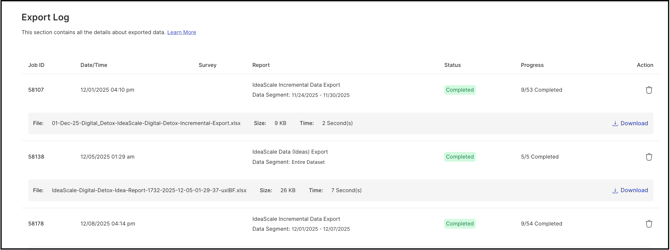
Each entry in the Export Log displays the following fields:
- Job ID: The server process number for the executed query.
- Date/Time: The time the report was requested, shown in PST time.
- Report: The title of the report.
- Data Segment: The date range covered by the export if a date filter was applied, or Entire Data Set if no filter was applied.
- Status: The current state of the export, shown as one of the following:
- Queued for Processing: The report is waiting in the queue.
- Currently Processing: The server is actively generating the report.
- Completed Successfully: The report has finished generating.
- Progress: The number of steps completed toward processing the report.
- Delete: Removes the report's entry from the Export Log.
- Time: The total time taken to generate the report.
- Size: The file size of the generated report.
- Output File Naming Format: The naming convention applied to the exported file — Report Title - Community ID - Year - Month - Date - Hour - Minute - Second.
Frequently Asked Questions
Can a report be re-downloaded from the Export Log after it has finished generating?
Yes. Completed exports remain listed in the Export Log so a previously generated report can be located and referenced again.
What does the Progress field show while a report is still generating?
The Progress field shows the number of steps completed so far in generating the report, giving a sense of how far along a Queued for Processing or Currently Processing export is.
Does the Export Log show exports from every community, or only the current one?
The Export Log is available at both the Workspace and Community level, and each level shows only its own respective log.
Related Articles