
Path: Workspace Homepage >> Navigation Panel >> Settings >> Community >> Data >> Export Data >> Group Data
| What is Export Groups Data? |
|---|
| Export Groups Data is a report containing detailed information on all groups within a community, along with group activities and related data, generated in Excel or XML format. |
The Export Groups Data report is generated from Community Settings - Data. Selecting Export Data generates a link to the file, which can then be downloaded; the file remains accessible at a later date from Data >> Export Log.
Role Permissions
- Community Administrator: Accesses Community Settings - Data and generates, downloads, and retrieves the Export Groups Data report, including while the community is in Read Only mode.
- Custom Administrator: Can access Export Groups Data if enabled for this role.
TABLE OF CONTENTS
Export OptionsFields on Excel Sheet with All Groups
Fields on Excel Sheet with Specific Groups
Frequently Asked Questions
Export Options
Before generating the report, the following options can be set:
- Group Type: Determines which groups the export covers. It can be set to All Group Types, Groups, or Group Based Moderation.
- Selecting Groups allows particular group reports to be specified for export.
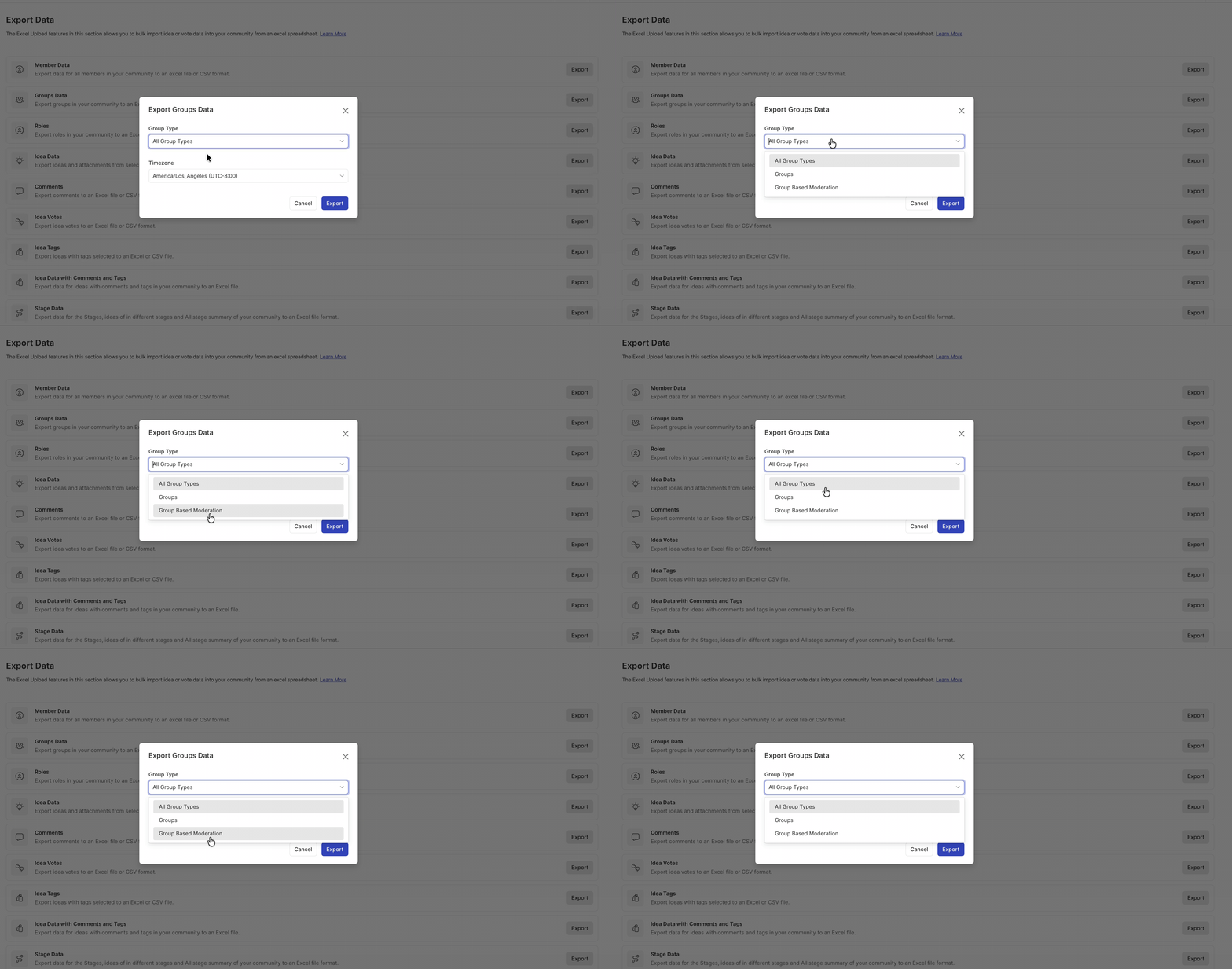
Fields on Excel Sheet with All Groups
Selecting All Group Types as the Group Type generates a workbook with the following sheets.
Sheet 1
The first sheet contains all the groups created in the community, along with each group's name, the number of members assigned to it, its member assignment method, and whether the group is private.
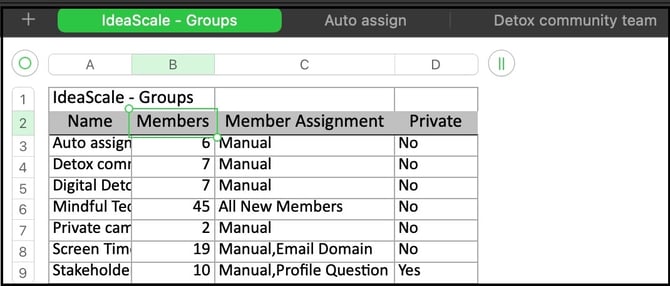
Sheet 2
The second sheet onward contains each group's details on a separate sheet, with the following columns: Member Id, Email Address, Username, Name, Member Since, Source, Status, Ideas, Votes, and Comments.
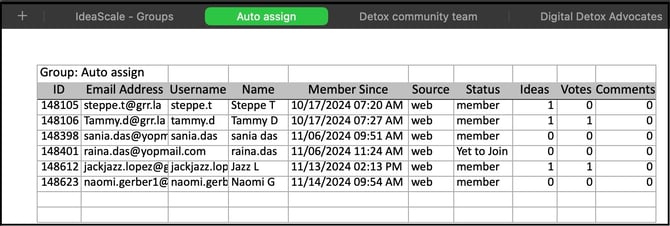
Fields on Excel Sheet with Specific Groups
Selecting Groups as the Group Type and specifying particular groups generates a workbook with the same sheets described in Fields on Excel Sheet with All Groups, containing data for the selected groups only.
Frequently Asked Questions
Where can a previously generated Export Groups Data file be accessed?
A previously generated file can be accessed from Data >> Export Log.
What file formats are available for the Export Groups Data report?
The report can be generated in Excel or XML format.
What is the difference between exporting All Group Types and exporting Specific Groups?
Selecting All Group Types includes every group created in the community in the export. Selecting Groups and specifying particular groups limits the export to only the selected groups, while producing the same set of sheets.
Why would the Timezone option be used when exporting Group Data?
The Timezone option allows the exported data to be displayed in a timezone other than the community's default, which is useful when the person reviewing the export is in a different timezone than the community.
Related Articles