
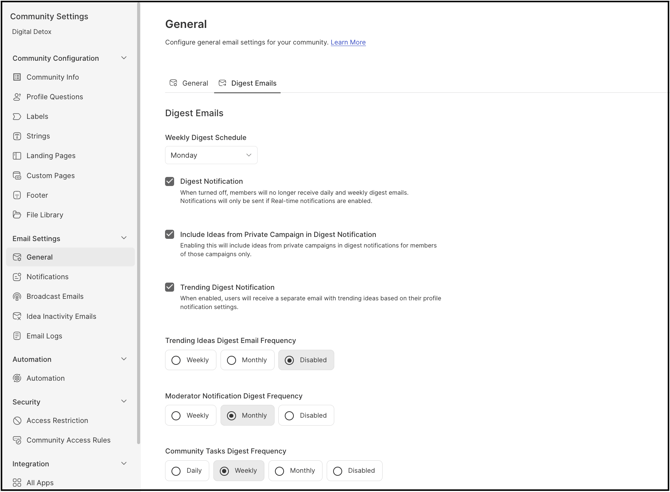
Path: Community Settings >> Email Settings >> General >> Digest Emails
| What is the Digest Emails section? |
|---|
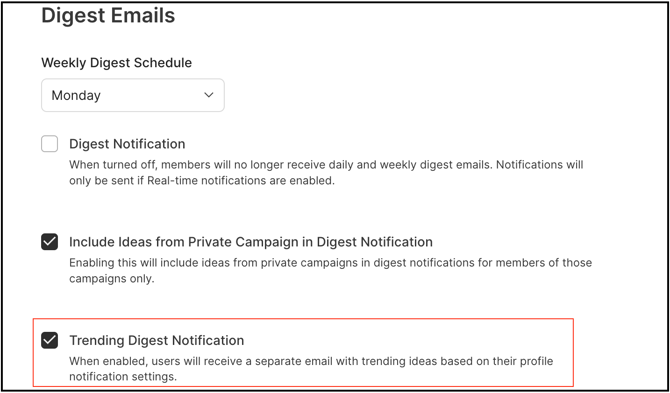
| The Digest Emails section is the area within Community Settings - Email Settings that contains all digest email settings available at the community level, including controls for daily and weekly digest frequencies, schedule, and options to include or exclude specific items such as private campaign ideas and the trending digest. |
These settings define which types of activity are summarized and how often participating members receive those summaries.
Role Permissions
- Community Administrator: Configures the Weekly Digest Schedule, switches Digest Notification on or off, controls whether ideas from private campaigns are included in digest notifications, switches the Trending Digest Notification on or off, and sets the Default Digest Email Frequency applied to new community members.
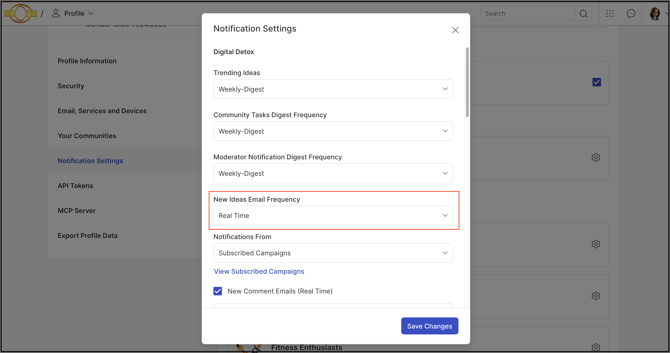
- Community Member: Receives digest email notifications according to the community's configured settings, and can individually adjust digest frequency or select Real-Time notifications at any time from Profile >> Settings >> Notification Settings >> Bell Icon.
TABLE OF CONTENTS
Weekly Digest Schedule
Digest Notification
Include Ideas from Private Campaign in Digest Notification
Trending Digest Notification
Default Digest Email Frequency
Exceptions
Frequently Asked Questions
Weekly Digest Schedule
The desired day can be set for sending the weekly digest to all community members who have opted in to receive it. The Community Administrator can choose a specific day of the week that best aligns with the community's engagement strategy or internal communication cadence.
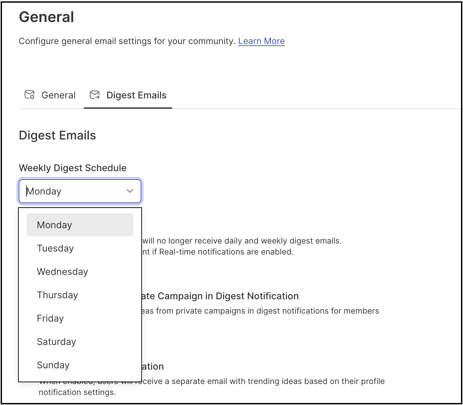
Each weekly digest includes a maximum of five ideas, typically prioritized based on recent activity and relevance within the selected time frame, keeping the content concise and focused.
See Exceptions below for the behavior when no new ideas are available for a given week.
Digest Notification
Switching Digest Notification to OFF disables all digest emails, both Daily and Weekly, for every community member. Members who have a Daily or Weekly digest frequency set for their email notifications do not receive a notification for community activity unless their setting is set to Real-Time.
Note: Turning off Digest Notification for the community does not disable email notifications entirely — members who have chosen Real-Time notifications continue to receive them. Members can also switch to Real-Time-only notifications at any time from Profile >> Settings >> Notification Settings >> Bell Icon.
Help article on Personal notification settings
Include Ideas from Private Campaign in Digest Notification
When this setting is switched ON, ideas from private campaigns are included in digest notifications for members of those private campaigns, alongside other community ideas.
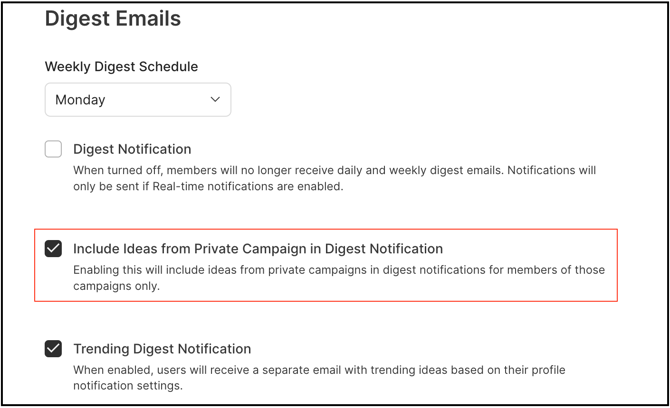
See Exceptions below for how private campaign visibility is restricted within digest emails.
Trending Digest Notification
When this setting is switched ON, a separate email highlighting trending ideas is sent to members who have enabled this option in their profile notification settings.
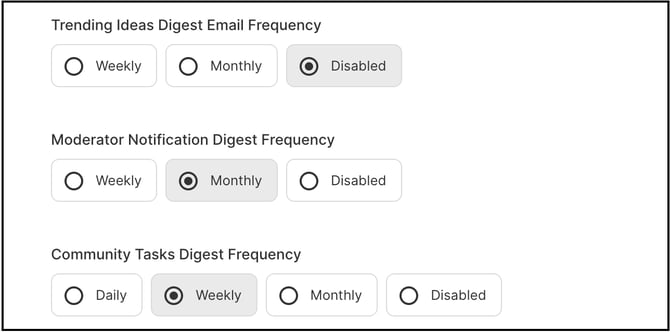
The Trending Digest Notification frequency can be configured as Weekly or Monthly. Members may also disable trending digest notifications entirely from Profile >> Settings >> Notification Settings >> Bell Icon.
Default Digest Email Frequency
The Community Administrator can configure a default digest email frequency that applies to all community members. This default setting is automatically applied to new members when they join the community.
Note: Although the Default Digest Email Frequency is applied automatically to new members, each member can adjust their own digest frequency independently at any time from Profile >> Settings >> Notification Settings.
Help article on List of Digest emails
Exceptions
- Empty Weekly Digest: If no new ideas are submitted to the community during the week, an empty weekly digest is not generated or sent, preventing members from receiving unnecessary emails.
- Private Campaign Idea Visibility: Members who are not authorized to view or participate in a private campaign do not see ideas from that campaign in their digest email notifications, even when Include Ideas from Private Campaign in Digest Notification is switched on for the community.
Frequently Asked Questions
What happens to the weekly digest if no new ideas were submitted that week?
No email is sent. As described in Exceptions above, an empty weekly digest is not generated or sent when there are no new ideas to summarize for that week.
Can community members still receive notifications if Digest Notification is switched off for the community?
Yes. When Digest Notification is switched off for the community, members can still choose to receive Real-Time email notifications from Profile >> Settings >> Notification Settings >> Bell Icon.
Will every community member see ideas from private campaigns in their digest email?
No. Only members who are authorized to view or participate in a specific private campaign see that campaign's ideas in their digest email, even when Include Ideas from Private Campaign in Digest Notification is switched on for the community.
Can an individual member override the Default Digest Email Frequency set for the community?
Yes. Although the Default Digest Email Frequency applies automatically to new members, each member can adjust their own digest frequency at any time from Profile >> Settings >> Notification Settings.
Can the Trending Digest Notification frequency be set independently of the Weekly Digest Schedule?
Yes. The Trending Digest Notification frequency is configured separately as Weekly or Monthly and can be disabled entirely without affecting the Weekly Digest Schedule or other digest email settings.
Related Articles