
Configuring the Webhook
- Under Method Type, select Post.
- Enter the GitHub account URL in the URL field.
- Select Basic Auth, then enter the GitHub account username and password in the Username and Password fields.
- Optional parameters and custom header names and values can also be configured.
- Under Post Payload, enter the payload code, for example:
Path: Workspace Homepage >> Navigation Panel >> Settings >> Community >> Automation >> Automation
| What is a Webhook with GitHub? |
| A Webhook with GitHub is an automation rule built in the Automation Builder that sends a POST request to a connected GitHub account whenever an idea meets a defined condition, such as being selected for implementation. |
This automation uses the Execute Webhook action to post idea data — including the submitter's email address, the idea title, description, and URL — to a GitHub account each time an idea satisfies the rule's condition. Automation rules are configured by a Community Administrator.
Role Permissions
- Community Administrator: Can create, configure, test, and enable an automation rule that pushes idea data to GitHub via webhook.
TABLE OF CONTENTS
Creating the Automation RuleConfiguring the Webhook
Testing and Enabling the Automation Rule
Frequently Asked Questions
Creating the Automation Rule
- Select Create to begin building a new automation rule.
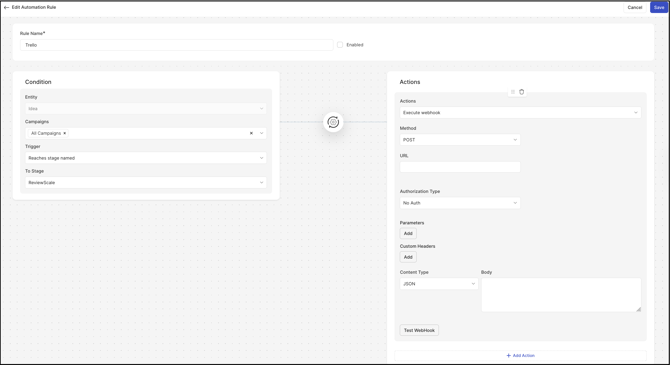
- Enter a name for the rule in the Rule Name field.
- Under Condition, use the drop-down menus to build a condition based on Idea, then select the activity that should trigger the idea being pushed to the GitHub account. Note: In the example configuration, the condition is set to trigger when an idea moves to the ReviewScale stage.
- Under Action, select Execute Webhook in the Name field, then select Save. Saving displays additional configuration options.
Configuring the Webhook
- Under Method Type, select Post.
- Enter the GitHub account URL in the URL field.
- Select Basic Auth, then enter the GitHub account username and password in the Username and Password fields.
- Optional parameters and custom header names and values can also be configured.
- Under Post Payload, enter the payload code, for example:
{
"name": "{emailAddress}",
"title": "{ideaTitle}",
"desc": "{ideaDesc}",
"urlSource": "{ideaUrl}",
"pos": "top"
}
Testing and Enabling the Automation Rule
- Select Test Webhook to confirm the configuration. A successful test produces a new request in the GitHub account.
- Select Enable, then select Save to activate the automation rule. Once enabled, any idea that satisfies the rule's condition is pushed to the GitHub account automatically.
Frequently Asked Questions
What triggers the webhook to send data to GitHub?
The webhook runs whenever an idea meets the condition configured under Condition in the automation rule, such as reaching a specific stage.
What authentication method connects the automation rule to GitHub?
The rule connects using Basic Auth, with a GitHub account username and password entered in the Username and Password fields.
What idea data is included in the payload sent to GitHub?
The Post Payload can include the submitter's email address, the idea title, the idea description, and the idea URL.
Related Articles