
Path: Workspace Homepage >> Navigation Panel >> Settings >> Community >> Automation >> Automation
| What is Webhook with Aha? |
|---|
| Webhook with Aha is a webhook-based automation that pushes idea data from IdeaScale into Aha whenever a configured Idea activity occurs, such as an idea reaching a specific stage or votes on an idea reaching a defined threshold. |
The integration is built using IdeaScale's automation builder in combination with Webhook by Zapier, which relays the idea data from IdeaScale to Aha's idea portal. Once configured, the automation runs automatically whenever the defined condition is met, with no manual export required.
Note: You need a premium zapier account/7-day free trial account to use webhooks by zapier
Role Permissions
- Community Administrators: Creates, configures, and saves automation rules under Community >> Automation, including the rule that pushes idea data to Aha.
TABLE OF CONTENTS
Data Pushed to Aha
Creating the Automation Rule in IdeaScale
Connecting the Automation Rule to Zapier
Configuring the Aha Action
Exceptions
Frequently Asked Questions
Data Pushed to Aha
The webhook payload can push the following idea data to Aha:
- Submitter's Email Address: The email address of the member who submitted the idea.
- Submitter's Name: The name of the member who submitted the idea.
- Idea Description: The description entered for the idea.
- Idea Title: The title given to the idea.
- Idea URL: The direct URL to the idea within IdeaScale.
Note: The sample payload below maps the "name" field to the Submitter's Email Address placeholder rather than a separate name placeholder.
Creating the Automation Rule in IdeaScale
Select the Create button to start creating a new automation rule.
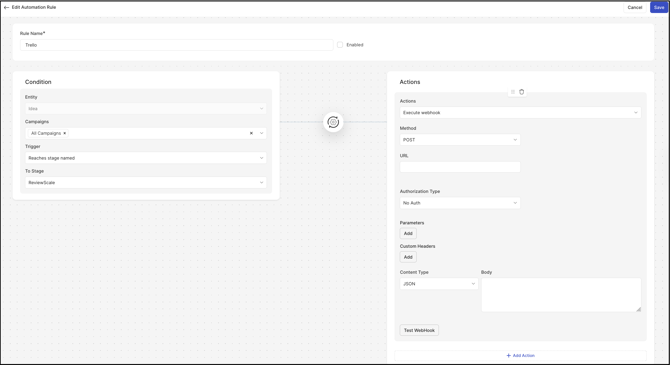
- Enter a name for the Rule Name field.
- Under Condition, use the dropdowns to build a condition set to Idea, then select the Idea activity that should trigger the push to Aha — for example, an idea moving to a specific stage, or an idea's votes reaching a defined threshold.
- Under the Action category, select Execute Webhook.
- Select Save. Saving the rule causes a new set of configuration options to appear.
Connecting the Automation Rule to Zapier
- Go to zapier.com and create a new Zap. Select Webhook by Zapier as the trigger app.
- Select Catch Hook as the trigger event.
- Copy the webhook URL generated by Zapier and paste it into the automation rule's webhook settings in IdeaScale, then test the payload from within the IdeaScale app.
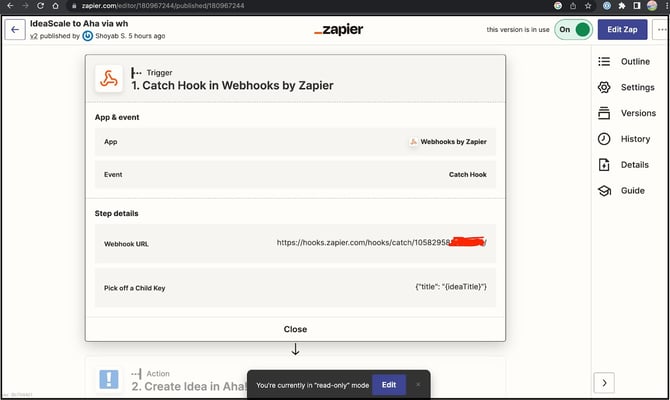
The payload takes the following form:
{ "name": "{emailAddress}","title": "{ideaTitle}","desc": "{ideaDesc}","urlSource": "{ideaUrl}"}
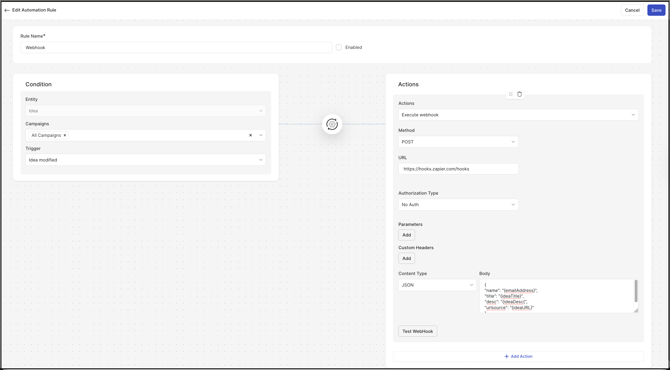
action.
Configuring the Aha Action
- Select Aha as the action app and log in to the Aha account.
- Complete the required action fields, then test the action. A successful test posts the idea to the Aha idea portal.
- Select Save and publish the Zap to complete the automation setup. See Exceptions below for Aha access requirements.
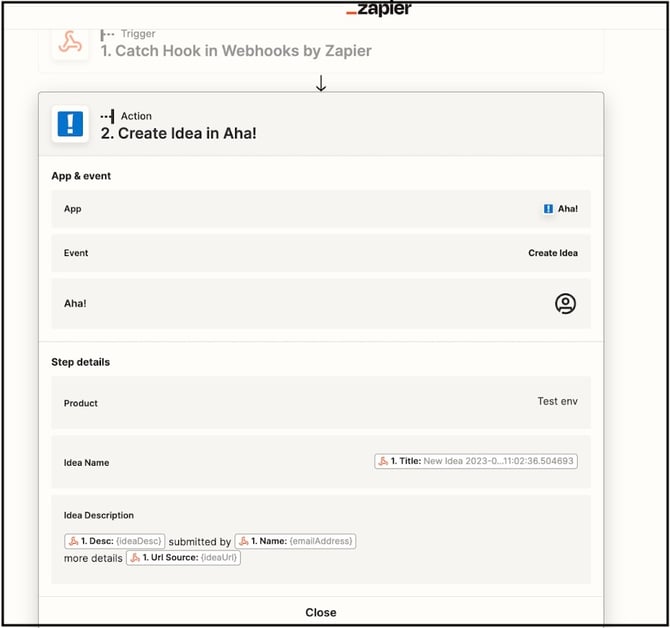
Once published, any idea meeting the rule's configured condition — for example, reaching a threshold of two votes — is automatically pushed to Aha.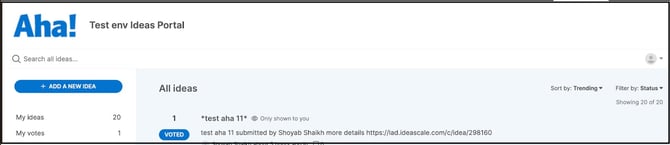
Exceptions
- Aha Admin Access : Admin access to Aha's idea portal may be required to complete the Aha-side setup of the action; the specific access level needed is not confirmed.
Frequently Asked Questions
What idea data can be pushed to Aha through the webhook payload?
The payload can carry the Submitter's Email Address, Submitter's Name, Idea Description, Idea Title, and Idea URL: the sample payload maps a "name" field to the email address placeholder rather than a distinct name field — this should be confirmed before publishing.)
What Idea activities can trigger a push to Aha?
Any Idea-related activity configured under the Condition can serve as the trigger, such as an idea moving to a specific stage or an idea's votes reaching a defined threshold.
Is a paid Zapier account required to use this integration?
Yes. Webhook by Zapier requires either a premium Zapier account or a 7-day free trial account to use webhook triggers.
Is admin access to Aha required to complete the setup?
Admin access to Aha's idea portal may be required to complete the Aha-side configuration.
Related Articles