
Path: Workspace Homepage >> Navigation Panel >> Settings >> Workspace Configuration >> Profile Questions >> Edit >> Regularly Update or Confirm Field
Path: Workspace Homepage >> Navigation Panel >> Settings >> Community >> Community Configuration >> Profile Questions >> Edit >> Regularly Update or Confirm Field
| What is Regularly Update or Confirm Field? |
|---|
| Regularly Update or Confirm Field is a Member Profile Question setting that prompts members to review and update their profile fields at a set interval. |
Member profile information can become outdated over time. Regularly Update or Confirm Field keeps this information current by prompting members to review and confirm their profile fields on a recurring basis, configurable independently at the Workspace level and the Community level.
Role Permissions
- Workspace Administrator: Switches on Regularly Update or Confirm Field for a Member Profile Question at the Workspace level and sets the Require Confirmation of Profile Fields Every X Months interval.
- Community Administrator: Switches on Regularly Update or Confirm Field for a Member Profile Question at the Community level and sets the Require Confirmation of Profile Fields Every X Months interval.
Administrative Setting
A Workspace Administrator can switch on this setting from Workspace Configuration >> Profile Questions. A Community Administrator can switch on this setting from Community Configuration >> Profile Questions. Select Edit on the desired Member Profile Question, then switch on Regularly Update or Confirm Field.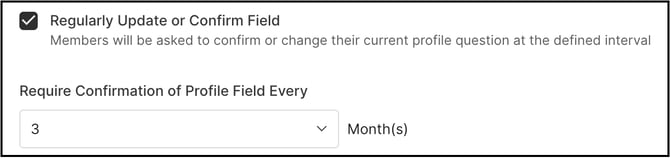
Switching on Regularly Update or Confirm Field reveals an additional field, Require Confirmation of Profile Fields Every X Months, where the interval (in months) at which members are asked to update or confirm the field is specified.
Member View
After Regularly Update or Confirm Field is enabled by an Administrator, a pop-up prompting the member to update the Profile field appears the next time the member logs in.
Note: The pop-up continues to appear for 3 consecutive logins.
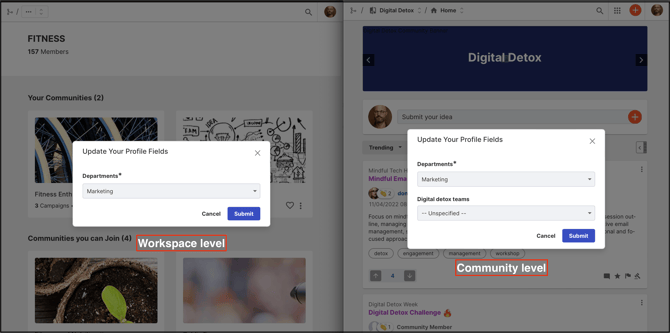
At the Community level, if a member cancels the pop-up, see Exceptions below for how this is handled.

Exceptions
- Pop-up Canceled (Community Level): If a member cancels the Profile field update pop-up for a Community level Member Profile Question, a Profile action item continues to appear in the member's Action Items Alert until completed.
- SSO-Mapped Profile Fields: For SSO communities where member profile attributes are mapped, if a member updates a Profile Question field that has Regularly Update or Confirm Field enabled, the member's updated answer prevails. The system ignores the SSO-mapped value for that field going forward.
Frequently Asked Questions
Can Regularly Update or Confirm Field be enabled at the Workspace level and the Community level independently?
Yes. The setting is configured separately for Workspace level Member Profile Questions and Community level Member Profile Questions, using Workspace Configuration >> Profile Questions and Community Configuration >> Profile Questions respectively, and each level can have its own Require Confirmation of Profile Fields Every X Months interval.
How is the confirmation interval set?
Once Regularly Update or Confirm Field is switched on for a Member Profile Question, the Require Confirmation of Profile Fields Every X Months field becomes available, where the interval is entered in months.
What happens if a member updates a Profile field that is also mapped from SSO?
In an SSO community where the field is mapped, the member's manually updated answer prevails over the SSO-mapped value. See Exceptions above.
Does canceling the pop-up remove the reminder to update the Profile field?
Not at the Community level. If the pop-up is canceled there, a Profile action item continues to appear in the member's Action Items Alert until the field is completed. See Exceptions above.
Related Articles