
Path: Workspace Homepage >> Navigation Panel >> Settings >> Community >> Community Configuration >> Community Info >> Terms of Service
| What is Terms of Service? |
|---|
| Terms of Service (TOS) is a community-level setting that requires members to review and accept a set of usage terms before participating in the community. |
Many organizations require users to accept Terms of Service or Terms of Use, and often extend this practice to members participating in their online communities. IdeaScale allows this requirement to be configured and applied at the community level.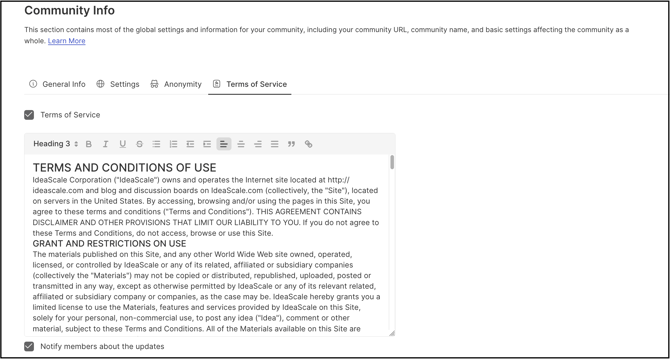
Roles and Permissions
Community Administrator: Configures the Terms of Service content, enables or disables the requirement, and determines whether members must re-accept updated terms.
TABLE OF CONTENTS
Terms of Service SetupMember Acceptance of Terms of Service
Frequently Asked Questions
Terms of Service Setup
The Community Administrator can either insert custom Terms of Service content in the Content field or retain the default terms provided by IdeaScale. Select Save to apply the changes.
Note: Selecting the Notify members about the updates checkbox before saving requires members to accept the Terms of Service again with the updated content.
To enable Terms of Service at the campaign level, see the Campaign Brief section.
Help Article for Campaign Management
Member Acceptance of Terms of Service
Once the Community Administrator has turned on the Terms of Service setting and saved it, new users registering to participate must select a checkbox to accept the terms before completing registration.
New members and existing members of the community are required to accept the Terms of Service on first login after the Community Administrator turns on the setting. Upon login to the Workspace, the system displays the message "You have not accepted this Community's Terms of Service. Click here to read." A member can select the link, or is redirected automatically to the Terms of Service page if no action is taken within a few seconds.
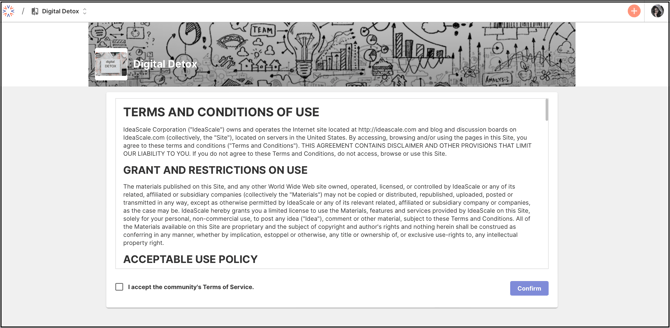
Note: Every time the Terms of Service is updated, members are asked to accept it again at their next login.
Frequently Asked Questions
Is a community required to write its own Terms of Service?
No. The Community Administrator can retain the default Terms of Service provided by IdeaScale or insert custom content in the Content field.
Do members need to accept the Terms of Service again after it changes?
Yes. Every time the Terms of Service is updated, members must accept it again at their next login. Selecting the Notify members about the updates checkbox when saving ensures members are prompted to re-accept the updated content.
Can Terms of Service be applied to a single campaign instead of the whole community?
Yes. Terms of Service can also be enabled at the campaign level from the Campaign Brief section of the campaign's settings. Help Article for Campaign Management.
Related Articles