
Path: Workspace Homepage >> Navigation Panel >> >> Campaigns >> Community >> Campaigns >> Team Roles
| What are Team Roles? |
|---|
| Team Roles are custom, idea-specific responsibilities that a Community Administrator can create and assign to members at different stages of a campaign funnel. |
Team Roles carry out idea-specific responsibilities at each point in the funnel — for example, evaluating ideas at a designated stage, developing cost estimates, or responding to questions that arise during a particular stage. Responsibilities vary by workflow and are defined individually for each role.
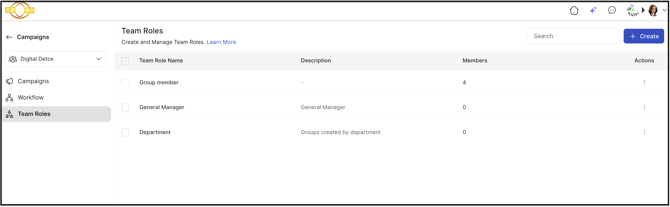
Role Permissions
- Community Administrator: Creates, edits, deletes, and searches Team Roles from the Team Roles section under Campaign Management, and assigns Team Roles to members during the Build Team Stage.
- Campaign Administrator, Custom Administrator: Access to Team Roles
TABLE OF CONTENTS
Team Role Creation
Search, Edit & Delete Functions
Team Role Assignment in Funnel
Exceptions
Frequently Asked Questions
Team Role Creation
Team Roles are created in the Team Roles section under Campaign Management.
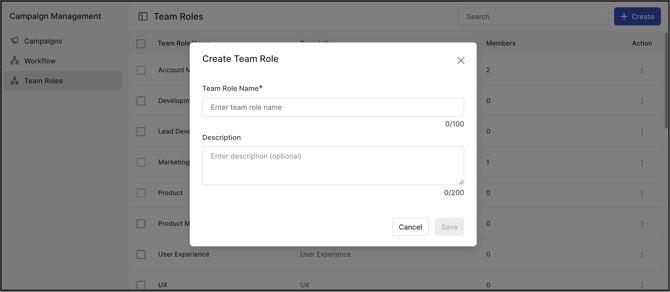
To add a new Team Role, the Create button is selected. A pop-up window opens requesting the following information:
- Team Role Name: A clear, descriptive name for the new Team Role, within 100 characters.
- Description: A brief explanation of the role's responsibilities and purpose, within 200 characters.
Once a Team Role is created, it appears in the Team Roles list.
Search, Edit & Delete Functions
Team Roles can be searched, edited, and deleted from the Team Roles section.
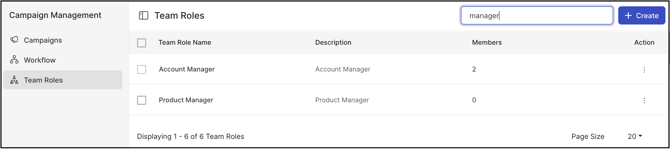
1. Search: A Team Role can be searched using partial or complete keywords of its name.
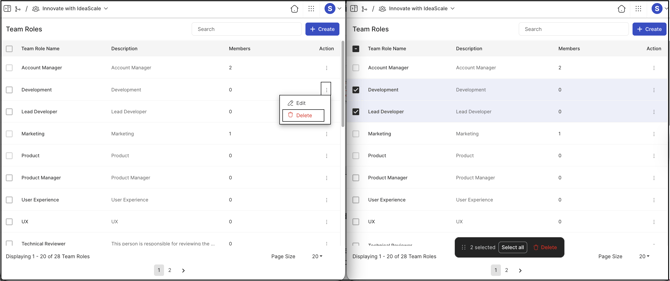
2. Edit: Selecting the More (three dots) option under the Actions column and choosing Edit updates a Team Role's name or description.
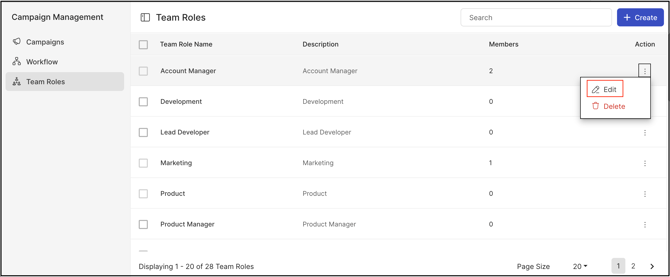
3. Delete: A Team Role can be deleted using either of two methods — selecting Delete from the More (three dots) dropdown under the Actions column, or selecting the checkbox beside one or more Team Role names and choosing Delete from the bottom bar, which removes multiple Team Roles at once. See Exceptions below for restrictions on deleting a Team Role with assigned members.
Team Role Assignment in Funnel
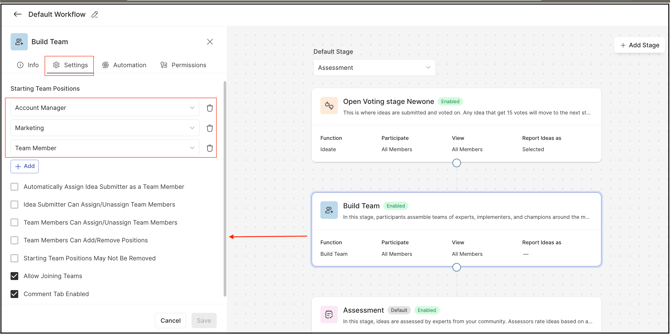
Team Roles can be assigned at different stages of a funnel; however, every funnel must include a stage of the Build Team Stage type with at least one Team Role assigned to it. The Build Team Stage can include multiple members, but each member must have a distinct position within that stage — for example, if each idea is evaluated by three judges, three separate judge positions must be created in the Build Team Stage settings.
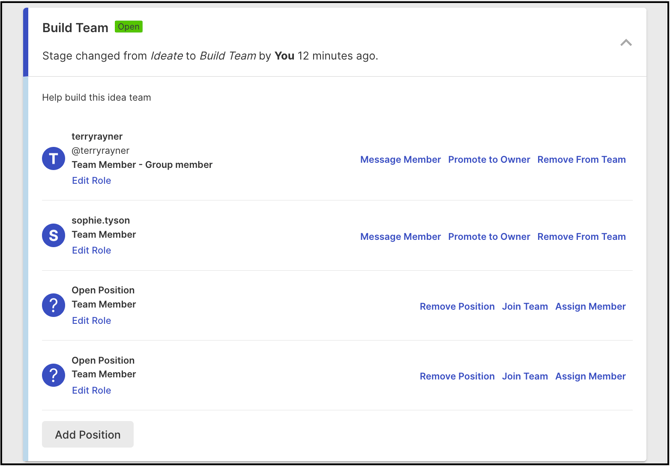
When an idea is in the Build Team Stage, the Community Administrator can assign Team Roles to specific members, promote a member to owner of the idea, or remove members from specific roles from the Idea Detail page.
Team Roles assigned within the Build Team Stage can be configured for the following stage types:
Ideate Stage
The team created in the Build Team Stage can be allowed to participate in idea evaluation by submitting votes, or to observe voting results and activity.
Refine Stage
The team created in the Build Team Stage can be allowed to edit refinement responses, or to review the refinement questions and submitted responses.
Estimate Stage
The team created in the Build Team Stage can be allowed to enter value and cost estimates, or to review existing estimates for value, cost, and ROI.
ReviewScale Stage
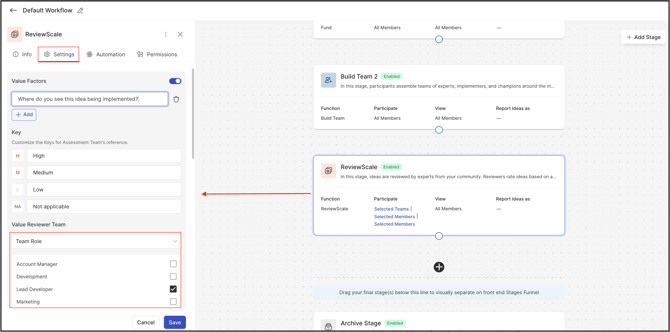
The team created in the Build Team Stage can be allowed to serve as the reviewer team, with specific teams designated as permitted reviewers. The Community Administrator can also determine whether this team may view current review comments and scores.
Fund Stage
The team created in the Build Team Stage can be allowed to pledge funds and receive a balance of funds, or to view current funding progress and activity.
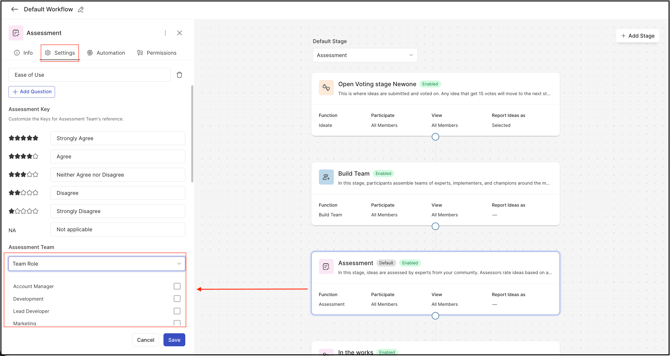
Assessment Stage
The team created in the Build Team Stage can be allowed to be part of the Assessment team, with specific teams designated as permitted reviewers. The Community Administrator can also determine whether this team may view current assessments and scores.
Exceptions
- Team Role Deletion: A Team Role that has members associated with it cannot be deleted until those members are removed from all stage assignments.
Frequently Asked Questions
Can a Team Role be assigned to more than one funnel stage type?
Yes. A team created in the Build Team Stage can be configured for use across multiple stage types within the same funnel, such as the Ideate Stage, Refine Stage, Estimate Stage, ReviewScale Stage, Fund Stage, and Assessment Stage.
Is a Build Team Stage required in every funnel?
Yes. Every funnel must include a stage of the Build Team Stage type with at least one Team Role assigned to it.
Can a Team Role be deleted while members are still assigned to it?
No. A Team Role with members associated with it must have those members removed from all stage assignments before it can be deleted. See Exceptions above.
Can the same Build Team member hold more than one position within a stage?
No. Each member assigned within the Build Team Stage must have a distinct position — for example, three judges evaluating an idea require three separate judge positions.
Related Articles