
Path: Workspace Homepage >> Navigation Panel >> Settings >> Security >> Authentication >> Single Signon Settings
| What is SAML Single Sign-On? |
|---|
| SAML Single Sign-On is an XML-based Single Sign-On method that exchanges authentication and authorization data between an organization's Identity Provider and IdeaScale as the Service Provider, using SP-initiated SSO. |
SAML (Security Assertion Markup Language) is one of several Single Sign-On (SSO) methods IdeaScale supports for web browser-based authentication. As an XML-based open standard, SAML exchanges authentication and authorization data between two parties: the Identity Provider (IdP), which produces the assertion, and the Service Provider (SP), which consumes it. IdeaScale uses SP-initiated SSO, with the IdeaScale community acting as the Service Provider.
Role Permissions
- Workspace Administrator: Configures the SAML 2.0 connection between IdeaScale and the organization's Identity Provider, including entering IdP connection details, configuring SAML General Settings, mapping the UserID, and managing certificate trust.
- Community Administrator: Can choose to enable or disable SAML for their community.
- Member: Authenticates through the configured Identity Provider once SAML Single Sign-On is enabled for the workspace, rather than logging in with separate IdeaScale credentials.
TABLE OF CONTENTS
Configure SAML Single Sign-OnSAML General Settings
IdeaScale SP Metadata
UserID Mapping
Certificate & Trust
Exceptions
Frequently Asked Questions
Configure SAML Single Sign-On
Configuring SAML Single Sign-On establishes the SP-initiated connection between an organization's Identity Provider and IdeaScale as the Service Provider.
Note: Installing a SAML tracer browser extension, such as SAML tracer for Firefox (https://addons.mozilla.org/en-US/firefox/addon/saml-tracer/), is recommended before beginning configuration. A SAML tracer captures the SAML request and response, which is useful for troubleshooting during setup.
Enable SAML and Add a New Connection
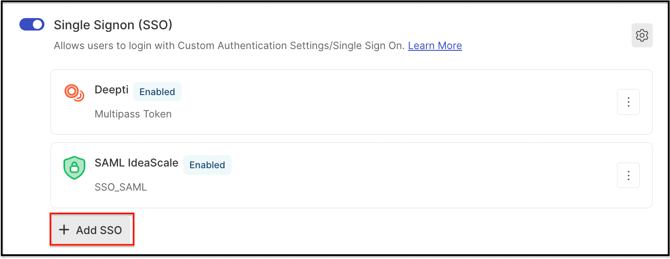
From the Single Signon Settings page, the SAML setting is switched on, then Add SSO is selected to begin configuring a new connection.
Select SAML 2.0
SAML 2.0 is selected from the list of available Single Sign-On types.
Enter Identity Provider Details in IdeaScale
The following fields are completed using information from the organization's Identity Provider:
- Display Name: A name that identifies this Single Sign-On connection within IdeaScale; any name can be used (e.g., "Acme Corp SAML SSO").
- SAML IdP Entity ID: The identifier for the Identity Provider, typically a URL, indicating the entity that provides SAML-based services or participates in the browser SSO profile. It is available in the IdP Metadata XML, in the entityID attribute of the EntityDescriptor tag. See Exceptions below for the entity ID matching requirement.
- SAML IdP Metadata: The Identity Provider's metadata, generally available at a well-known URL published by the IdP software or within the IdP's admin/configuration section.
Note: Enabling the Help Article for SSO Debugger (https://help.ideascale.com/sso-debugger-new-admin-panel) tool is recommended, as it is useful for identifying Single Sign-On issues.
The Enabled switch must be turned on for the connection to take effect.
Enter IdeaScale's Metadata in the Identity Provider
IdeaScale's own metadata must also be entered into the Identity Provider's configuration. This metadata is accessed by selecting the link listed under Type on the SAML connection. The NameID must also be configured on the Identity Provider side; NameID handling is covered in UserID Mapping below.
SAML General Settings
SAML General Settings are accessed by selecting Edit on the SAML Single Sign-On connection.
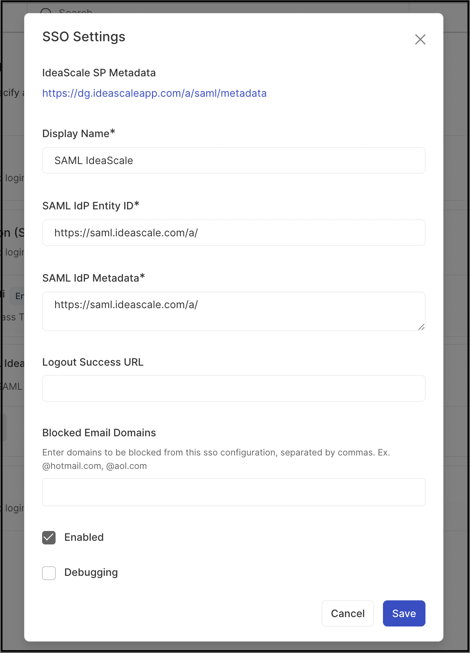
- Display Name: The name of the Single Sign-On connection as displayed on the login page.
- SAML IdP Entity ID: The Identity Provider's login page to which members are redirected.
- SAML IdP Metadata: The metadata URL for the Single Sign-On connection.
- Logout Success URL: The page to which members are redirected after logging out through Single Sign-On.
- Blacklisted Email Domains: Email domains that are not permitted to log in through this connection (e.g., gmail.com).
Shibboleth Support
Shibboleth supports the standard SAML 2.0 protocol, and IdeaScale's SAML support is built on SAML 2.0. See Exceptions below for the metadata adjustment required for Shibboleth compatibility.
IdeaScale SP Metadata
IdeaScale's Service Provider (SP) metadata must be installed in the Identity Provider's configuration. The method for doing so varies by IdP software. IdeaScale's SP metadata is accessed at the following URL pattern:
http://[community-name].ideascale.com/a/saml/metadata
Some Identity Providers accept the metadata as a single XML file, while others require each field to be entered individually. All required fields are present in the metadata XML, which includes:
- NameIDFormat accepted, in preference order.
- AssertionConsumerService URL and Bindings.
- SingleLogoutService URL and Bindings.
- Signing and Encryption Certificate in X.509 format; this certificate should be added to the IdP's trust store.
A valid IdP metadata XML is expected to provide the following information. See Exceptions below for what happens when this information is missing or invalid.
- EntityID: A unique entity ID for the Identity Provider, generally the base URL for the IdP software.
- IDPSSODescriptor: Must support urn:oasis:names:tc:SAML:2.0:protocol.
- Signing and Encryption Certificate in X.509 format, used to trust SAML messages originating from the IdP software.
- NameIDFormat list: IdeaScale's preferred NameID is emailAddress (urn:oasis:names:tc:SAML:1.1:nameid-format:emailAddress). IdeaScale also supports any persistent NameID that does not change between logins.
- SingleSignonService URL and Bindings: At least one of HTTP-POST or HTTP-Redirect must be present.
- SingleLogoutService URL and Bindings: Both HTTP-POST and HTTP-Redirect Bindings are supported.
UserID Mapping
IdeaScale uses the email address, or any persistent NameID, to map members from the organization's security domain to IdeaScale communities. Passing the email address alongside the NameID is preferred whenever the NameID format is not itself an email address. The email address can be passed in either of two ways:
- Using the email address as the NameID, which is the preferred method.
- Adding an AttributeStatement to the SAML Response with a Name or FriendlyName of "mail." The AttributeStatement must follow the AuthnStatement, as shown below:
xml
<saml:AttributeStatement> <saml:Attribute NameFormat="urn:oasis:names:tc:SAML:2.0:attrname-format:basic" Name="mail"> <saml:AttributeValue xsi:type="xs:string">[email address]</saml:AttributeValue> </saml:Attribute> </saml:AttributeStatement>See Exceptions below for what happens when the email address is not passed along.
Certificate & Trust
IdeaScale uses its own certificate for signing and encrypting SAML messages. For incoming SAML messages from the Identity Provider, IdeaScale checks the signing certificate provided in the IdP metadata XML within the community's settings and uses it as the trusted certificate.
Exceptions
- Entity ID Matching: The SAML IdP Entity ID entered in IdeaScale must match the entity ID present in the Identity Provider's metadata. See Enter Identity Provider Details in IdeaScale above.
- Shibboleth Metadata Adjustment: For IdeaScale's SAML support to work correctly with a Shibboleth Identity Provider, references to protocol support must be removed from the IdP metadata XML. See Shibboleth Support above.
- Missing or Invalid IdP Metadata: If a valid IdP metadata XML is not provided, the Single Sign-On service will not operate correctly. The SingleLogoutService field is optional and its absence alone does not trigger this exception. See IdeaScale SP Metadata above.
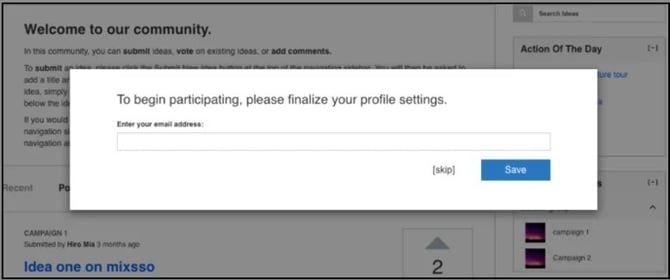
- Email Address Not Passed: If the email address is not passed along with the NameID, a member is prompted to provide it upon first login, with the option to select Skip and decline. See UserID Mapping above.
Frequently Asked Questions
What is the difference between the Identity Provider and the Service Provider in SAML?
The Identity Provider (IdP) is the party that produces the SAML assertion, while the Service Provider (SP) consumes it. IdeaScale acts as the Service Provider and uses SP-initiated SSO.
Where can IdeaScale's SP metadata be found?
IdeaScale's SP metadata is available at http://[community-name].ideascale.com/a/saml/metadata, and can be installed in the Identity Provider's configuration either as a full XML file or as individually entered fields, depending on the IdP software.
What happens if the email address is not passed along with the NameID?
The member is prompted to provide an email address upon first login, though the member may select Skip to decline providing it.
Can a Shibboleth Identity Provider be used with IdeaScale's SAML Single Sign-On?
Yes. Shibboleth supports the standard SAML 2.0 protocol that IdeaScale's SAML support is built on, though references to protocol support must be removed from the IdP metadata XML for the connection to work correctly.
What tool is recommended for troubleshooting SAML configuration issues?
A SAML tracer browser extension is recommended, as it captures the SAML request and response for review during setup.
Related Articles