
Path: Workspace Homepage >> Navigation Panel >> >> Campaign >> Community >> Workflow >> Reserve Stage
| What is the Reserve Stage? |
|---|
| The Reserve Stage is a holding area within a campaign workflow for ideas that are not currently active. |
The Reserve Stage provides a place to store dated or on-hold ideas instead of leaving them in active stages such as Ideate, Refine, or Build Team. The stage has no functionality of its own and acts as a holding pen for ideas; while an idea is in the Reserve Stage, members cannot vote or comment on it. Administrators can choose whether the stage is visible to members.
Role Permissions
- Community Administrator: Sets up and configures the Reserve Stage, including its Info and Settings tabs, and can view the stage and its ideas within Idea Management when the stage is not visible to members.
- Moderator: Enables Reserve Stage ideas in Idea Management, can view the stage and its ideas within Idea Management when the stage is not visible to members, and can comment on ideas in the Reserve Stage.
- Member: Can view the Reserve Stage and its ideas on the campaign homepage only when Visible is enabled; cannot vote or comment on ideas in the Reserve Stage.
TABLE OF CONTENTS
Reserve Stage Setup
1. Info
2. Settings
Stage Functionality on Homepage
Reserve Stage in Idea Management
Exceptions
Frequently Asked Questions
Reserve Stage Setup
Reserve Stage setup is divided into four tabs: Info, Settings, Automation, and Permissions. Each tab is described in detail below.
1. Info
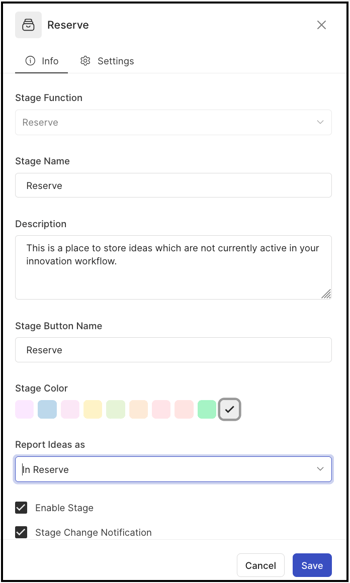
The Info tab contains the basic details of the stage, with the following fields:
- Stage Function: The function of the stage, selected from a dropdown. Reserve is selected here. See Exceptions below for restrictions after saving.
- Stage Name: A custom name or label for the stage.
- Stage Key: A unique identifier for the stage, used for data retrieval through API calls. See Exceptions below for restrictions after saving.
- Description: A description of the stage's functionality or intended use. The description appears as mouseover text on the stages stack in the right-hand navigation of the community homepage.
- Stage Color: A color for the stage, selected from 10 available default options.
- Reported Ideas As: A label applied to all ideas within the stage — Selected, Implemented, In Reserve, or blank. See Exceptions below for availability of the In Reserve option.
Help article on Selected & Implemented Ideas - Enable Stage: A checkbox that activates the stage, allowing ideas to be moved into it.
- Stage Change Notification: A checkbox that activates stage change notifications. When enabled, a stage change email notification is sent to members who have opted in to receive it.
2. Settings
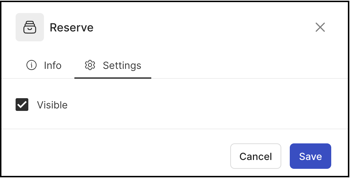
The Settings tab contains the Visible setting, which controls who can see the Reserve Stage and the ideas in it:
- Visible enabled: The Reserve Stage appears alongside all other stages in the right-hand navigation menu on the campaign homepage, making it visible to all community members. Ideas in the Reserve Stage are also listed under All Stages.
- Visible disabled: The Reserve Stage becomes private. Only Community Administrators and Moderators can view the stage and the ideas it contains, within Idea Management.
Stage Functionality on Homepage
Once an idea is moved to the Reserve Stage, it carries the In Reserve label. The label appears in each of the following views:
Grid View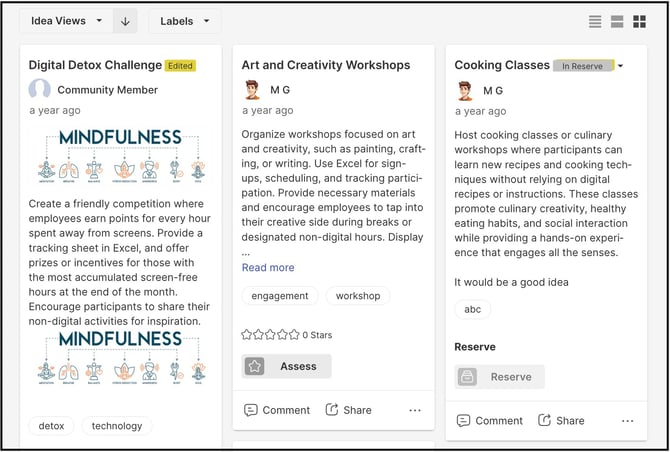
Idea List View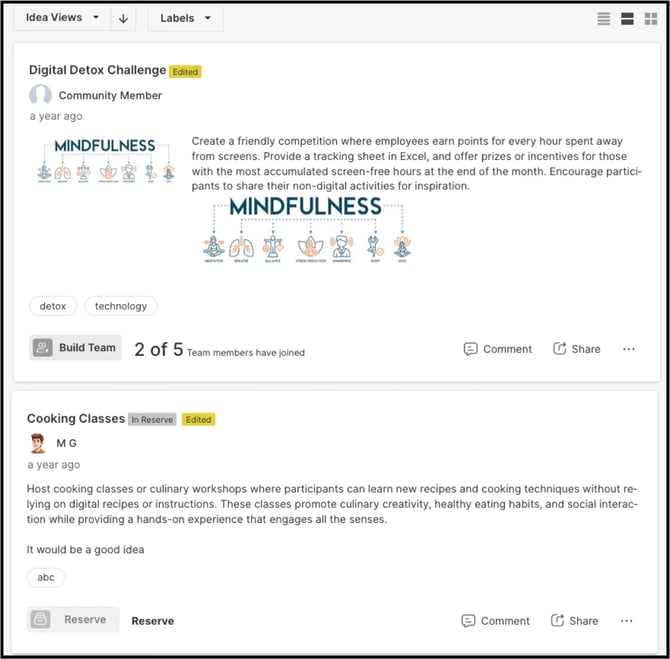
Idea Details Page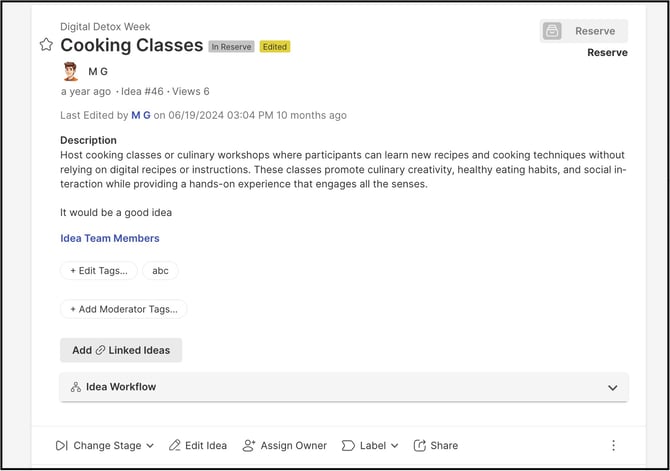
Reserve Stage In Idea Management
Reserve Stage ideas are not shown in Idea Portfolio by default. To access them:
Select the settings icon in Idea Portfolio. A pop-up opens with the available display options.
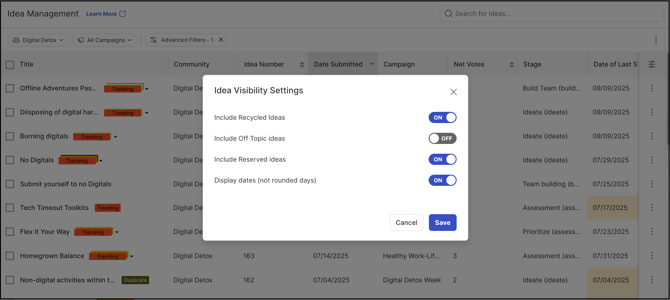
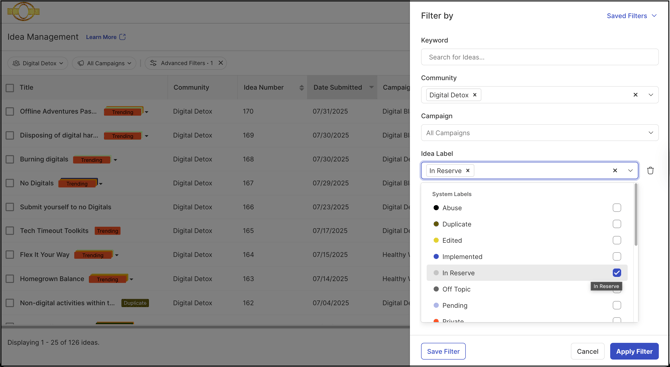
Enable the Reserve Stage option. Enter the Stage command in the search bar. The Reserve Stage name now appears among the available stages.
Exceptions
- Stage Function: Once Reserve is selected and saved, the Stage Function field is greyed out and cannot be changed to another stage function.
- Stage Key: Once saved, the Stage Key cannot be changed.
- In Reserve Label: The In Reserve option under Reported Ideas As is available only when the Stage Function is Reserve.
- Voting and Commenting: Members cannot vote or comment on ideas while they are in the Reserve Stage. Moderators can still comment.
- Automation Out of Reserve: Ideas cannot be moved out of the Reserve Stage automatically, as the stage has no inherent functionality.
Frequently Asked Questions
Does anything happen to ideas in the Reserve Stage?
No. The Reserve Stage has no functionality of its own; it acts as a holding pen for ideas, similar to a folder.
Can ideas be moved into the Reserve Stage automatically?
Yes. Ideas can be moved into the Reserve Stage automatically by enabling Automation in the stage that comes before the Reserve Stage.
Can ideas be moved out of the Reserve Stage automatically?
No. Because the Reserve Stage has no inherent functionality, ideas cannot be moved out of it automatically.
Can members vote or comment on ideas in the Reserve Stage?
No. Members cannot vote or comment on ideas while they are in the Reserve Stage.
Can Moderators comment on ideas in the Reserve Stage?
Yes. Moderators can comment on ideas in the Reserve Stage.
Can members see the Reserve Stage?
Only when Visible is enabled in the Settings tab. When Visible is disabled, only Community Administrators and Moderators can view the stage and its ideas, within Idea Management.
Related Articles
- Help Article for Selected & Implemented Ideas
- Help Article for Workflow
- Help Article for Community Settings - Automation
- Help Article for Idea Portfolio