
Path: Workspace Homepage >> Navigation Panel >> Settings >> Community >> Community Access >> Access Control >> Blocklist >> Profanity Filtering
| What is Profanity Filtering? |
|---|
| Profanity Filtering is an Access Control setting that blocks or restricts abusive words and emojis from being used within a workspace and its communities. |
Profanity Filtering screens submitted content against a default list of blocked words as well as any additional words or emojis an administrator configures. Content matching the default list is blocked outright, while content matching administrator-added keywords is routed for moderator review instead.
Role Permissions
- Workspace and Community Administrator: Configures the additional Keyword Filtering list and the Emoji Filtering list.
- Community Moderato: Reviews ideas placed in pending approval status due to an administrator-added keyword match.
TABLE OF CONTENTS
Default Profanity FilteringKeyword Filtering
Emoji Filtering
Frequently Asked Questions
Default Profanity Filtering
IdeaScale maintains a built-in list of seven words that, when used, automatically blocks the associated content from being submitted or saved. This applies to ideas, comments, and member names, and extends to tags, labels, idea attachment notes, and assessment notes.
If a member attempts to submit an idea containing one of these words, the submission is blocked and a message appears directly on the idea submission form. The idea cannot be submitted until the flagged word is removed.
Keyword Filtering
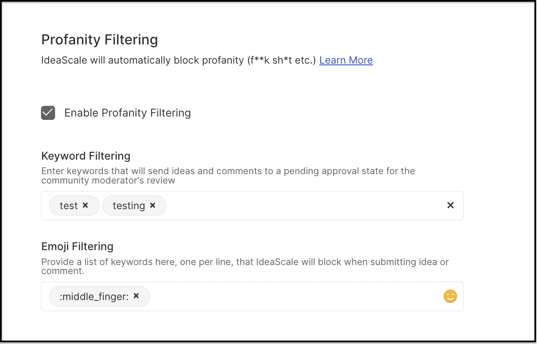
A Community or Workspace Administrator can extend the default list by entering additional words in the text field provided in the Keyword Filtering section. Unlike the default list, an idea containing an administrator-added keyword is not blocked outright — instead, it is placed in a pending approval state for a Community Moderator to review.
- Word Entry: Enter one additional word per line in the Keyword Filtering text field.
Note: The default seven-word list detects profanity in English only. Translated versions of these words are not automatically recognized; equivalent words in another language must be entered manually in the Keyword Filtering text field.
Emoji Filtering
A Community or Workspace Administrator can restrict inappropriate emojis in addition to words by adding them to the Emoji Filtering section and saving the changes.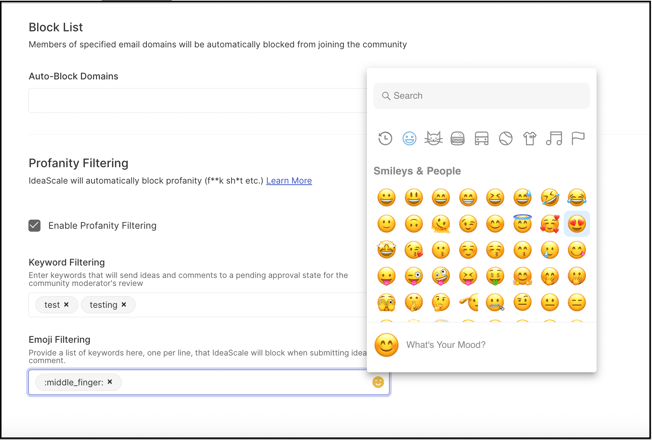
Emoji Entry: Add each inappropriate emoji to the Emoji Filtering section, then save the changes to apply the update.
Frequently Asked Questions
Does Profanity Filtering apply to more than idea submissions?
Yes. Both the default word list and administrator-added keywords are checked against ideas, comments, and member names, as well as tags, labels, idea attachment notes, and assessment notes.
What happens when an idea contains a word from the default list?
The idea is blocked outright at submission. A message appears on the idea submission form, and the idea cannot be submitted until the flagged word is removed.
What happens when an idea contains an administrator-added keyword?
The idea is not blocked. Instead, it is placed in a pending approval state for a Community Moderator to review before it becomes visible.
Does Profanity Filtering work in languages other than English?
The default seven-word list only recognizes English. To catch profanity in another language, equivalent words must be added manually through the Keyword Filtering text field.
Can emojis be filtered the same way as words?
Yes. Inappropriate emojis can be restricted separately through the Emoji Filtering section.
Related Articles