
Released : Historical Snapshot Reports ( BETA)
Innovation teams track how ideas move through workflow stages — but until now, that view has always been a snapshot of right now. If you wanted to know how your pipeline looked three months ago, or whether a bottleneck in the Review stage has gotten better or worse over the last quarter, you had to piece it together manually.
Historical Snapshot Reports change that. This new report type, available now in the Reporting module, captures point-in-time snapshots of idea distribution across workflow stages at configurable intervals. Instead of a single current-state view, you get a timeline: how ideas moved, where they stalled, and whether throughput improved after process changes.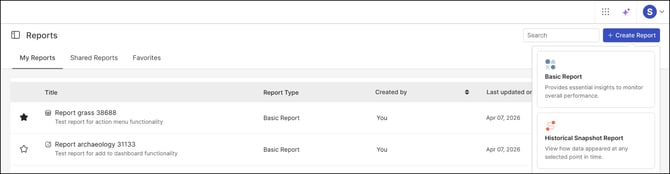
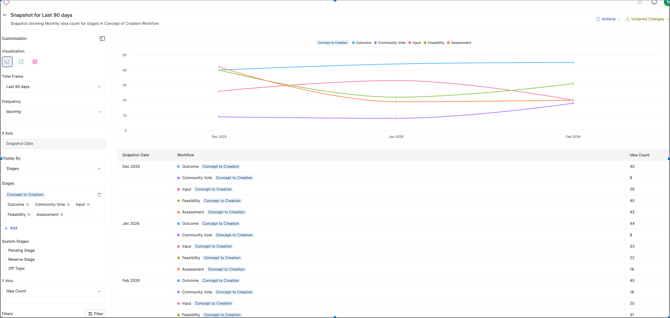
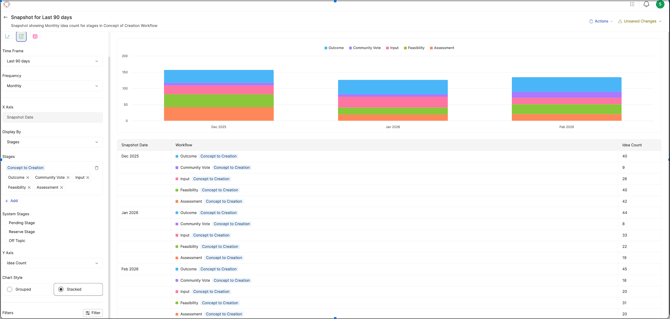
Three visualization options are available:
- Line charts - track stage-level trends over time
-
Bar charts — compare stage distribution across snapshots
-
Table View - export-ready tabular data for detailed analysis
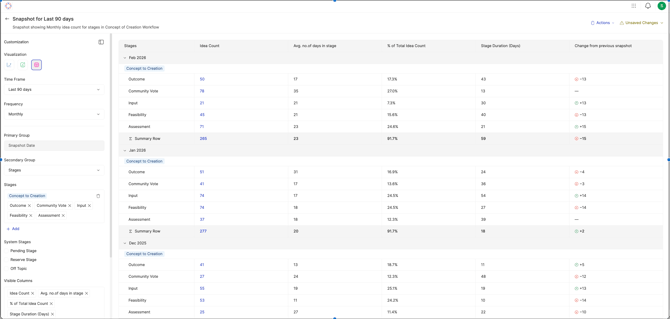
This is particularly useful for teams running quarterly or annual innovation programs who need to show leadership how pipeline health changed over the reporting period — not just where things stand today.
NOTE : Historical Snapshot Reports are in beta. We're actively refining the feature and welcome feedback.
Coming Soon : Campaign Manage Quick Filters
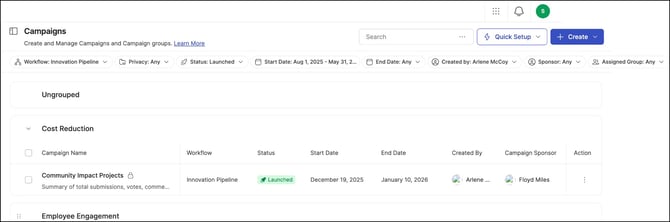
Finding the right campaign in a long list shouldn't require scrolling and squinting. New quick filter options are coming to the Campaign Management view, making it significantly faster to locate specific campaigns.
The new filters include:
- Workflow — show all campaigns using a selected workflow
- Campaign Status — filter by Launched, Archived, or Scheduled
- Start Date / End Date — find campaigns by specific dates or custom date ranges
- Campaign Sponsor — find campaigns by sponsor
- Campaign Creator — search by creator name or email
- Assigned Groups — show campaigns linked to a specific group
- Campaign Privacy — filter by public or private
Coming Soon : Community & Campaign Tags
Community and campaign-specific tags are currently managed through the legacy admin interface. With the upcoming release, the Tags section moves to the modern interface — consistent with the recent migration of Admin and Campaign settings.
Beyond the visual refresh, the new UI introduces functional improvements to how tags are created, scoped, and managed. More details will follow as the feature nears release.
Questions or feedback? Reach out to your Customer Success Manager or contact support@ideascale.com