
RELEASED :
Duplicate Detection
Finding and managing duplicate ideas is now significantly easier.
Our new Duplicate Detection Tool automatically identifies potentially similar ideas during idea submission, helping reduce duplicate entries and encouraging contributors the opportunity to support existing ideas instead of creating duplicates.
Benefits:
-
Reduce duplicate submissions
-
Improve idea discovery
-
Consolidate votes and feedback
-
Keep campaigns organized

In the Idea Portfolio, ideas with potential duplicate matches, display similar ideas and their similarity percentage in the side panel. The Compare option provides a side-by-side view with an AI-generated explanation of why the ideas were identified as potential duplicates.


Journey Reports
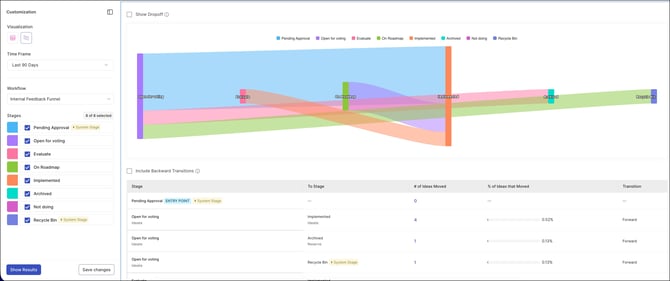
Journey Reports is a new report type in Reporting that helps you understand how ideas move between workflow stages over a selected time period.
The report pairs a Sankey diagram with a detailed data table. The Sankey chart visualizes forward transitions—how many ideas moved from one stage to the next. The data table provides a complete breakdown of stage movements, including both forward and backward transitions. Enable Show Drop-offs to surface ideas that had no stage transitions during the timeframe, and Include Backward Transitions to count ideas that moved back to a previous stage.
Benefits:
- Visualize idea movement – See how ideas move between workflow stages with an easy-to-understand Sankey diagram that highlights forward transitions.
- Identify bottlenecks – Quickly spot stages where ideas are slowing down or accumulating, helping teams focus improvement efforts where they matter most.
- Find stalled ideas – Use the Show Drop-offs option to surface ideas that did not move stages during the selected timeframe.
- Understand rework and reversals – Include backward transitions to see how many ideas moved back to earlier stages and had to be reworked on . Counting backward transitions (via "Include Backward Transitions") shows rework and reversals, not just the optimistic forward story — so teams understand churn in the process, not just progress.
- Make data-driven decisions – Gain a clearer understanding of how your workflow operates, helping you optimize processes, improve efficiency, and reduce delays.
Together, these views give you a complete picture of how ideas move through your workflow—forward progress, stalled ideas, and backward movement—so you can better understand and improve your process.
UPCOMING :
Idea Merging & Unmerging
Idea Merging lets moderators consolidate duplicate or closely related ideas into a single idea, while Unmerging reverses that action, restoring the separated ideas to their original standalone state. It pairs naturally with AI Duplicate Detection — detection flags potential overlaps, and merging resolves them
- Improves organization by bringing duplicate and related ideas together under a single idea.
- Preserves the votes, comments, and engagement attached to related submissions
- Makes merges reversible, so a mistaken or premature merge is never permanent
- Lets moderators clean up duplicates confidently, knowing they can always undo
Redesigned Member Approval & Auto-Approval Settings
An upcoming release will introduce a redesigned Member Approval and Auto-Approval experience, offering a clearer, more intuitive interface for managing how new members are admitted. Administrators will be able to configure manual approval and auto-approval rules with greater clarity, reducing ambiguity around how access is granted.
All existing approval settings will be automatically mapped to the new configuration model, ensuring a seamless transition with no disruption to current access rules.
Navigation Experience Upgrade for Admins and Moderators
What's Changing :
We will be replacing the current top navigation bar with a modern, persistent left-side navigation panel. This update is designed around how administrators, moderators, and other back-office users navigate and manage the platform
New Left-Side Navigation Panel
A fixed sidebar will remain visible throughout the platform and will be organized into two primary sections:
-
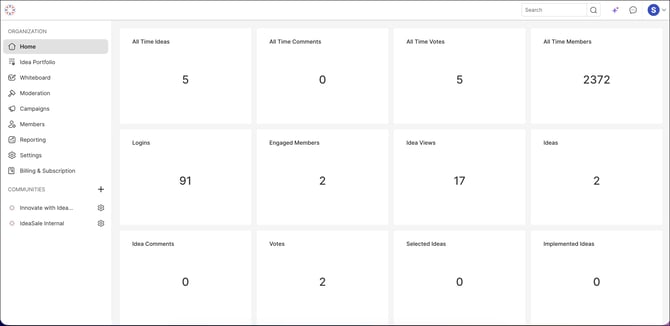
Organization :The Organization section is the top-level control center. It holds the tools that operate across the whole organization rather than inside any single community: Home , Idea Portfolio, Whiteboard, Moderation, Campaigns, Members, Reporting, Settings and Billing & Subscription .
-
Communities: All communities will be available in one centralized location, where administrators can manage accessible communities,. From this unified view, admins can use the gear icon to jump straight into Community Settings for administrative tasks, or open a community's home page directly when they need to view or interact with it as a participant.
This structure creates a clear distinction between management work and the participant experience. Workspace-wide tools serve both administrators and moderators from the Organization section.Communities are accessed only when there's a need to view or engage with them in the context of that specific community.
Workspace Dashboard as the New Home :
The Home destination will now open the Workspace Dashboard for administrators and moderators. Instead of landing on a generic home page, they land on a consolidated view of workspace activity, making it easier to monitor workspace health and identify items that require attention. The data displayed is automatically scoped to each user’s role.
Benefits:
-
Fewer Steps for Common Tasks : Frequently performed activities such as switching communities, managing campaigns, and updating settings will require fewer clicks and less navigation.
-
Improved Context Awareness : The persistent navigation panel will keep the current location visible at all times, helping administrators and moderators maintain context while navigating deeper into campaigns, ideas, and settings.
-
Faster Multi-Community Management :For organizations managing multiple communities, the new quick-switcher will streamline movement between community workspaces and reduce unnecessary navigation.
-
Easier Settings Management :Related settings will be grouped together, making configuration tasks more intuitive and reducing time spent searching for specific options.
What's Not Changing :
This release focuses exclusively on navigation and platform organization. Existing features, workflows, permissions, and data remain unchanged, and all current functionality works as it does today. No setup is required, and no data or configuration is affected.
This change applies only to Admin and Moderator roles. The experience for community members is completely unchanged—the people who submit, vote on, and comment on ideas will see no difference. Their navigation and everything they interact with stays exactly as it is today.