
Path: Workspace Homepage>> Navigation Panel >> Campaign Management >> Edit Campaign >> Submission Form
| What is a Private Idea? |
|---|
| A private idea is one that can only be accessed and viewed by Community Administrators, Moderators, or designated groups of authorized members. |
Private idea submission allows a campaign to accept ideas that remain hidden from the general community, visible only to designated roles. This is a campaign-specific setting and may be configured differently from one campaign to another.
Role Permissions
- Community Administrator: Enables the Private Idea Submission field and configures its settings on the Submission Form.
- Campaign Administrator: Enables the Private Idea Submission field and configures its settings on the Submission Form.
- Global Moderator, Campaign Moderator, and specifically authorized group members: View and access private ideas submitted within the campaign.
- Community Member: Submits ideas as private when the setting is enabled, and can view their own private ideas under My Ideas on their Profile Page.
TABLE OF CONTENTS
Enabling Private Idea SubmissionSubmitting a Private Idea
Finding Private Ideas
Exceptions
Frequently Asked Questions
Enabling Private Idea Submission
Navigate to Community Topbar >> Apps icon >> Campaign Management >> Edit Campaign >> Submission Form, then drag and drop the Private Idea Submission field into the submission form to make the option available to idea submitters.
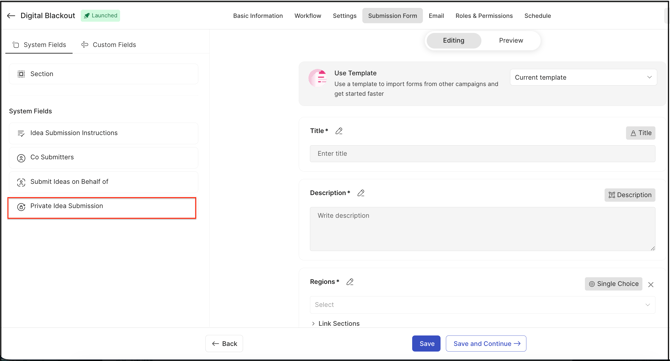
Private idea submission can be configured using either of the following options:
- Force Submissions to be Private: When enabled, every idea submitted to the campaign is automatically marked private, and idea submitters do not have the option to change this setting on the submission form.
- Notify Admins, Moderators, and Authorized Groups: When enabled, idea submitters can choose to mark an individual idea as private on the submission form. Administrators, Moderators, and authorized groups are notified each time a private idea is submitted.
Help Article for Campaign Management
Submitting a Private Idea
When the Private Idea Submission field is enabled, a member submitting an idea sees the option Private Idea Submissions (viewable to admins, moderators and authorized groups), along with a switch to enable or disable it for that idea. If the member turns the switch on, the idea is marked with the Private label upon submission.
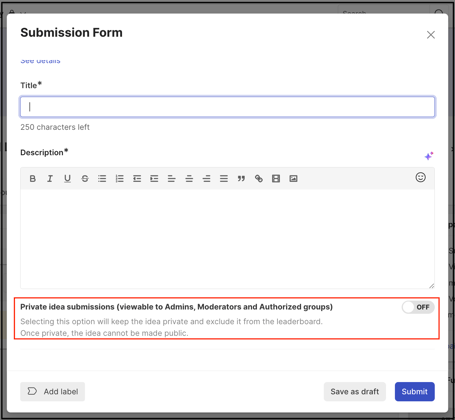
Note: Ideas submitted as private are excluded from any leaderboard points, and once submitted this way, an idea may not be made public.
Finding Private Ideas
Community Administrators, Global Moderators, Campaign Moderators, and specifically authorized group members can find private ideas submitted by members under the Private Ideas sub-tab of the My Ideas tab..webp?width=576&height=453&name=Screenshot%202025-07-28%20at%2012%20(2).webp)
An idea submitter can also view their own private ideas under My Ideas on their Profile Page.
.webp?width=670&height=354&name=Screenshot%202024-10-29%20at%2010%20(2).webp)
Exceptions
- Campaign Type: Private idea submission can be enabled in both public and private campaigns; a Community Member can submit a private idea in either type as long as the setting is enabled for that campaign.
- Private ideas will always have the label Private.
- Ideas submitted in this way will be excluded from any leaderboard points.
Frequently Asked Questions
Who can submit private ideas?
A Community Member can submit a private idea if private idea submission is enabled in the campaign, regardless of whether the campaign itself is public or private.
What is the difference between a Private Idea and a Private Campaign?
A private idea is accessible only to Community Administrators, Global Moderators, Campaign Moderators, and specifically authorized group members, regardless of who can otherwise view the campaign. A private campaign, by contrast, can be viewed by any member who has been invited to participate in it, without restricting individual ideas within it.
Who can access and view private idea submissions?
Community Administrators, Global Moderators, Campaign Moderators, and specifically authorized group members can view and access private idea submissions.
Can a private idea later be made public?
No. Once an idea is submitted as private, it may not be made public.
Do private ideas count toward leaderboard points?
No. Ideas submitted as private are excluded from any leaderboard points.
Related Articles