
Path: Community Homepage/ Campaign page >> Idea >> More (3 dots) option
| What is Print Idea? |
|---|
| Print Idea is a feature that exports an individual idea, or a selected group of ideas, into a formatted PDF document suited for printing, workshop use, or executive review. |
Print Idea is available from the More options menu on any idea and produces a QR-coded PDF that links back to the idea within the platform when scanned. Community members can choose which fields appear in the printed output, and Moderators can print multiple ideas at once from the Idea Portfolio.
Role Permissions
- Community Administrator: Prints individual ideas via the More options menu; sees regular custom fields and Moderator fields on the printed output, with Moderator fields shown only if Visible to normal members is enabled.
- Moderator: Prints individual ideas via the More options menu, with all custom fields visible on the printed output regardless of visibility setting; can also print up to 20 ideas at once from Workspace Homepage >> Navigation Panel >> Idea Portfolio.
- Idea Owner: Prints individual ideas via the More options menu; sees regular custom fields, Team-only fields, and Moderator fields on the printed output, with Moderator fields shown only if Visible to normal members is enabled.
- Member: Prints individual ideas via the More options menu; sees regular custom fields and Moderator fields on the printed output, with Moderator fields shown only if Visible to normal members is enabled.
TABLE OF CONTENTS
Accessing Print IdeaIncluded Fields
Print Output
Bulk Printing Ideas
Exceptions
Frequently Asked Questions
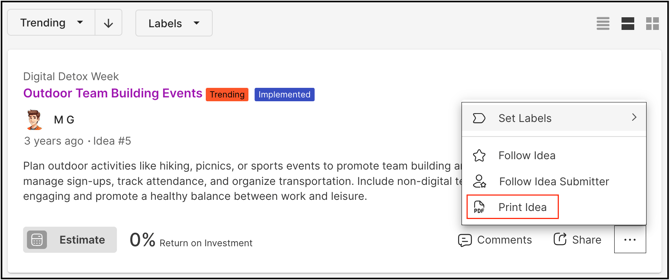
Accessing Print Idea
Print Idea is available from the More options ("...") menu on any idea. Selecting Print Idea opens a field-selection screen, from which the fields described in Included Fields below can be added to or removed from the export before it is generated.
Homepage View Variations
The More options menu containing Print Idea appears consistently across all three Homepage idea display views — Grid View, List View, and Compact View. The option functions the same way from each view; only the layout of the idea list differs.
Included Fields
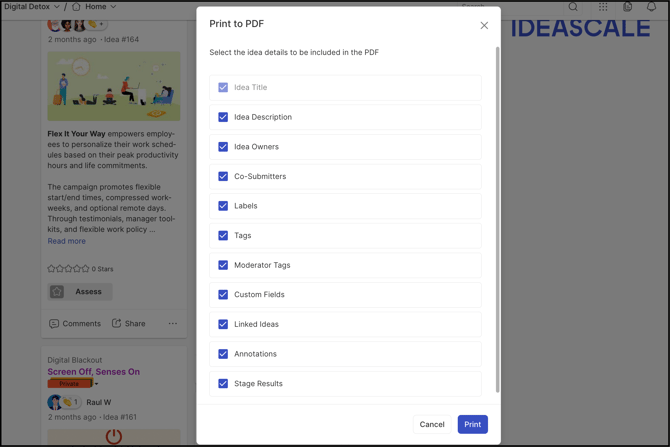
Members can choose to add all or specific fields to the printed idea. The following fields are available:
- Idea Title: The title of the idea. This field cannot be disabled or removed from the print format.
- Idea Description: The full description text submitted with the idea.
- Idea Owners: The members listed as owners of the idea.
- Co-submitters: Additional members credited as co-submitters of the idea.
- Labels: Any labels applied to the idea.
- Tags: Any community tags applied to the idea.
- Moderator Tags: Any moderator tags applied to the idea.
- Custom Fields: Any custom fields configured on the idea submission form; visibility of these fields on the printed output varies by role — see Role Permissions above.
- Linked Ideas: Other ideas linked to the idea.
- Annotations: Notes and annotations added to the idea, along with the name of the member who added each one.
- Stage Results: The idea's results as recorded at its current or completed stage.
Note: The Idea Title field cannot be disabled or removed from the print format. See Exceptions below.
Print Output
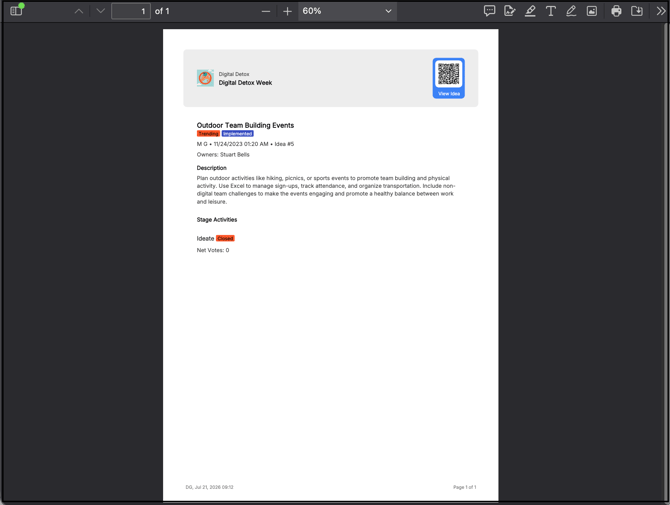
The printed idea exports as a PDF document with a QR code in the upper right-hand corner of the page. Scanning the QR code returns the member to that idea's detail page within the platform. The exported PDF also includes blank space for notes, sketching, and brainstorming.
Note:
-
Most iOS and Android devices include a built-in QR code reader through the native camera app.
-
Printing is optional; ideas remain fully accessible within the platform without generating a printed copy.
Bulk Printing Ideas
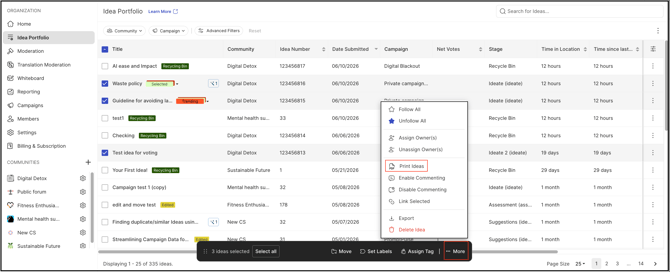
Moderators can print multiple ideas at once from the Idea Portfolio.
- Navigate to Workspace Homepage >> Navigation Panel >> Idea Portfolio.
- Search for the relevant community name and campaign name.
- Select the ideas to include.
- From the Bulk Actions menu, select More, then select Print Ideas.
Note: A maximum of 20 ideas can be printed at one time. See Exceptions below.
Exceptions
- Idea Title Field: Cannot be disabled or removed from the print format; it appears on every printed idea regardless of which other fields are selected.
- Bulk Print Limit: A maximum of 20 ideas can be printed at one time from the Idea Portfolio's bulk actions.
Frequently Asked Questions
Can the Idea Title be removed from a printed idea?
No. The Idea Title field is always included in the print format and cannot be disabled, regardless of which other fields are selected.
Do all roles see the same custom fields when printing an idea?
No. Custom field visibility in the printed output depends on the role of the member generating the print — see Role Permissions above for what each role can view.
What happens when the QR code on a printed idea is scanned?
Scanning the QR code in the upper right-hand corner of a printed idea returns the member to that idea's detail page within the platform.
Can more than 20 ideas be printed at once?
No. The Idea Portfolio's bulk print option is limited to 20 ideas per print request.
Related Articles