
Path: Community Settings >> Email Settings >> Notifications
| What are Notification Settings? |
| Notification Settings are the Default Notification Preferences a Community Administrator configures for the email notifications sent to all members of a community. |
The Community Administrator configures Default Notification Preferences for the email notifications sent to all members of a community, and these settings are applied automatically to every new member account. Each member can independently review and adjust personal preferences at any time through Profile >> Settings >> Notifications >> Bell icon. The notification options are organized into five tabs — Idea Notification, Activity Notification, Personal Notification, Admin Notification, and Moderator Notification — each of which the Community Administrator can update and save separately.

Role Permissions
- Community Administrator: Configures Default Notification Preferences across the Idea Notification, Activity Notification, Personal Notification, Admin Notification, and Moderator Notification tabs for all members of the community, and applies changes to all existing members or to selected members and groups using Reset for All Members or Reset for Selected Members & Groups.
- Community Moderator, Campaign Moderator: Receive Moderator Notification alerts, including Idea Approval, Comment Approval, and Approve New Members reminders, and may receive Private Comment notifications configured under Personal Notification. They can adjust personal notification preferences at any time through Profile >> Settings >> Notifications >> Bell icon, independent of the Community Administrator's default configuration.
- Member: Reviews and adjusts personal notification preferences at any time through Profile >> Settings >> Notifications >> Bell icon, independent of the Community Administrator's default configuration.
TABLE OF CONTENTS
Idea Notification
Activity Notification
Personal Notification
Admin Notification
Moderator Notification
Reset For All Members or Selected Members & Groups
Exceptions
Frequently Asked Questions
Idea Notification
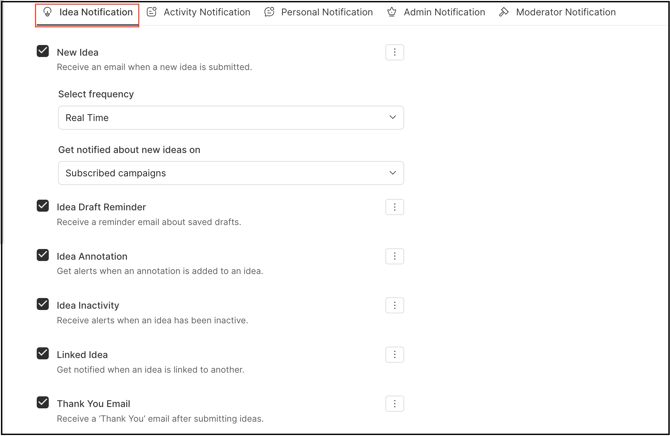
- New Idea: Enables the Community Administrator to disable or set the frequency of emails sent through the New Ideas Digest.
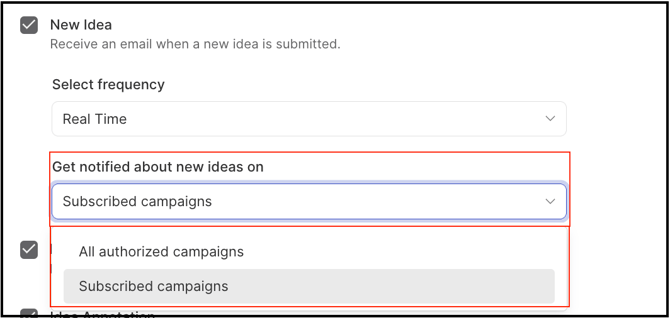
When Frequency is set to Real Time, notifications can be configured for either All Authorized Campaigns, which sends email notifications for every campaign a member is authorized to access and participate in, or Subscribed Campaigns, which sends email notifications only for campaigns the member has subscribed to.
- Idea Draft Reminder: Notifies a community member of ideas that have not yet been published.
- Receive Email Notifications for Idea Annotation: Sends an email to the idea submitter when a comment is annotated on the idea.
- Receive Idea Inactivity Emails: Sends a notification to the idea submitter and/or idea owner when their idea has been inactive for a set number of days, according to the Idea Inactivity rule.
- Thank You Email: Sends an email to the idea submitter thanking them for the submission.
Activity Notification
-
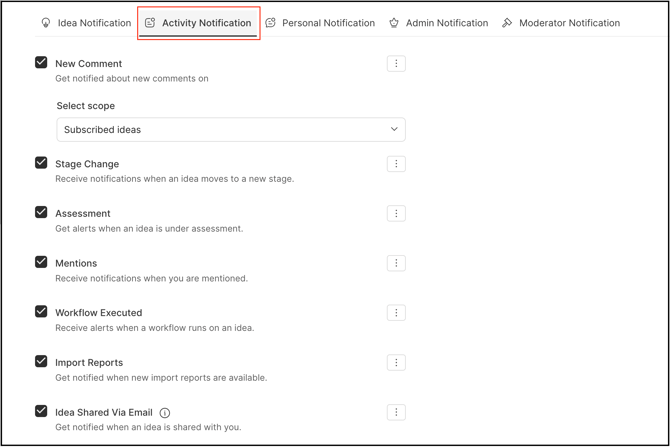
New Comment Emails: Enabling this switch allows members to receive an email for every new comment posted on their idea.
When Frequency is set to Real Time, notifications can be configured for either Subscribed Ideas, which sends email notifications only for comments on ideas the member is following, or Subscribed Campaigns, which sends email notifications only for comments on campaigns the member has subscribed to.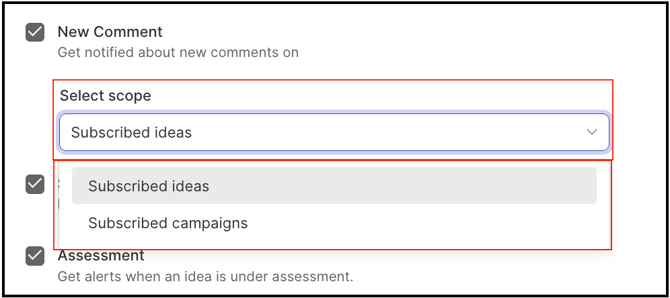
- Stage Change: Notifies members when an idea changes stage.
- Assessment: Sends an email when Remind All Unassessed Members is initiated during the Assessment stage.
- Mentions: Enabling this switch allows members to receive an email when they are mentioned in the community using @mention.
- Workflow Executed: Sends emails to the groups or members selected in Notify when a workflow created in the Automation builder completes.
- Import Reports: Sends an email to the relevant administrator whenever an import is completed.
- Idea Shared Via Email: Enabling this switch allows members to receive an email when an idea has been shared with them via email.
Personal Notification
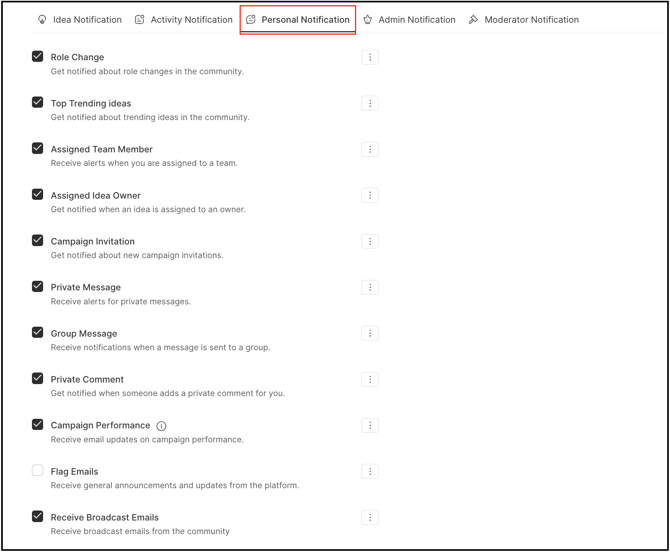
- Role Change: Enabling this switch sends members an email when their role within the community or workspace changes — for example, if a member's account is assigned as Workspace Administrator, Community Administrator, or Moderator.
- Top Trending Ideas: Enabling this switch allows members to receive an email notification when their idea appears on the top trending list.
- Assigned Team Member: Sends an email notification to members assigned as a team member on an idea.
- Assigned Team Owner: Notifies community members when they have been assigned as the owner of an idea.
- Campaign Invitation: Enabling this switch allows members to receive campaign invitation emails whenever a new campaign invite is sent.
- Private Message: Enabling this switch allows members to receive an email for every private message sent to them.
- Group Message: Enabling this switch allows members to receive an email when the /email/group/{id} API call is used, sent only to the members of the group specified by the group ID. This notification is available only through the API.
- Private Comment: Enabling this switch allows Administrators, Community Moderators, and Campaign Moderators to receive an email for every private comment submitted.
- Campaign Performance: Enabling this switch allows members to receive an email for campaign performance, or a Moderator Campaign Digest shared by a moderator from an in-app notification.
- Flag Emails: Sends flag emails to members of the community if their idea has been reported as duplicate or abuse.
- Receive Broadcast Emails: Enabling this switch allows members to receive Broadcast emails sent from the community.
Admin Notification
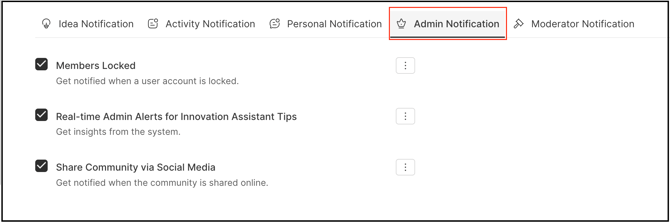
- Members Locked: Sends the Community Administrator a summary email detailing members who have been locked out due to incorrect password attempts or prolonged inactivity.
- Real-Time Admin Alerts for Innovation Assistant Tips: Sends an email notification when a new Innovation Assistant Tip is available.
- Shared Using the Social Web Email Option: Enabling this switch sends an email to members whenever the community is shared through the Social Web option.
Moderator Notification
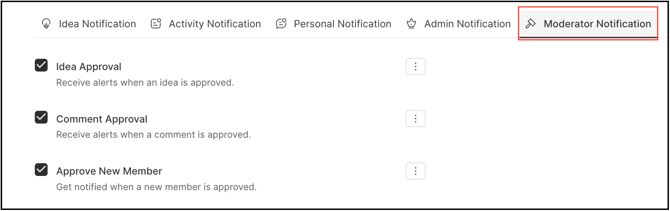
- Idea Approval: Notifies moderators by email when a new idea is submitted and requires approval before publishing.
- Comment Approval: Notifies moderators by email when a new comment is submitted and requires approval before publishing.
- Approve New Members: Enabling this switch sends an email notification reminding Community Administrators and Community Moderators to approve new members.
Reset For All Members or Selected Members & Groups
In each notification section, using the More (three-dot) option next to an individual notification setting, the Community Administrator can enable or disable that notification for all members or for specific members and groups.
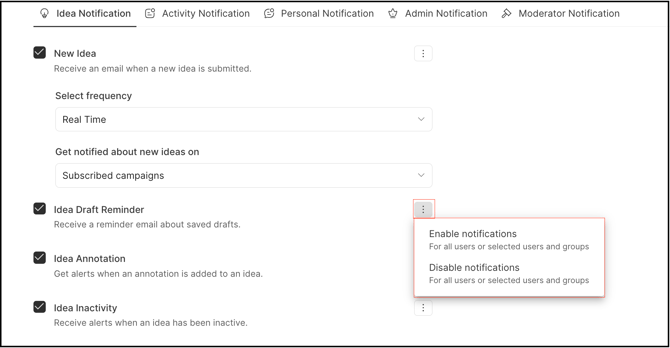
Selecting Enable Notification or Disable Notification opens a modal for applying the action to All Members or Selected Members and Groups.
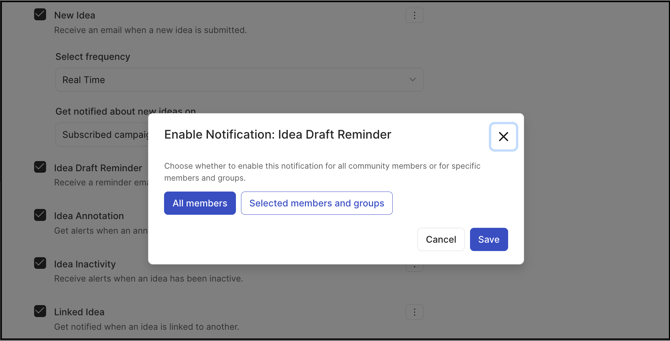
All Members
Selecting All Members applies the notification's current setting to every existing member of the community.
- Select Enable Notifications or Disable Notifications from the More (3 dots) option.
- Select the All Members option.
- Click the Save button.
Selected Members and Groups
Selecting Selected Members & Groups applies the notification's current setting only to the chosen members and/or groups, rather than to the entire community. Members can be searched by username or email address, and groups can be searched by full or partial group name; all members and groups also appear in their respective dropdowns.
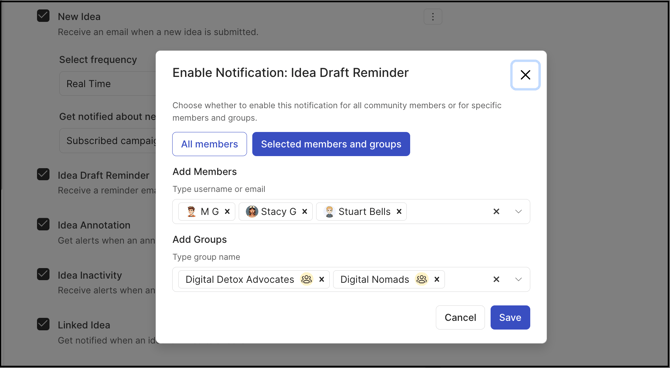
Note: The setting applies only to the selected members and groups — members and groups not selected are unaffected.
Exceptions
- All Members: Enabling or disabling notifications for All Members overrides the choices of members who have manually turned off their own notifications for that section. The reset is applied globally to every current member of the community.
Frequently Asked Questions
Can a member change the notification settings the Community Administrator configured by default?
Yes. Each member can independently review and adjust their own notification preferences at any time through Profile >> Settings >> Notifications >> Bell icon, regardless of the Community Administrator's default configuration.
What happens to a member's own notification changes if the Community Administrator uses All Members for enabling or disabling notification settings?
All Members overrides the choices of members who have manually turned off their own notifications for that section, applying the reset globally to every current member of the community.
How can a Community Administrator apply notification settings to only some members instead of the whole community?
The Community Administrator can use Selected Members & Groups after clicking on Enable Notifications or Disable Notifications, which opens a modal for choosing individual members and/or groups to receive the applied settings.
Is the Group Message notification available outside of the API?
No. Group Message notifications are sent only when the /email/group/{id} API call is used, and only to the members of the group specified by the group ID.
Which roles receive Moderator Notification alerts?
Community Moderators and Campaign Moderators receive Idea Approval and Comment Approval alerts, and Approve New Members reminders are sent to both Community Administrators and Community Moderators.
Related Articles