
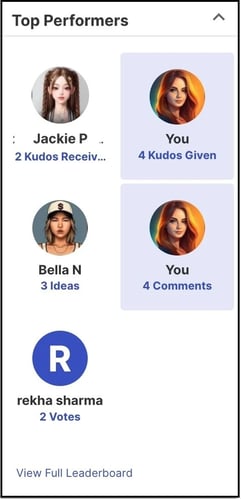
Path: Community Homepage >> Sidebar >> Top Performers
| What is a Leaderboard? |
| The Leaderboard is a ranking page that displays a community's top-performing members based on participation activity. |
Leaderboard promotes community engagement and encourages member participation. The homepage displays the top community members for Kudos Received, Kudos Given, Idea Submissions, Comments, and Votes. Every member can access the Leaderboard from the Landing Page, the Homepage Dropdown, or the Community Sidebar Panel. The Leaderboard page includes four main filters and highlights the viewing member's own position on the board. Members can navigate to each filter section to view all members ranked within it.
Role Permissions
- Member: Views the Leaderboard, filters it by metric, campaign, group, and time period, and sees their own ranking on the board.
- Community Administrator: Removes members from the Leaderboard.
TABLE OF CONTENTS
Leaderboard Filter
- Metric
- Campaigns
- Groups
- Time Period
Exceptions
Frequently Asked Questions
Leaderboard Filter
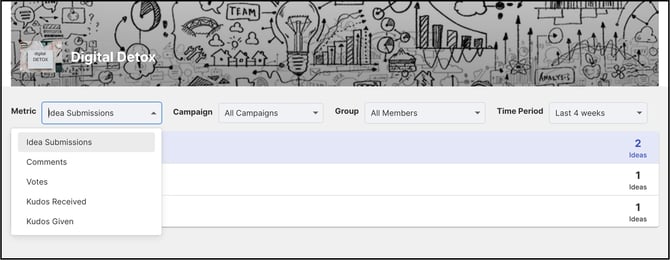
The Leaderboard can be filtered by metric, campaign, member group, and time period.
Metric
The Metric filter allows the Leaderboard to be filtered by Idea Submissions, Comments, Votes, Kudos Received, and Kudos Given.
Campaigns
All active campaigns are displayed in the Campaigns dropdown.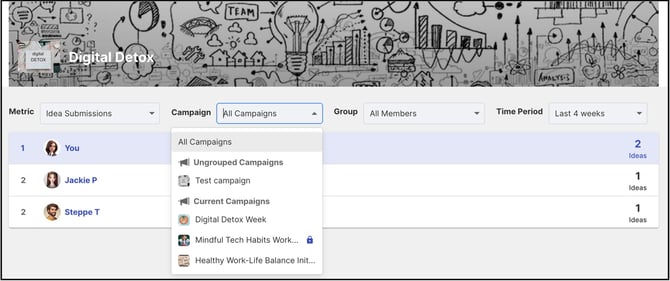
Groups
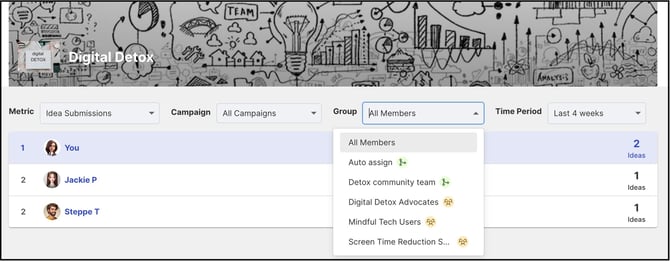
All community groups and Workspace groups used in the community are displayed in the Groups dropdown.
Time Period
The Leaderboard can be filtered by All Time, Last 4/8/12 Weeks, Last 6/12 Months, or Last 4/6/8 Quarters.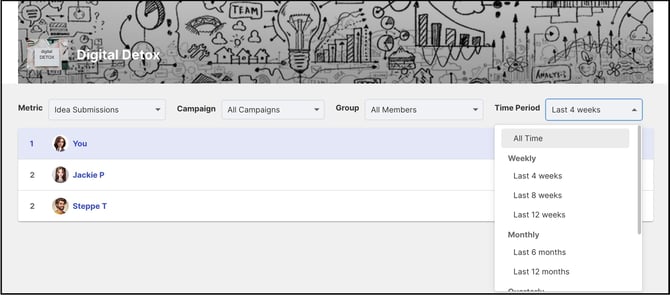
Removing Members from the Leaderboard
Members can be removed from the Leaderboard by the Community Administrator.
Help Article on Keep Off Leaderboard
Exceptions
- Hidden Groups: Groups marked as "Hide this Group in the leaderboard" under Group Management >> Group visibility are excluded from the Leaderboard list.
- Current Period Exclusion: When Last 4 Weeks is selected, data for the current week is excluded. The same applies to month and quarter selections.
- Weekly Data Refresh: Leaderboard data does not update in real time; it updates every Sunday at midnight server time.
Frequently Asked Questions
How often does Leaderboard data update?
Leaderboard data does not update in real time; it updates every Sunday at midnight.
Why might a group not appear in the Groups filter?
A group configured with the Hide this Group in the leaderboard setting under Group Management >> Group visibility is excluded from the Leaderboard list.
Who can remove a member from the Leaderboard?
A Community Administrator can remove a member from the Leaderboard.
Where can a member see their own ranking?
The Leaderboard page highlights the viewing member's own position on the board.
Related Articles