
Path: Workspace Homepage >> Navigation Panel >> >> Campaign >> Community >> Workflow >> Estimate Stage
| What is the Estimate Stage? |
|---|
| The Estimate Stage is a workflow stage in which participants assess the potential value and expected cost of an idea, and the system calculates the idea's overall estimated Return on Investment (ROI) from the submitted estimates. |
In the Estimate Stage, either the full campaign community or a designated subgroup submits estimates of an idea's average financial value and average financial cost. These individual estimates are then averaged to calculate the idea's overall estimated ROI.
Role Permissions
- Community Administrator: Configures the Estimate Stage's Info, Settings, Automation, and Permissions tabs, including the currency used to estimate costs, the automation threshold, and which community members, groups, or Team Member roles can submit and view value, cost, and ROI estimates.
- Community Member, Group Member, or Team Member (as granted by the Community Administrator): Submits value and cost estimates for ideas in the Estimate Stage, and views submitted estimates and ROI figures where permitted.
TABLE OF CONTENTS
Estimate Stage Setup
1. Info
2. Settings
3. Automation
4. Permissions
Stage Functionality on Homepage
Exceptions
Frequently Asked Questions
Estimate Stage Setup
Estimate Stage setup is divided into four tabs: Info, Settings, Automation, and Permissions.
1. Info
-
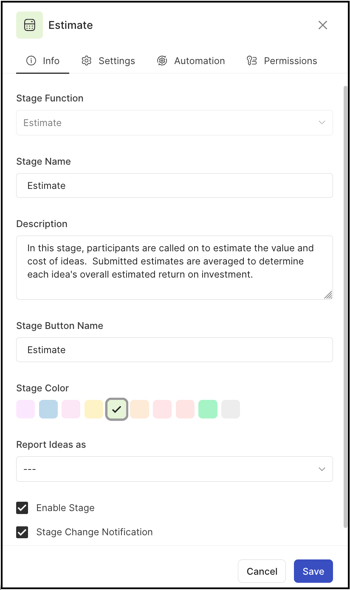
The Info tab contains basic details about the stage:
- Stage Function: Select Estimate Stage from the dropdown. Once selected and saved, this field is greyed out and cannot be changed to another stage.
- Stage Name: Create a custom name or label for the stage. Note: Character limit is 40.
- Stage Key: A unique identifier for the stage, required for API call data retrieval. Once saved, the key cannot be changed.
- Description: Describe the stage's functionality or intended use. This description appears as mouseover text on the stage stack in the right navigation panel of the community homepage.
- Stage Color: Select a color for the stage from the 10 available default options.
- Reported Ideas As: Set the stage as Selected, Implemented, or leave it blank to apply the respective label to all ideas within the stage.
Help article on Selected & Implemented Ideas
- Enable Stage: Select this checkbox to activate the stage, allowing ideas to be moved into it.
- Stage Change Notification: Select this checkbox to activate the stage change notification, which sends a stage change email notification to members who have opted in
2. Settings
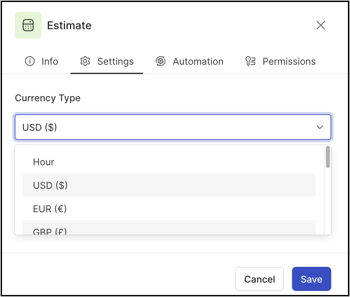
The Community Administrator selects the currency used to estimate idea costs. Available currencies are USD, EUR, GBP, JPY, AUD, CAD, HKD, CHF, and AED.
3. Automation
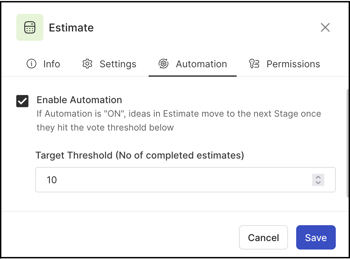
The Automation tab configures automation for the Estimate Stage. When enabled, the Community Administrator defines a target threshold for the number of completed estimates. Once an idea meets or exceeds this threshold, it automatically advances to the next stage in the workflow.
4. Permissions
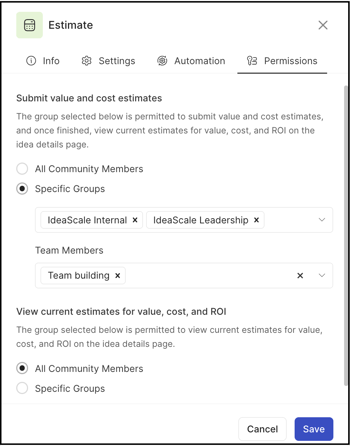
The Permissions tab defines who can submit value and cost estimates in the Estimate Stage, and who can view the submitted value, cost, and ROI estimates on the idea detail page. The Community Administrator can configure these permissions for all community members, for a specific group, and/or for a specific Team Member role (available only if a Team Member role has been specified and filled in a Build Team stage within the same funnel).
Stage Functionality on Homepage
Idea Detail Estimate
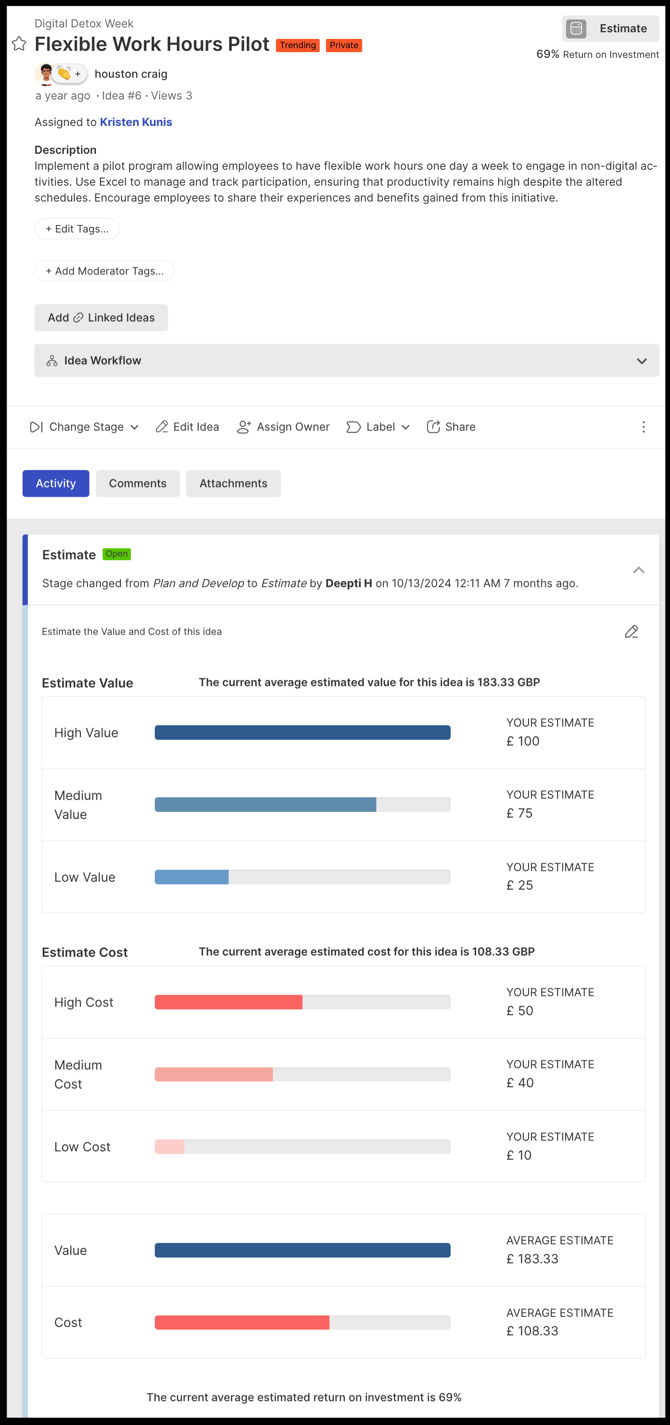
Once an idea enters the Estimate Stage, assigned group members select the Submit Estimate button, which opens the idea details page displaying two sets of questions.
The first set estimates cost:
- What is the MOST that this idea could cost to implement?
- What is a REASONABLE cost to implement this idea?
- What is the LEAST that this idea could cost to implement?
The second set estimates value:
- What is the MOST that this idea could be worth?
- What is a REASONABLE amount that this idea would be worth?
- What is the LEAST that this idea could be worth?
Estimates are entered as digits. See Exceptions below for validation rules governing the Low, Medium, and High values. Once all fields are complete, selecting Submit Estimate causes the system to average all submitted estimates and provide the final ROI figure.
Members can modify their submitted estimates by selecting the pencil icon.
Note: Members who are not permitted to view or participate do not see the progress bar, ROI percentage, or average estimated value and cost.
Exceptions
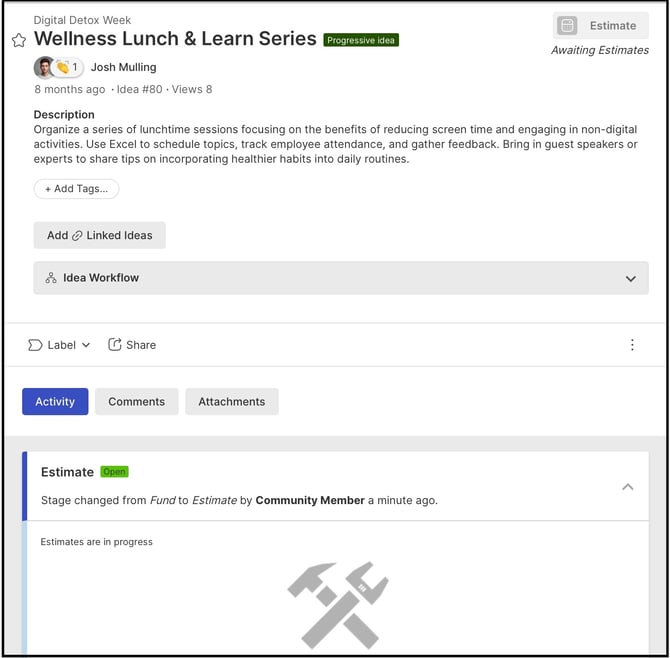
- Estimate Value Order: The Low cost value cannot be entered higher than the Medium value, and the Medium value cannot be entered higher than the High value; only digits are accepted for estimate entries.
Frequently Asked Questions
How is an idea's ROI calculated in the Estimate Stage?
The system averages all cost and value estimates submitted by participating members and calculates the idea's overall estimated ROI from those averages.
Can a member update an estimate after submitting it?
Yes. A member can modify a previously submitted estimate by selecting the pencil icon next to it.
Who determines which currency is used for cost estimates?
The Community Administrator selects the currency from the Settings tab of the Estimate Stage setup. Available currencies are USD, EUR, GBP, JPY, AUD, CAD, HKD, CHF, and AED.
What happens when an idea meets the completed-estimates threshold set in Automation?
If Automation is enabled and an idea meets or exceeds the Community Administrator's defined threshold for completed estimates, the idea automatically advances to the next stage in the workflow.
Can every community member view an idea's ROI, value, and cost estimates?
No. Only members permitted to view or participate, as configured on the Permissions tab, can see the progress bar, ROI percentage, and average estimated value and cost.
Related Articles