
Path: Workspace Homepage >> Navigation Panel >> Settings >> Community >> Integrations >> Developer Api
| What is the Developer API? |
|---|
| The Developer API is IdeaScale's REST API that allows external applications to create, retrieve, and manage community data — such as members, campaigns, and ideas — for use in mashups, integrations, and other consumable formats. |
The Developer API allows a community to be connected with internal or home-grown software solutions, so that data can be pulled from IdeaScale and community activity can be automated through custom applications. Access is available to any member for whom the Community Administrator has enabled API access, and the IdeaScale API library is expanded over time with additional endpoints.
Role Permissions
- Administrator: Has access to the API, including administrative-only endpoints such as emailing a group.
- Moderator: Has access to the API.
TABLE OF CONTENTS
About theAPI
Getting Started
Authentication
URL
Example API Endpoints
Create New Members
Vote on Idea
Email Members
Response code
Order Keys
Known API Issues
Assumptions
Frequently Asked Questions
About the API
This document serves as the instruction set for any current or future integration built against the IdeaScale API, and covers the environment requirements of the systems or applications connecting to the API. It does not address the customer's environment as a whole.
Any member can use the API once granted access; obtaining an API token takes a short sign-up process, which allows IdeaScale to track API usage and reach members if changes are made to the API. The Developer API is a RESTful API, based on the HTTPS protocol, and supports JSON format data transfers.
Get Started:
How to request an API token:
API token access is available to members who are assigned a community role, such as Community Administrator, Community Moderator, or a custom role.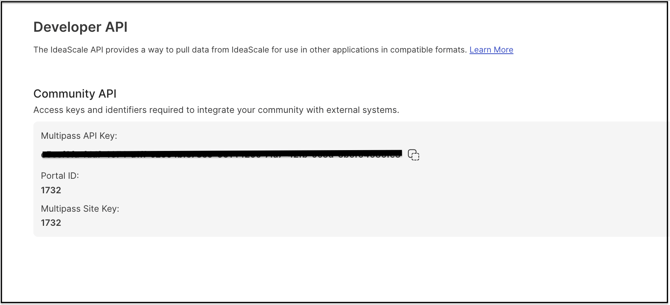
To access the API, an eligible member creates an API Token from their IdeaScale profile:
- Navigate to Profile >> Settings >> API Tokens.
- Select Request New API Token.
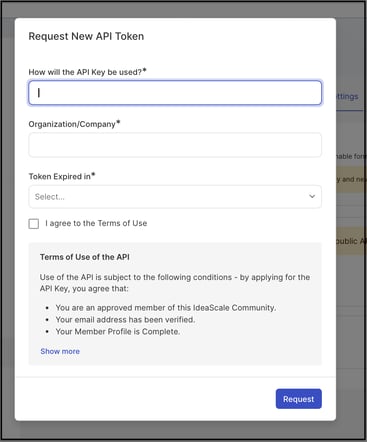
- Complete the required details in the form and submit to generate the token.
Profile >> Settings >> API Tokens
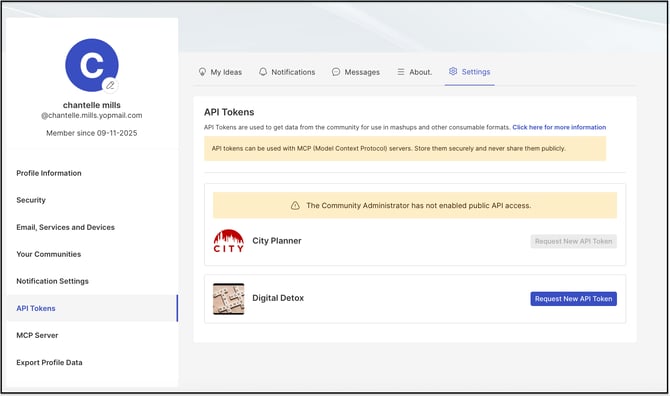
Selecting "Request New API Token" opens a form where you can generate a new API token by providing the required details.
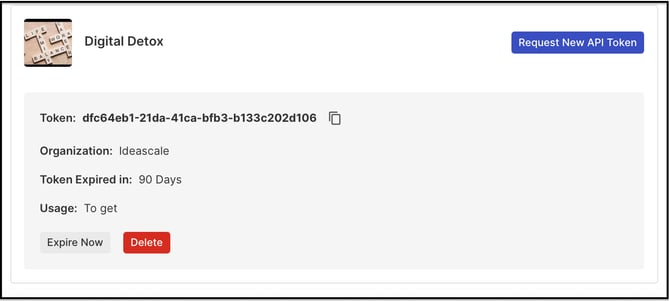
API access is granted on a per-member basis, and a member can hold one or more API tokens. Each token inherits the permissions of the member's IdeaScale user role — a standard member's token is limited to the calls permitted to that role, while an Administrator's token receives admin-level permission. An API token is separate for each community within the Workspace; the correct token must be used to retrieve or modify data for the corresponding community.
Every API request must include the appropriate member's API token in the HTTPS request header, using the header field name api_token.
Note: API token is separate of each community within the workspace.
Authentication
Non-SSO Communities
Authentication in a Non-SSO community is based on the API token described above. This token must be included in every REST call, in an HTTPS header named api_token.
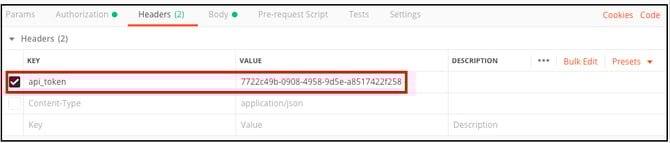
Non-SSO Communities with Member Token
An API call can also be made on behalf of a specific community member using a Multipass token. When a header named member_token contains a valid encrypted Multipass token, that token is used to identify the acting member. The Multipass token is generated using the Multipass token generation code available at https://github.com/ideascale/multipass, which includes examples in a number of programming languages. In brief, the token is an AES-encrypted JSON string containing, at minimum, the target member's email address.
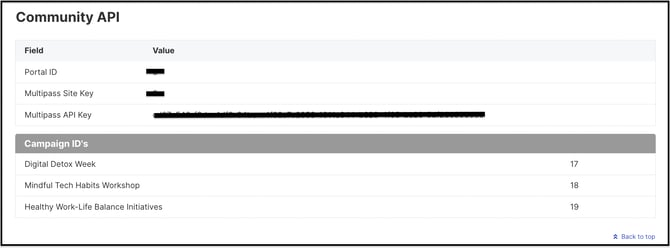
Generating a Multipass token requires the Site Key and API Key, both of which are found at: Navigation Panel >> Settings >> Community >> Integrations >> Developer API
Help Article for Multipass SSO Setting
SSO Communities
An API request for a Single Sign-On community must contain an API token from an Administrator of the community, in an HTTPS header named api_token, along with the SSO credentials of the member for whom the request is being made, supplied in an HTTPS header named sso_token — the Multipass token used for SSO authentication. This requires that a Multipass Key has been created for the community, which can be set from Community Settings >> Single Sign-On.
Help Article for Single Sign-On
API Url Structure
The Developer API URL is made up of three components:
- Workspace URL: The URL of the Workspace the API calls are being made against.
- API Version: Identifies the version of the Developer API being used.
- Method URL: The specific call being made.
For example, a call to retrieve the set of campaigns for a community under the Workspace apitest.ideascale.com, using version 1.0 of the API, would be:
https://apitest.ideascale.com/a/rest/v1/campaigns
Tip: Replace 'apitest.ideascale.com' with your specific Workspace URL
Note: The API will not accept certain types of content submitted as ideas, comments, titles or tags. For example, if the following types of content are POSTed to the API, the API will return an 'INVALID_CONTENT' error:
a. html tags
b. Excessively long text (if the idea length limit is enforced by your moderator)
c. Curse words (if the moderator has enabled curse word filtering)
API token for each community within the Workspace will be different. Input correct API token to get the correct community data.
For the detailed list of API endpoints refer to: https://a.ideascaleapp.com/api-docs/index.html
Example API Endpoints:
Note: These are example URL's, please replace the portion of the URL using 'ideascale.com' with your specific Workspace URL
Action: Create New Member
Method URL: /members
EG: https://ideascale.com/a/rest/v1/members
Method: POST
Action: Create Campaign
Method URL: /campaign
EG: https://ideascale.com/a/rest/v1/campaign
Method: POST
Action: Create New Idea
Method URL: /idea
EG: https://ideascale.com/a/rest/v1/idea
Method: POST
Action: Delete Ideas
Method URL /idea/{ideaId}/delete
EG: https://ideascale.com/a/rest/v1/idea/3421/delete
Method: DELETE
Action: Delete all Ideas, Comments and Vote
Method URL /community/delete/ideas
EG: https://ideascale.com/a/rest/v1/community/delete/ideas
Method: DELETE
Action: Delete all members and ideas including votes and comments from community
Method URL /community/delete/ideasAndMembers
EG: https://ideascale.com/a/rest/v1/community/delete/ideasAndMembers
Method: DELETE
Action: Get all Campaigns
Method URL: /campaigns
EG: https://ideascale.com/a/rest/v1/campaigns
Method: GET
Action: Get Member Information
Method URL: /members/{memberId}
EG: https://ideascale.com/a/rest/v1/members/29781
Method: GET
Action: Get Member Information By Name
Method URL: /members/name/{name}
EG: https://ideascale.com/a/rest/v1/members/name/John
Method: GET
Action: Get Member Information By Email
Method URL: /members/email/{email}
EG: [email protected]
Method: GET
Create New Members:
Note: These are examples, please replace the portion of the URL using 'ideascale.com' with your specific Workspace URL
-
Example URL: https://ideascale.com/a/rest/v1/members (This will send verification email to members)
-
Example URL: https://ideascale.com/a/rest/v1/members/create/silent (This will only create members and will not sent verification email)
-
Method: POST
-
POST data: Member JSON Structure
-
Expected Response: JSON Member Info structure for new member
Member JSON Structure
Used by: /members
Field Name Type Required Description
name String Required Name of Member
email String Required Email address of member
Sample:
{"name" : "John Doe", "email" : "[email protected] "}
Vote on Idea:
Note: This is an example, please replace the portion of the URL using 'ideascale.com' with your specific Workspace URL
-
Example URL: https://ideas.ideascale.com/a/rest/v1/ideas/20884/vote
-
Method: POST
-
POST data: Vote on Idea JSON structure
-
Expected Response: JSON Idea Info structure for the updated idea
Vote Up on Idea JSON Structure
Used by: /ideas/{ideaId}/vote/up
Field Name Type Required Description
MyVote Number Optional 1 for agree
Sample:
{ "myVote":1 }
Email Members:
Note: This is an example, please replace the portion of the URL using 'ideascale.com' with your specific Workspace URL
Used by: /email/group/{id}
-
Example URL: https://ideascale.com/a/rest/v1/email/group/75
-
Method: Post
-
Endpoint: /email/group/{id}
-
App Scope Required: Admin
-
Response content type: JSON
Note: Only Admin will be able to sent email to a group
Query Parameter
"Id": Group Id. Group can be "moderators", "admins" or a "group"
Request Body Parameters:
"subject" : String (required)
"body" : String (required)
Sample:
{
"subject" : "Are you ready for the survey",
"body" : "Hey, You will receive another email shortly"
}
Response Code
Key Message HTTP Code UNEXPECTED Unexpected Error 500
INVALID_HEADER Invalid HTTP Header for API Request 400 NO_AUTHENTICATION
_HEADER No Header containing authentication data 400 NO_API_TOKEN No API Token provided 400
NO_CAMPAIGN No Campaign provided 400 INVALID_API_TOKEN Invalid API Token 400
INVALID_OAUTH_TOKEN Invalid OAuth Token 400
INVALID_SSO_TOKEN Invalid SSO Token 400
INVALID_MEMBER_TOKEN Invalid Member Token 400 MULTIPASS_SSO_NOT
_ENABLED Multipass SSO not enabled 400 MULTIPASS_KEYS_NOT
_CONFIGURED Multipass Keys not configured 400 SSO_MEMBER_NOT_FOUND
SSO Member not found 404
PERMISSION_DENIED Permission Denied 403
RESTRICTED_TO_ADMIN Resource is restricted to ADMIN 403 NO_SECURE_CHANNEL Secure channel required 403
NO_SSO_TOKEN No SSO token provided by SSO community 403 LICENSE_NOT_ALLOWED Resource not accessible to current license 403 COMMUNITY_NOT_FOUND Community not found 404
MEMBER_NOT_FOUND Member not found 404
MEMBER_NAME_NOT
_FOUND Member name not provided 404 PERSON_NOT_FOUND Person not found 404
CAMPAIGN_NOT_FOUND Campaign not found 404
IDEA_NOT_FOUND Idea not found 404
STATUS_NOT_FOUND custom status not found 404
MISSING_REMOTE Authentication missing expected Remote
_IDENTITY_DATA identity Data 400 INVALID_CREDENTIALS Authentication data contains invalid credentials 403 INVALID_STATUS_CHANGE Invalid Status Change 400
INVALID_CONTENT Invalid Content 400
COMMENT_NOT_FOUND Comment not found 404
OWNERSHIP_DISABLED Idea ownership is not enabled 400 MULTIPLE_OWNERSHIP
_DISABLED Mulitple ownership is not enabled 400
INVALID_EMAIL Invalid Email 400
UNSUPPORTED_FILE
_EXTENSION Unsupported file extension 400 FILE_STORAGE_LIMIT You have exceeded the storage limit 400
FILE_EXIST A file with the same name already exists 400 EMAIL_ALREADY
_REGISTERED Email already registered 400
INVALID_EMAIL_OR Invalid email or already registered,
_ALREADY_REGISTERED try a different email. 400
IDENTITY_NOT_FOUND Identity not found 404
PRIVATE_COMMUNITY Private community
_NOT_ALLOWED is not allowed for research 403
ACTOR_IS_LOCKED Actor is locked 403
HTML_TAGS_NOT
_ALLOWED Html tags not allowed 400
TEXT_CONTAINS_
FORBIDDEN_CHARACTERS Text Contains forbidden characters 400
ABUSIVE_WORD_FOUND Abusive/Inflammatory/Curse words found 400 PERSON_LOCKED Person is locked 403
REVIEWSCALE_NOT_
FOUND Reviewscale not found 404
STAGE_NOT_FOUND Stage not found 404
FUNNEL_NOT_FOUND Funnel not found 404
BADGE_NOT_FOUND Badge not found 404
CAMPAIGN_CHANGE_
NOT_ALLOWED Campaign change not allowed 403 REQUIRED_FIELD_
MISSING Required data not found 400 INVALID_ORDER_BY_KEY Invalid order by key 400
CAMPAIGN_GROUP_
NOT_FOUND Campaign Group not found 400
INVALID_INPUT Invalid input value 400
ASSESSMENT_NOT_
FOUND Assessment Not Found 400
GROUP_NOT_FOUND Group not found 400
Order keys
date-up
date-down
id-up
id-down
name-up
name-down
point-up
point-down
Known API Issues
-
Error Info JSON is not being returned
-
top ideas are sometimes not ordered correctly
-
specifying version as “v1.0” returns 404
Assumptions
This API documentation will have the below two items as mandatory environmental considerations.
Host:
https://ideascale.com/a/rest/v1/
Your Workspace URL in place of 'ideascale.com'
Header:
All API call should provide these header values.
Parameter name: api_token
Value: {Value provided by ideascale}
Frequently Asked Questions
Can any member of a community obtain an API token?
Any member can request an API token from their own profile settings, provided the Community Administrator has enabled the API Access for Members setting. A token's permissions are scoped to the requesting member's role.
What happens if content submitted through the API contains HTML tags or curse words?
The API returns an INVALID_CONTENT error and rejects the submission. This applies to ideas, comments, titles, or tags that contain HTML tags, that exceed a Moderator-enforced length limit, or that contain curse words where curse word filtering is enabled.
Does the same API token work across every community in a Workspace?
No. An API token is specific to a single community, and a different token is required to access each community within a Workspace.
Is an Administrator-level token required for every API call?
No. Most calls can be made using a Member-level token scoped to that member's role. An Administrator-level token is required only for specific actions, such as emailing a group of members or authenticating requests on behalf of members in a Single Sign-On community.
Related Articles
- Help Article for Multipass SSO Setting
- Help Article for Single Sign-On (SSO)
- Help Article for Campaign Management