
Path: Workspace Homepage >> Navigation Panel >> Members >> Community >> Import tab >> Hide Identity
| What is Bulk Hiding User Identity? |
|---|
| Bulk Hiding User Identity is a feature that allows a Community Administrator to conceal the identities of multiple existing community members at once through a bulk import process. |
Rather than hiding identities one at a time, the Community Administrator can upload a single file listing every member whose identity should be concealed. The option is only available when the underlying anonymity setting has been enabled at the community level.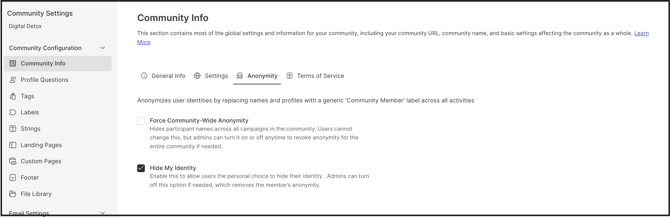
Role Permissions
Community Administrator: Can access the Import tab and bulk hide the identity of existing community members.
TABLE OF CONTENTS
Prerequisite: Enabling Hide My IdentityImporting Member Identities to Hide
Result of Hiding Identity
Import Notifications
Exceptions
Frequently Asked Questions
Prerequisite: Enabling Hide My Identity
The Hide Identity option appears in the Import tab only when Hide My Identity is enabled in Community Configuration >> Community Info >> Anonymity >> Hide My Identity. If this setting is disabled, the bulk import option for hiding identities does not display.
Importing Member Identities to Hide
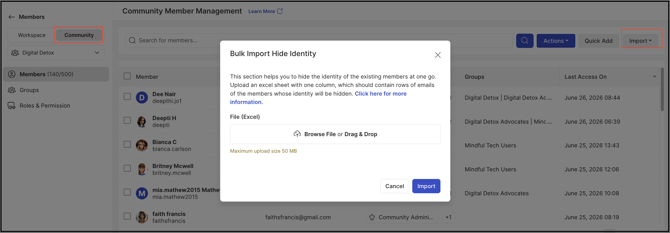
Navigate to Members >> Community >> Import tab and select Hide Identity. Upload a file containing the email addresses of the members whose identities are to be hidden.
- File Format: The file must be in .xls or .xlsx (Excel) format.
- File Content: A single column listing the email addresses of the members whose identities are to be hidden.
Note: If the uploaded file fails validation, see Exceptions below.
Result of Hiding Identity
Once the import completes, each hidden member appears as "Community Member" instead of their actual name throughout the community, and their profile image is hidden as well.

Import Notifications
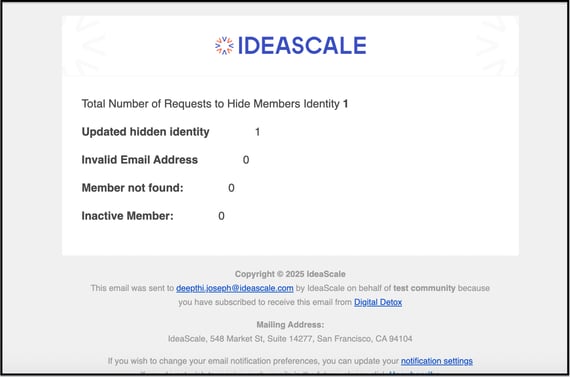
Upon successful import, the Community Administrator receives an email notification confirming that the selected identities have been hidden.
Exceptions
- Malicious File Content: If the uploaded file contains malicious content, a virus, or malware, the system displays an error and the import fails.

Frequently Asked Questions
What file formats are supported for the bulk import?
The file must be in .xls or .xlsx (Excel) format.
What happens to a member once their identity is hidden?
The member appears as "Community Member" instead of their name, and their profile image is hidden.
How does the Community Administrator know the import was successful?
The Community Administrator receives an email notification once the import completes successfully.
Why doesn't the Hide Identity option appear in the Import tab?
The option only displays when Hide My Identity is enabled in Community Configuration >> Community Info >> Anonymity >> Hide My Identity.
Related Articles