
Path: Workspace Homepage >> Navigation Panel >> Settings >> Community >> Community Access >> Access Control >> Approvals >> Auto Approval
| What is Auto Approval? |
| Auto Approval is a Community Access Control setting that specifies email domains to be automatically approved for new members, bypassing moderator review. |
The Community Administrator can enable or disable the Require Member Approval switch for the community. Switching this setting on or off dynamically displays the corresponding panel, where the Community Administrator can configure additional actions related to the Auto-Approved Domain List.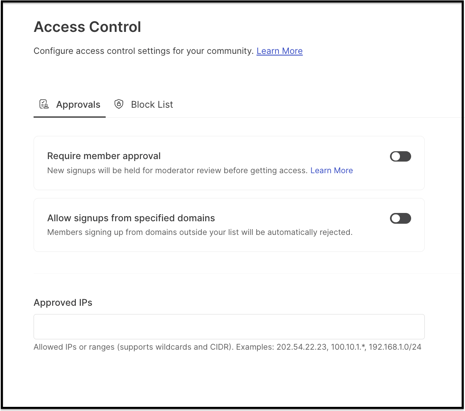
Role Permissions
- Community Administrator: Enables or disables the Require Member Approval switch and configures the Auto-Approved Domain List and its related actions.
- Workspace Administrator: Configures Approved IPs to restrict workspace access by IP address.
TABLE OF CONTENTS
Require Member Approval is ENABLED + Auto-Approved Domains List
Require Member Approval is DISABLED + Auto-Approved Domains Listed
Approved IPs
Frequently Asked Questions
Require Member Approval is ENABLED + Auto-Approved Domains List
1. Rule for New Signups: All new signups are held in a queue for moderator review before access is granted.
2. Auto Approved Domain List: A member registering with a domain on the Auto-Approved Domain List is granted access to the workspace. A member registering from a domain not on the list requires manual moderator approval.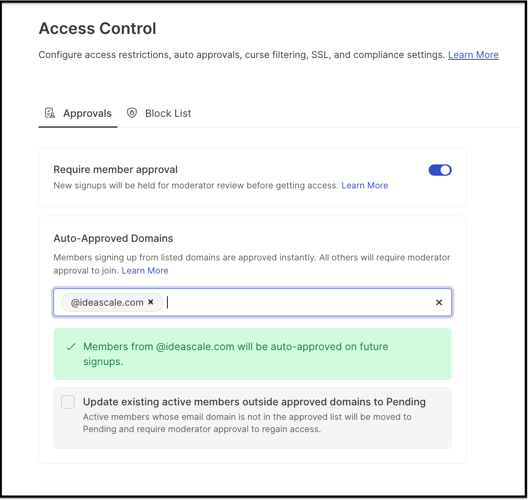
A member with an approved domain receives a verification email containing a code. Selecting the "verify my email" link prompts the member to enter the code.
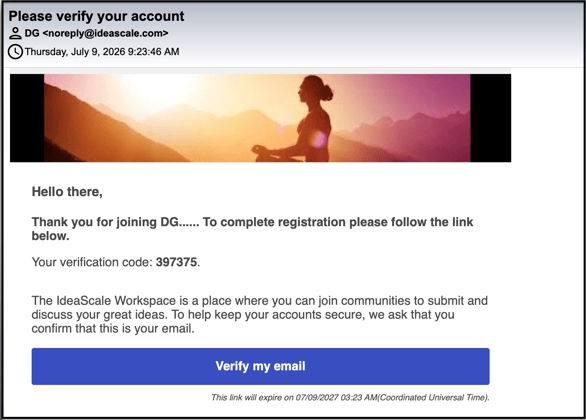
Once verified, the member is redirected to the login page and, upon logging in, is required to set up a workspace profile.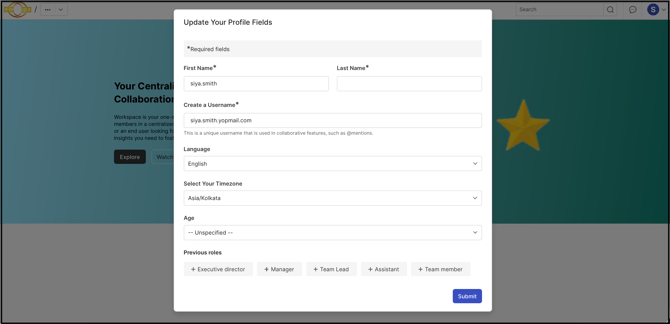
3. Optional Admin Action: When an Auto-Approved Domain List is added, the Community Administrator sees the option "Update existing active members outside approved domains to Pending." Selecting this option sweeps the current member list and moves already-active members whose domains do not match the approved list into the Pending state, requiring moderators to re-approve them. See Exceptions below for how this affects existing members.
Require Member Approval is DISABLED + Auto-Approved Domains Listed
1. Rule for New Signups: New signups no longer require moderator approval and can access the workspace instantly after verifying their email address.
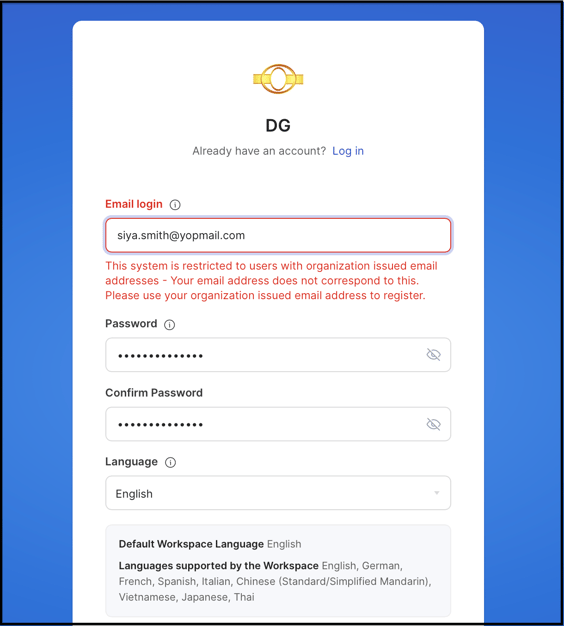
2. Auto Approved Domain List: A member registering with a domain on the Auto-Approved Domain List is granted access to the workspace. Because the "Allow signups from specified domains" sub-switch acts as a restriction list, a member attempting to register from a domain outside the list is automatically rejected and shown an access prohibition message.
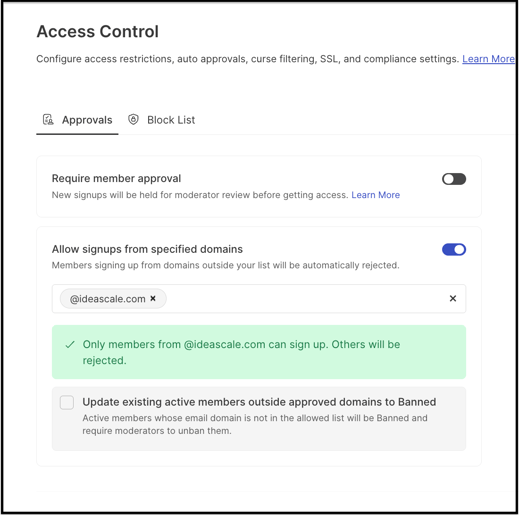
Any future signups not matching the auto-approved list will be blocked from signing up and will see an access prohibition message.
3. Optional Admin Action: When an Auto-Approved Domain List is active in this mode, the Community Administrator sees the option "Update existing active members outside allowed domains to Banned." Selecting this option instantly bans currently active members whose domains do not match the new allowlist. See Exceptions below for how this affects existing members.
Approved IPs
IP-based access restriction allows the Workspace Administrator to control access to the workspace by IP (Internet Protocol) address. Only members accessing the workspace from the defined IP addresses are permitted to view and participate in the workspace.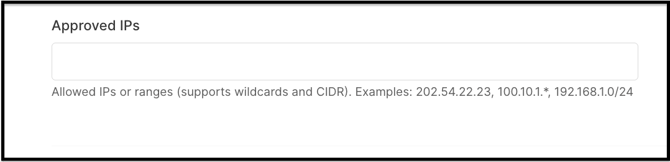
Exceptions
- Existing Active Members: Adding or activating an Auto-Approved Domain List does not automatically change the status of existing active members. The Community Administrator must select the corresponding Optional Admin Action ("Update existing active members outside approved domains to Pending" or "Update existing active members outside allowed domains to Banned") to apply the new domain list to members who were already active.
Frequently Asked Questions
Does a member need to verify their email even if their domain is on the Auto-Approved Domain List?
Yes. A member registering with an approved domain still receives a verification email with a code. The member must verify the code before being redirected to the login page, where a workspace profile is set up.
What happens to a member whose domain is not on the Auto-Approved Domain List when Require Member Approval is disabled?
The member is automatically blocked from signing up and sees an access prohibition message, because the Auto-Approved Domain List acts as a restriction list in this mode.
Are existing members affected automatically when the Auto-Approved Domain List changes?
No. Existing active members keep their current status unless the Community Administrator runs the corresponding Optional Admin Action to move non-matching members to Pending or Banned.
Can Approved IPs be used together with the Auto-Approved Domain List?
The article establishes both as Community Access Control settings, but does not document how they interact when configured together.
Related Articles