
Path: Workspace Homepage >> Navigation Panel >> >> Community Homepage >> Idea Detail page
| What are Annotations? |
|---|
| Annotations are comments on an idea that have been elevated by an eligible role to appear as part of the idea itself, rather than as a comment within the surrounding community discussion. |
Annotations let key participants on an idea draw attention to a specific comment by marking it as an extension of the idea rather than leaving it as a standalone community comment. Once annotated, a comment surfaces in several other areas of the platform in addition to its original location in the comment thread.
Role Permissions
- Idea Author, Co-Submitter, Idea Owner, Team, Moderator: Can annotate a comment at any stage of the idea, including stage-specific comments from the Team, Assessment, and Review stages, and can remove an existing annotation at any time.
TABLE OF CONTENTS
Annotating Comment
Annotations Visibility in Other Sections
Frequently Asked Questions
Annotating Comment
A comment can be annotated by the Idea Author, Co-Submitter, Idea Owner, Team, or Moderator, in any stage. Stage-specific comments from the Team, Assessment, and Review stages can also be annotated.
Note: Private comments cannot be annotated. If a comment is marked as Private, the Annotate this comment option does not appear.
The following shows an annotation made by the Idea Author.-1-1.gif?width=542&height=523&name=Screen-Recording-2025-07-28-at-1%20(1)-1-1.gif)
Annotations can be reordered according to preference.-1.gif?width=570&height=550&name=Screen-Recording-2025-07-28-at-1%20(2)-1.gif)
An annotation can be removed at any time by the Idea Author, Co-Submitter, Idea Owner, Team, or Moderator.
Annotations Visibility in Other Sections
Once created, an annotation is visible in several other places in addition to the Idea Detail page.
Print Idea
Annotations appear in the printed version of the idea.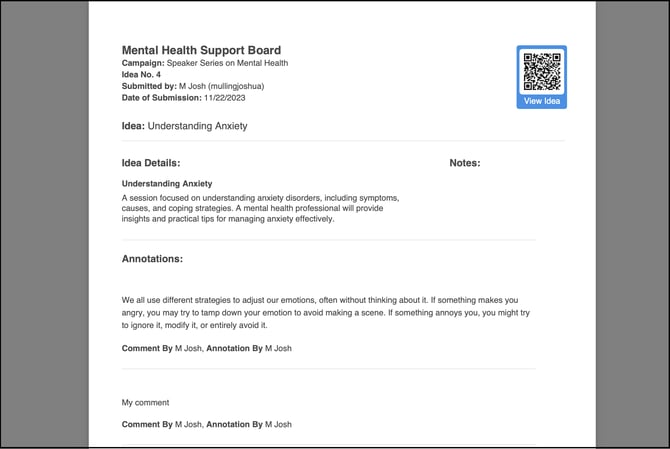
Moderator Dashboard
Annotations appear on the Moderator Dashboard..webp?width=670&height=320&name=Screenshot%202025-07-28%20at%2012%20(3).webp)
Idea Management
Annotations appear in Idea Management.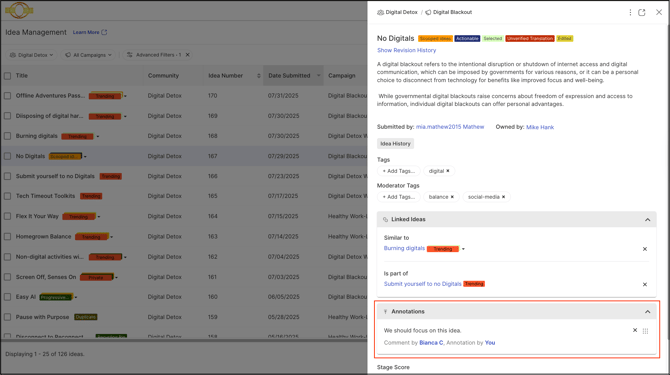
Data Exports
The URL of an annotated comment is included in Data exports.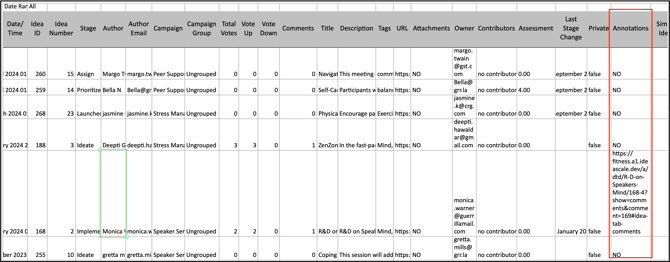
Frequently Asked Questions
Which roles can annotate a comment?
The Idea Author, Co-Submitter, Idea Owner, Team, and Moderator can annotate a comment, in any stage of the idea, including stage-specific comments from the Team, Assessment, and Review stages.
Can a Private comment be annotated?
No. The Annotate this comment option is not available on a comment marked as Private.
Can annotations be reordered?
Yes. Annotations on an idea can be reordered according to preference.
Where can annotations be seen besides the Idea Detail page?
Annotations are also visible on the Print Idea view, the Moderator Dashboard, Idea Management, and in Data exports, where the URL of an annotated comment is included.
Can an annotation be removed once it is created?
Yes. An annotation can be removed at any time by the Idea Author, Co-Submitter, Idea Owner, Team, or Moderator.
Related Articles